-
SELECT SID, Serial#, UserName, Status, SchemaName, Logon_Time
-
FROM V$Session
-
WHERE
-
Status=‘ACTIVE’ AND
-
UserName IS NOT NULL;
Enjoy
Thank you
Osama mustafa
For the people who think differently Welcome aboard
Enjoy
Thank you
Osama mustafa
1-
SQL>Show parameter Spfile ;
NAME TYPE VALUE
------------------------------------ ----------- ------------------------------
spfile string +DATA/orcl/spfileorcl.ora
2-
Create pfile=’/u01/new.pfile’ from spfile ;
3-
Create spfile=’/u01/app/oracle/product/10.2.0/db_1/dbs/newspfile.ora’ from
pfile=’/u01/new.pfile’;
4-
Shutdown immediate ;
startup ;
5-
Check new Location For Spfile ;
Thank you
Osama Mustafa
sql > SELECT OWNER,TABLE_NAME,STATTYPE_LOCKEDFROM DBA_TAB_STATISTICSWHERE STATTYPE_LOCKED IS NOT NULL;
sql> exec dbms_stats.unlock_schema_stats(‘schema_owner’);e.g : sql> exec dbms_stats.unlock_schema_stats(‘apps’);
sql> exec dbms_stats.unlock_schema_stats(‘table_owner’,’table_name’);e.g : sql > exec dbms_stats.unlock_schema_stats(‘AR’,’AR_REV_REC_QT’);
SQL> select a.column_name, nvl(a.hsize,254) hsizefrom FND_HISTOGRAM_COLS awhere table_name = ‘JE_BE_LINE_TYPE_MAP’order by column_name;
COLUMN_NAME HSIZE—————————— ———-SOURCE 254SOURCE 254
select table_name, column_name, count(*)from FND_HISTOGRAM_COLSgroup by table_name, column_namehaving count(*) > 1;
delete from FND_HISTOGRAM_COLSwhere table_name = ‘&TABLE_NAME’and column_name = ‘&COLUMN_NAME’and rownum=1;
delete from FND_HISTOGRAM_COLSwhere (table_name, column_name) in(select hc.table_name, hc.column_namefrom FND_HISTOGRAM_COLS hc , dba_tab_columns tcwhere hc.table_name =’&TABLE_NAME’and hc.table_name= tc.table_name (+)and hc.column_name = tc.column_name (+)and tc.column_name is null);
Summary of Possible Reasons and Solutions for the Problem Where All Concurrent Requests Stuck in Pending Phase
Below are several different possible solutions to the problem where concurrent
requests are stuck in pending status:
This is non-destructive. Concurrent Manager views can be rebuild by running the following command at the command line:
Ensure that concurrent manager is shutdown.
FNDLIBR FND FNDCPBWV apps/apps SYSADMIN ‘System Administrator’ SYSADMIN
restart the concurrent mgr.
1. Log into Oracle Applications as SYSADMIN.
2. Select System Administrator responsibility.
3. Navigate to PROFILE –> SYSTEM.
4. Query for %CONC%ACTIVE%.
5. Change the profile option for Concurrent: Active Request Limit to Null (blank).
6. Exit Oracle Applications and log in again for the change to take affect.
7. Run a new concurrent request.
.
sql> update fnd_concurrent_requests
set status_code=’X’, phase_code=’C’
where status_code=’T’;
sql> commit;
Set the control_code to ‘A’ in fnd_concurrent_queues for the Conflict Resolution Manager:
1. Logon to Oracle Applications database server as ‘applmgr’.
2. Verify the Applications environment is setup correctly ($ORACLE_HOME and $ORACLE_SID).
3. Logon to SQL*Plus as ‘APPS’ and run the following SQL statement:
update fnd_concurrent_queues
set control_code = ‘A’
where concurrent_queue_name = ‘FNDCRM’;
commit;
If the CRM is still not active, bounce (deactivate, activate) the Internal Concurrent Manager. This is done through the Concurrent -> Manager ->
Administer form from the ‘System Administrator’ responsibility. It can also be done through the CONCSUB command at the command level.
Setting the control_code to ‘A’ in the fnd_concurrent_queues table for the Conflict Resolution Manager indicates that this concurrent manager is to be activated with the parameter values specified through this table for this manager (MAX_PROCESSES, CACHE_SIZE, etc).
If concurrent requests are rarely prioritized and there are managers that service short-running requests, consider setting the cache size to equal at least twice the number of target processes. This increases the throughput of the concurrent manaagers by attempting to avoid any sleep time. For example, if more than one manager or worker processes the same type of requests with only a small cache size, it may be unable to process any jobs in a single processing cycle, because other processes have already run the cached requests. When this happens, it is important to note that the manager will sleep before refreshign its cache. To increase manager throughput where there are sufficient requests of the required type in the queue, increase the cache size to improve the chance of the manager finding work to process and thus avoid having to enter a sleep phase.
TIP: Ensure that the system is not resource-constrained before attempting to increase the rate of concurrent processing in this way; otherwise, these changes may actually reduce concurrent processing throughput because jobs take longer to run..
Enter the number of requests your manager remembers each time it reads which requests to run. For example, if a manager’s workshift has 1 target process and a cache value of 3, it will read three requests,, and will wait until these three requests have been run before reading new requests.
In reading requests, the manager will only put requests it is allowed to run into its cache. For example, if you have defined your manager to run only Order Entry reports then the manager will put only Order Entry requests into its cache.
If you enter 1, the concurrent manager must look at its requests list each time it is ready to process another request. By setting the cache size at a higher number, the concurrent manager does not have to read its requests list each time it runs a request. However, the manager does not recognizea nay priority changes you make for a particular request if it has already read that request into its cache. Further, even if you give a higher priority to a new request, that new request must wait until the buffer isempty and the manager returns to look at the requests list. That request may have to wait a long time if you set the buffer size to a high number.
You should use cache size to tune your concurrent managers to work most efficiently for you site’s needs. If your organization tends to reprioritize jobs going to a certain manager, that manager should have its buffer size set fairly low.
*Suggestion: *Enter a value of 1 when defining a manager that runs long, time-consuming jobs, and a value of 3 or 4 for managers that run small, quick jobs.
1. Check for the value set for the sleep seconds for the concurrent manager using the following path: System Administrator Responsibilty -> Concurrent -> Manager -> Define.
2. Check the processes running for the concurent manager using the following command:
ps -ef | grep ‘INVLIBR’
As all concurrent programs are dealt by INVLIBR, the number of processes returned here must tally with the value specified for the processes defined for the concurrent manager.
3. Also, check for the duration for which the processes are sleeping. Reducing the value assigned for it would improve performance.
V$SESS_TIME_MODEL and V$SYS_TIME_MODEL views.V$ACTIVE_SESSION_HISTORY view.V$SYSSTAT and V$SESSTAT views.Step 1: Go to $ORACLE_HOME.
Step 2: Once in $ORACLE_HOME go to cd rdbms and then cd admin.
Step 3: Run command ‘ls –ltr awr*’.
Step 4: Go to ‘sqlplus / as sysdba
Step 5: In sqlplus the following is run ‘SQL> @awrrpt.sql. Select the format for the report as either ‘HTML’ or ‘TEXT’.
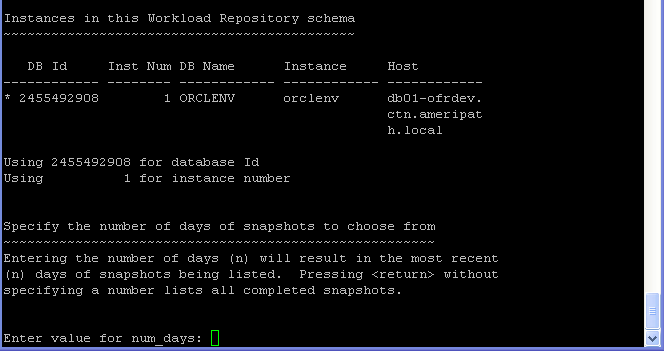
Step 6: Select number of days you want to go back or just hit enter for listing all
completed snapshots, if you press ENTER it will give you all snapshot .
Step 7: Then specify Begin and End snapshot Ids.
Step 8: Here you specify the name of the report or select the default name assigned.
Exit Sql , And Search for your report_name in the Same Directory .
Just As Note :
@?/rdbms/admin/awrrpti.sql – Script can be used for the specified database and instance so the script in addition will prompt for dbid and instance number.
@?/rdbms/admin/awrddrpt.sql – Script can be used to generate a combine report of 2 different snapshots for comparison of performance in one report so it will prompt for two pairs of snapshot snapshots to compare against.
@?/rdbms/admin/awrinfo.sql – Script print AWR information like space usage by AWR, subset of AWR snap ids, Automatic Database Diagnostic Monitor (ADDM), Active Session History (ASH) information.
@?/rdbms/admin/awrrpt.sql – It is an interactive script that can be used to generate HTML or text reports. The script prompts for type of report requested and prompts for number of days of snapshots to choose from so based on that it displays snap ids to choose the start and end snapshot it.
The Next Post will be How to read AWR Tips .
Enjoy
Osama Mustafa
m : megabytes
g : gigabytes
total used free shared buffers cached
Mem: 503 451 52 0 14 293
-/+ buffers/cache: 143 360
Swap: 1027 0 1027
another example :
free -t -mtotal used free shared buffers cached
Mem: 750 625 125 0 35 335
-/+ buffers/cache: 253 496
Swap: 956 0 956
Total: 1707 625 1082
procs -----------memory---------- ---swap-- -----io---- --system-- ----cpu----
r b swpd free buff cache si so bi bo in cs us sy id wa
1 0 0 131620 35432 341496 0 0 42 82 737 1364 15 3 81 1
3-top
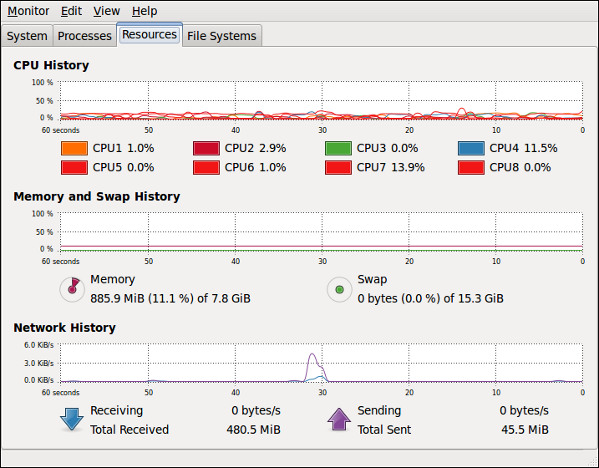
4-gnome-system-monitor
The below Command for clear cache memory in linux
sync;echo 3 > /proc/sys/vm/drop_caches
you can make it as job in linux save in it crontab
0 * * * * /root/clearcache.sh
Create a file in '/root' called 'clearcache.sh' with the following content:
#!/bin/sh
sync; echo 3 > /proc/sys/vm/drop_caches
Thank you
osama mustafa
The following query will reveal the profile:
SQL> select profile, resource_name, limit
from dba_profiles
where resource_type='PASSWORD' order by 1,2;
The default 10.2.0.1.0 profile for SYSMAN has the following parameters:
PROFILE………..RESOURCE_NAME……………. LIMIT
———————————————————————————–
DEFAULT………..FAILED_LOGIN_ATTEMPTS…….. 10
DEFAULT………..PASSWORD_GRACE_TIME………. UNLIMITED
DEFAULT………..PASSWORD_LIFE_TIME……….. UNLIMITED
DEFAULT………..PASSWORD_LOCK_TIME……….. UNLIMITED
DEFAULT………..PASSWORD_REUSE_MAX………. . UNLIMITED
DEFAULT………..PASSWORD_REUSE_TIME……… UNLIMITED
DEFAULT………..PASSWORD_VERIFY_FUNCTION…..NULL
DBSNMP uses the MONITORING_PROFILE, which is defined the same except for the FAILED_LOGIN_ATTEMPTS, which is set to UNLIMITED.
The failing instance, in one case, showed the following for the DEFAULT profile:
PROFILE………..RESOURCE_NAME……..LIMIT
—————————— ——————————————-
DEFAULT………..FAILED_LOGIN_ATTEMPTS……… 4
DEFAULT………..PASSWORD_GRACE_TIME……….. 1
DEFAULT………..PASSWORD_LIFE_TIME………… 60
DEFAULT………..PASSWORD_LOCK_TIME……….. . 0138
DEFAULT………..PASSWORD_REUSE_MAX………… 100
DEFAULT………..PASSWORD_REUSE_TIME……….. UNLIMITED
DEFAULT………..PASSWORD_VERIFY_FUNCTION…… NULL
1. In SQL*Plus, logon as SYS and change DBSNMP’s MONITORING_PROFILE, for example:
ALTER PROFILE MONITORING_PROFILE
LIMIT FAILED_LOGIN_ATTEMPTS UNLIMITED
PASSWORD_GRACE_TIME UNLIMITED
PASSWORD_LIFE_TIME UNLIMITED
PASSWORD_LOCK_TIME UNLIMITED
PASSWORD_REUSE_MAX UNLIMITED
PASSWORD_REUSE_TIME UNLIMITED
PASSWORD_VERIFY_FUNCTION NULL;
2. Then modify SYSMAN’s DEFAULT:
ALTER PROFILE DEFAULT
LIMIT FAILED_LOGIN_ATTEMPTS 10
PASSWORD_GRACE_TIME UNLIMITED
PASSWORD_LIFE_TIME UNLIMITED
PASSWORD_LOCK_TIME UNLIMITED
PASSWORD_REUSE_MAX UNLIMITED
PASSWORD_REUSE_TIME UNLIMITED
PASSWORD_VERIFY_FUNCTION NULL;
After this Drop with following Steps :
SQL> drop role mgmt_user;
SQL> drop user sysman cascade;
SQL> drop user MGMT_VIEW cascade;
SQL> drop public synonym mgmt_target_blackouts;
SQL> drop public synonym setemviewusercontext;
-Recreate EM
emca -dbcontrol db -repos create ;
Thank you
Osama mustafa
Check the below Steps to delete duplicate row :
SQL>select * from emp;
EMPID ENAME SAL DEPTNO
---------- -------------------- ---------- ----------
10005 palani 54544 10
10001 Scott Tiger 1000 40
10002 Frank Naude 500 20
10003 rajesh 21000 140
10004 ramesh 3500 220
10005 suresh 34567 123
delete duplicate rows in empid column in emp table
SQL>delete from emp where rowid not in (select max(rowid) from emp group by empid);
1 row deleted.
SQL>select * from emp;
EMPID ENAME SAL DEPTNO
---------- -------------------- ---------- ----------
10001 Scott Tiger 1000 40
10002 Frank Naude 500 20
10003 rajesh 21000 140
10004 ramesh 3500 220
10005 suresh 34567 123
to delete the old duplicate row from the table instead of max(rowid) replace min(rowid)
for exampl
SQL>insert into emp values(10005,’Osama’,54544,10);
1 row created.
SQL>select * from emp;
EMPID ENAME SAL DEPTNO
---------- -------------------- ---------- ----------
10005 Osama 54544 10
10001 Scott Tiger 1000 40
10002 Frank Naude 500 20
10003 rajesh 21000 140
10004 ramesh 3500 220
10005 suresh 34567 123
6 rows selected.
SQL>delete from emp where rowid not in (select min(rowid) from emp group by empid);
1 row deleted.
SQL>select * from emp;
EMPID ENAME SAL DEPTNO
---------- -------------------- ---------- ----------
10005 Osama 54544 10
10001 Scott Tiger 1000 40
10002 Frank Naude 500 20
10003 rajesh 21000 140
10004 ramesh 3500 220
thank you
Osama mustafa
Run The Pre-Upgrade Information Tools : (Mandatory)
When database resource allocation decisions are left to the operating system, you may encounter the following problems:
Excessive overhead results from operating system context switching between Oracle Database server processes when the number of server processes is high.
The operating system deschedules database servers while they hold latches, which is inefficient.
The operating system distributes resources equally among all active processes and is unable to prioritize one task over another.
Check The Resource Manager On your Database :
SQL> show parameter resource_manager_plan
NAME TYPE VALUE
------------------------------------ ----------- ------------------------------
resource_manager_plan string SCHEDULER[0x3003]:DEFAULT_MAIN
TENANCE_PLAN
All this is Introduction about the Error that appear when you upgrade to 11g , you will getting the following messages in the alert.log.
Setting Resource Manager plan SCHEDULER[0x51B5]:DEFAULT_MAINTENANCE_PLAN via scheduler windowSetting Resource Manager plan DEFAULT_MAINTENANCE_PLAN via parameterThu Feb 05 22:00:03 2009Begin automatic SQL Tuning Advisor run for special tuning task "SYS_AUTO_SQL_TUNING_TASK"Thu Feb 05 22:00:39 2009End automatic SQL Tuning Advisor run for special tuning task "SYS_AUTO_SQL_TUNING_TASK"
Solution to Disable the resource manager , Steps to Do this :
1-set the current resource manager plan to null
alter system set resource_manager_plan='' scope=both
2-change the active windows to use the null resource manager plan execute dbms_scheduler.set_attribute('WEEKNIGHT_WINDOW','RESOURCE_PLAN','');
execute dbms_scheduler.set_attribute('WEEKEND_WINDOW','RESOURCE_PLAN','');
3-run :SQL> execute dbms_scheduler.set_attribute('','RESOURCE_PLAN','');You Can Also Disable SQL tuning By :
BEGIN
DBMS_AUTO_TASK_ADMIN.DISABLE(
client_name => 'sql tuning advisor',
operation => NULL,
window_name => NULL);
END;
/
Thank you
Osama Mustafa