Extend File system On Solaris Using ZFS Command

The below is demostration for extend File system On Solaris 11 :  

root@TEST:~# zfs list
NAME                      USED  AVAIL  REFER  MOUNTPOINT
oracle                    107G  10.6G  1.11M  /oracle
oracle/u01                105G  13.0G   105G  /u01
rpool                    32.2G  46.0G    39K  /rpool
rpool/ROOT               5.40G  46.0G    31K  legacy
rpool/ROOT/solaris       5.40G  46.0G  5.03G  /
rpool/ROOT/solaris/var    318M  46.0G   314M  /var
rpool/dump               1.03G  46.1G  1.00G  –
rpool/export              854K  46.0G    32K  /export
rpool/export/home         822K  46.0G    32K  /export/home
rpool/export/home/omnix   790K  46.0G   790K  /export/home/omnix
rpool/swap               25.8G  46.8G  25.0G  –

 root@TEST:~# zpool list

NAME     SIZE  ALLOC   FREE  CAP  DEDUP  HEALTH  ALTROOT
oracle   140G   105G  34.9G  75%  1.00x  ONLINE  –
rpool   79.5G  31.4G  48.1G  39%  1.00x  ONLINE  –

root@TEST:~# zpool set autoexpand=on oracle

root@TEST:~# zpool list
NAME     SIZE  ALLOC   FREE  CAP  DEDUP  HEALTH  ALTROOT
oracle   140G   105G  34.9G  75%  1.00x  ONLINE  –
rpool   79.5G  31.4G  48.1G  39%  1.00x  ONLINE  –

now you have to do the below :

root@TEST:~# zfs get volsize,reservation oracle

         NAME    PROPERTY     VALUE    SOURCE

oracle  volsize      –        –
oracle  reservation  107G     local

root@TEST:~# zfs set reservation=140G oracle/u01

          root@TEST:~# zfs get reservation oracle/u01

NAME        PROPERTY     VALUE   SOURCE
oracle/u01  reservation  140     local

–> zfs set quota=140G oracle

Finally Check df -h and size are increased 🙂

Thank you
Osama mustafa 
cannot unmount ‘/export/home/oracle’: Device busy

Operating System : Solaris 11

When run the below command :

zfs destroy rpool/export/home/grid

 cannot unmount ‘/export/home/oracle’: Device busy

Solution :

zfs unmount rpool/export/home/grid
zfs destroy rpool/export/home/grid

Thank you
Osama mustafa

cannot mount ‘rpool/u01’ on ‘/u01’: mountpoint or dataset is busy

When you try to use the below command :

zfs create -o mountpoint=/u01 rpool/u01

Error :
cannot mount ‘rpool/u01’ on ‘/u01’: mountpoint or dataset is busy
The Solution :
  • First destroy rpool/u01
  • zfs create rpool/u01
  • zfs set mountpoint=/u01 rpool/u01
  • mkdir /u01
  • zfs mount /u01
Thank you 
Osama Mustafa

Increase /tmp Using Zfs Solaris 11

zfs create -V 1gb rpool/newtmp
swap -a /dev/zvol/dsk/rpool/newtmp

 Old Size :

swap                   159M   212K       159M     1%    /tmp
rpool/export            78G    32K        67G     1%    /export
rpool/export/home       78G    32K        67G     1%    /export/home
rpool/export/home/omnix
                        78G   790K        67G     1%    /export/home/omnix
oracle                 118G   1.1M        11G     1%    /oracle
rpool                   78G    39K        67G     1%    /rpool
oracle/u01             118G    93G        25G    79%    /u01
/oracle                 11G   1.1M        11G     1%    /home/oracle

New Size :

root@HMMDB:/# zfs create -V 1gb rpool/extraswap
root@HMMDB:/# zfs list
NAME                      USED  AVAIL  REFER  MOUNTPOINT
oracle                    107G  10.6G  1.11M  /oracle
oracle/u01               92.6G  25.0G  92.6G  /u01
rpool                    12.6G  65.6G    39K  /rpool
rpool/ROOT               5.39G  65.6G    31K  legacy
rpool/ROOT/solaris       5.39G  65.6G  5.03G  /
rpool/ROOT/solaris/var    316M  65.6G   312M  /var
rpool/dump               1.03G  65.7G  1.00G  –
rpool/export              854K  65.6G    32K  /export
rpool/export/home         822K  65.6G    32K  /export/home
rpool/export/home/omnix   790K  65.6G   790K  /export/home/omnix
rpool/extraswap          1.03G  66.7G    16K  –
rpool/swap               5.16G  65.8G  5.00G  –

root@HMMDB:/# swap -a /dev/zvol/dsk/rpool/extraswap

Now Check New Size for /tmp

swap                   1.2G   212K       1.2G     1%    /tmp
rpool/export            78G    32K        66G     1%    /export
rpool/export/home       78G    32K        66G     1%    /export/hom

Thank you
Osama Mustafa

Flashback version query/Operation Column is Unknown

SQL > SELECT START_SCN,OPERATION,LOGON_USER,XID FROM  FLASHBACK_TRANSACTION_QUERY WHERE TABLE_NAME=’TEST’;

The Output will be like this :

XID              TABLE_OWNER TABLE_NAME OPERATION           LOGON_USER UNDO_SQL
—————- ———– ———- ——————————– ———-              —————
0600090064030000              TX         UNKNOWN                          TEST
0600090064030000              TX         UNKNOWN                          TEST

To avoid Unknown Status enable  supplemental logging by

SQL> ALTER DATABASE ADD SUPPLEMENTAL LOG DATA ;

Database altered.

Thank you
Osama mustafa

Enable FTP On Redhat

to enable FTP on Redhat on you have to follow to follow the below step,you need to define which user will use the FTP, in this article i will use root user :

Edit the files /etc/vsftpd.ftpusers and /etc/vsftpd.user_list looks like :

#

# List of users denied access to the FTP server, see ftpusers(4).
#
root
daemon
bin
sys
adm
lp
uucp
nuucp
dladm
netadm
netcfg
smmsp
xvm
mysql
openldap
webservd
nobody
noaccess
nobody4
unknown
zfssnap
aiuser

and remove root user from each file.

You can control ftp as services from

/etc/init.d/vsftpd

Thank you
Osama Mustafa

ORA-00607/ORA-00600

ORA-00600: internal error code, arguments: [4193], [4271], [4056], [], [], [], [], []

As you see the above error ORA-00600 usually Indicate for Bug, A mismatch has been detected between Redo records and Rollback (Undo)  records. and to solve this issue you need to do the below :

SQL> show parameter undo
NAME                                 TYPE        VALUE
———————————— ———– ——————————
undo_management                      string      AUTO
undo_retention                       integer     900
undo_tablespace                      string      UNDOTBS

SQL> alter system set undo_management=’MANUAL’ scope=spfile;

SQL > Shutdown immediate ;
SQL > Startup ; 

SQL > create undo tablespace NEW_UNDOTBS datafile ‘/u01/app/oracle/oradata/SID/NEW_UNDOTBS01.DBF’ size 1G ;

SQL> alter system set undo_tablespace=’NEW_UNDOTBS’ scope=spfile;

System altered.

SQL> alter system set undo_management=’AUTO’ scope=spfile;

System altered.

 After Shutdown The new Effect Should be Taken And If you want to Drop Old Undo you can do This another option you can use is Take if Offline. Sometimes when you want to drop Old Undo you receive new error : 

SQL> drop tablespace UNDOTBS01 including contents;
ORA-01548: active rollback segment ‘_SYSSMU1_1255349037$’ found, terminate dropping tablespace

So What Can i do Take Offline Or The Below Option :

SQL> select * from v$rollname ;

USN NAME
———- —————–
0   SYSTEM
1  _SYSSMU1$
2 _SYSSMU2$
3 _SYSSMU3$
4 _SYSSMU4$
5 _SYSSMU5$
6 _SYSSMU6$

 SQL > Create Pfile=’/u01/New.init’ from spfile
 File Created

SQL > Shutdown immediate ;

Edit pfile 

*.undo_management=’MANUAL’
*.undo_retention=1800
*.undo_tablespace=’NEW_UNDOTBS’
*._offline_rollback_segments= (_SYSSMU1$,_SYSSMU2$,_SYSSMU3$,_SYSSMU4$,_SYSSMU5$,_SYSSMU6$ )

  • Startup database from new pfile without create spfile ;
  • try to Drop Tablespace Now, this way should work.
  • After drop Undo Tablespace, Remove _offline Parameter and undo_management to AUTO 

Thank you 
Osama Mustafa

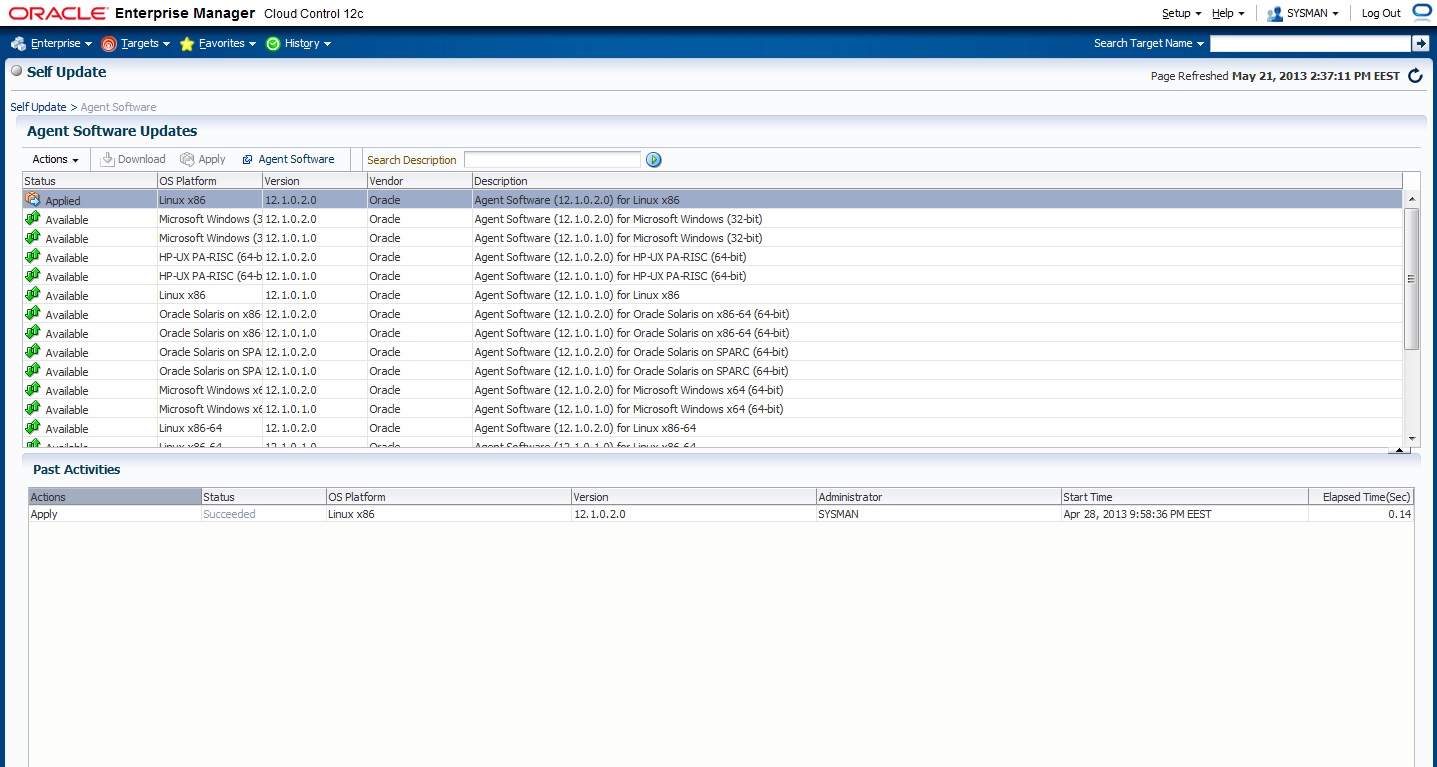
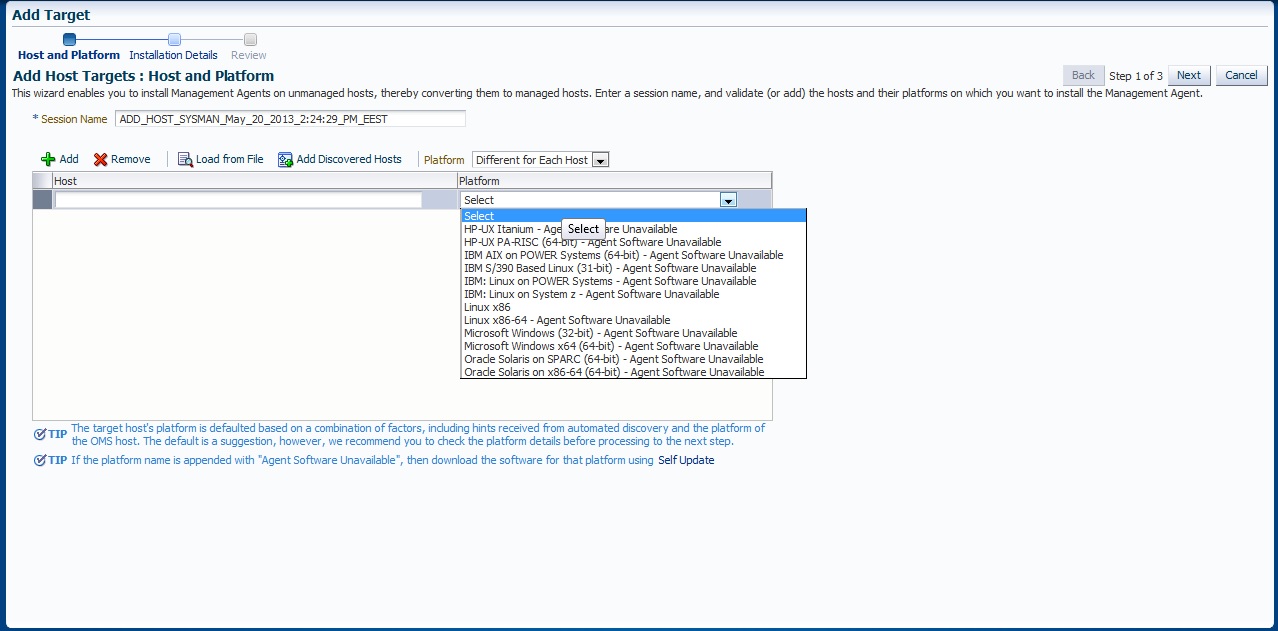
em12c agent software unavailable

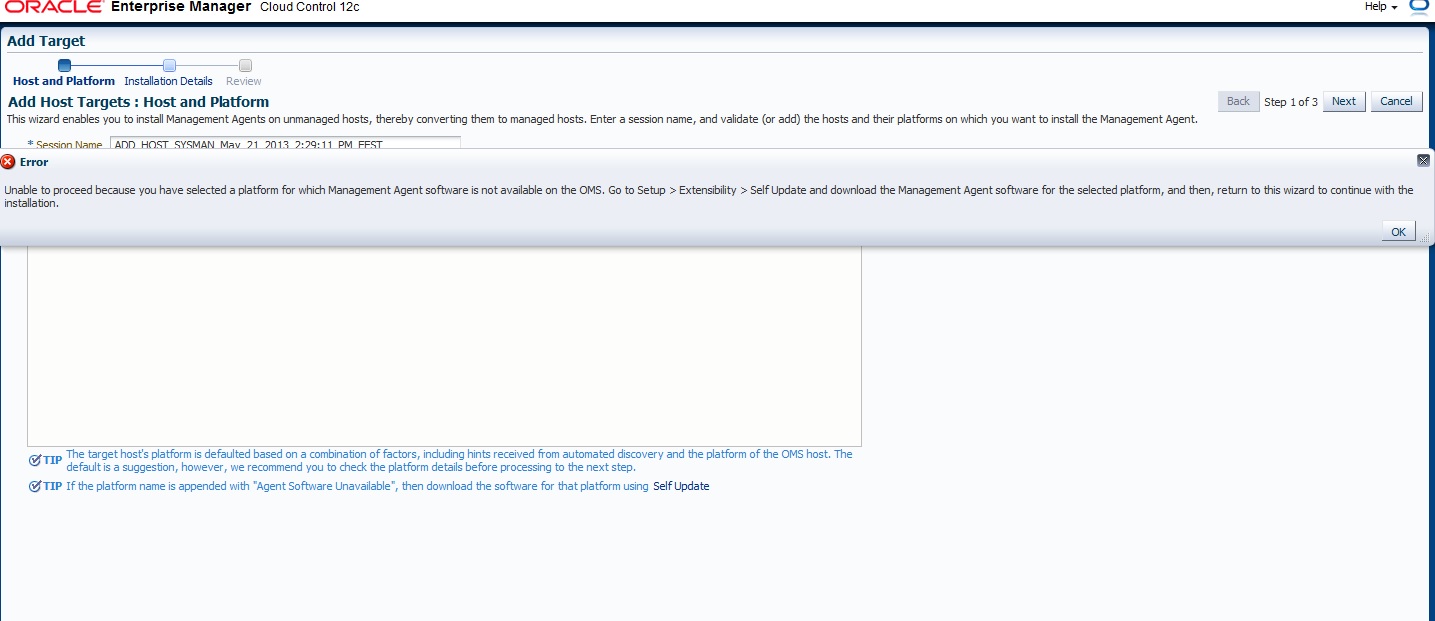
Sometimes you need to deploy new agent to different machine or database, and to do that you have to add target and choose which platform installed but Agent software unavailable  this is the message you will see.

to solve this :

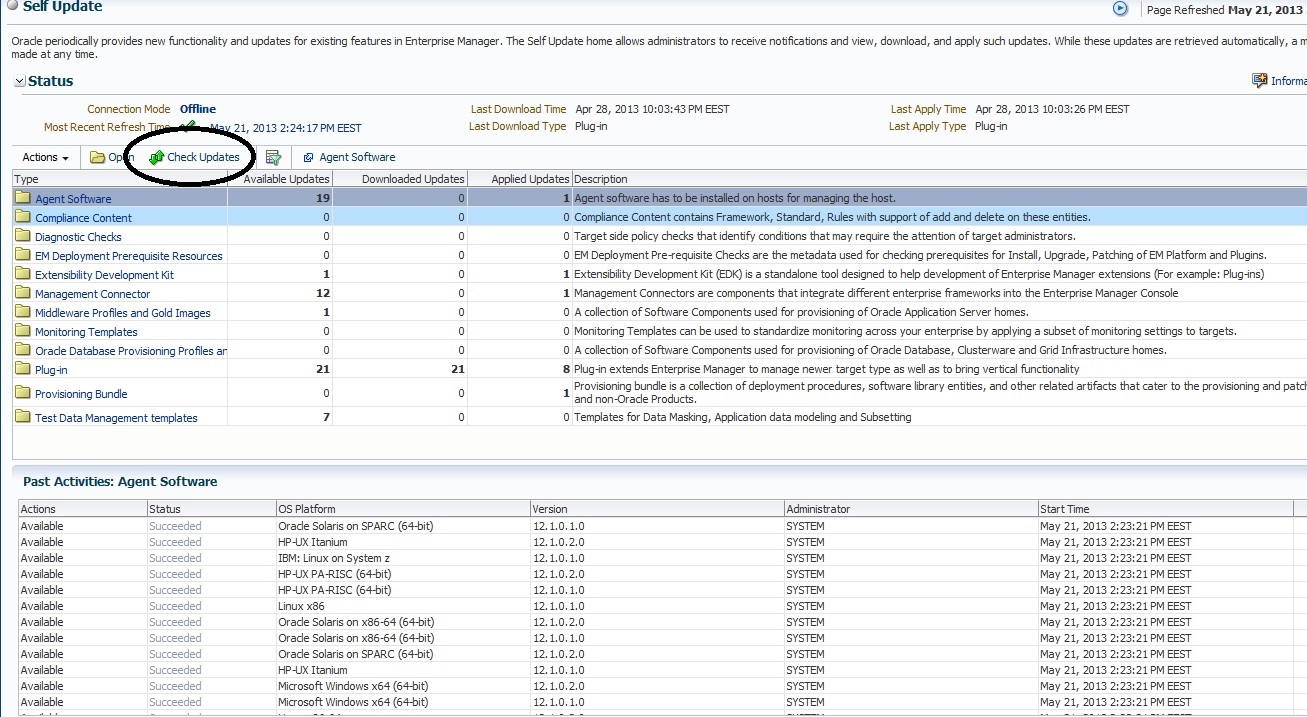
Setup >> Extensibility >> Self Update

Connection mode should be Offline ( you need to configure System Library to change Connection mode or Error will be appeared )

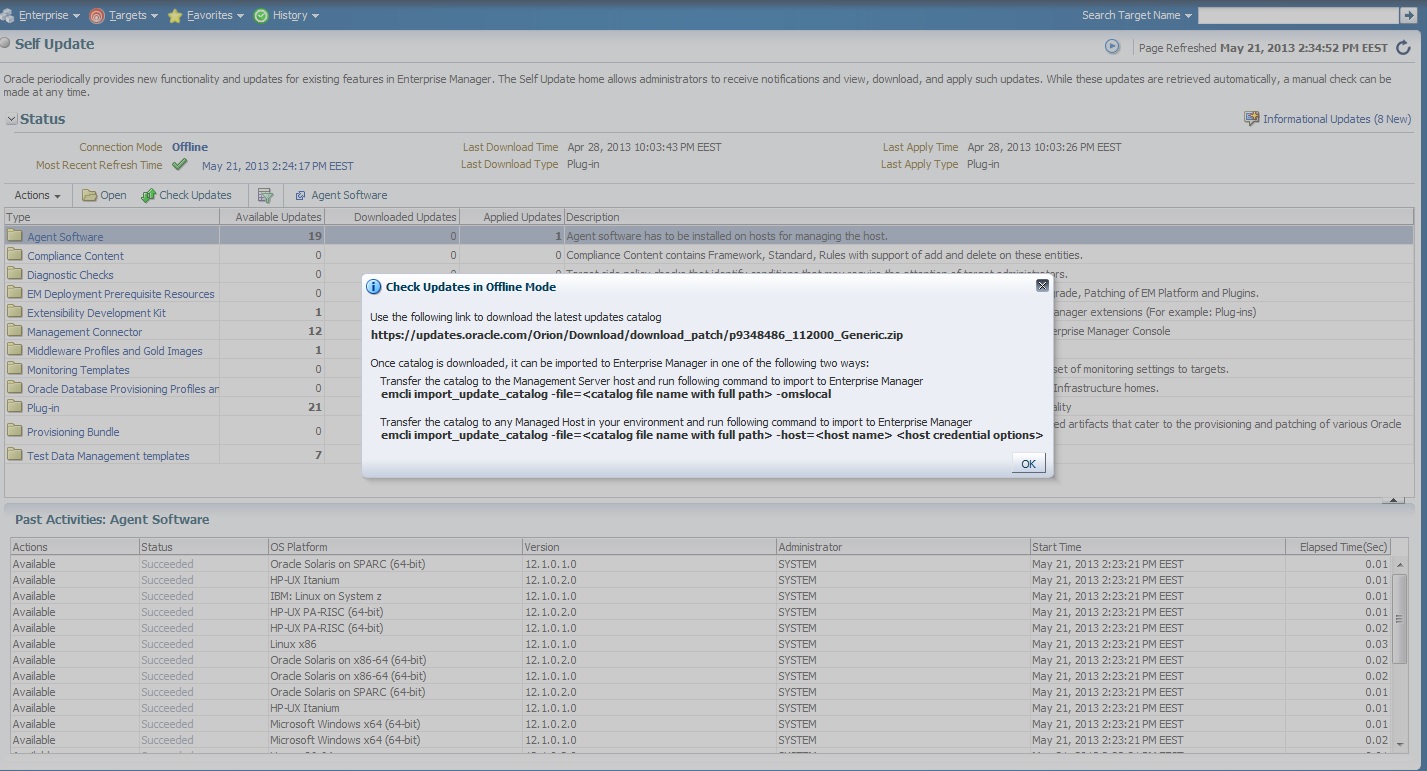
After change Connection mode to offline back to self_update main screen And Press Check Updates

New Box Dialog will appear 

You need to visit https://support.oracle.com and download patch number 9348486 after finish downloading copy to OMS server using FTP and don’t unzip it.

Run the below command

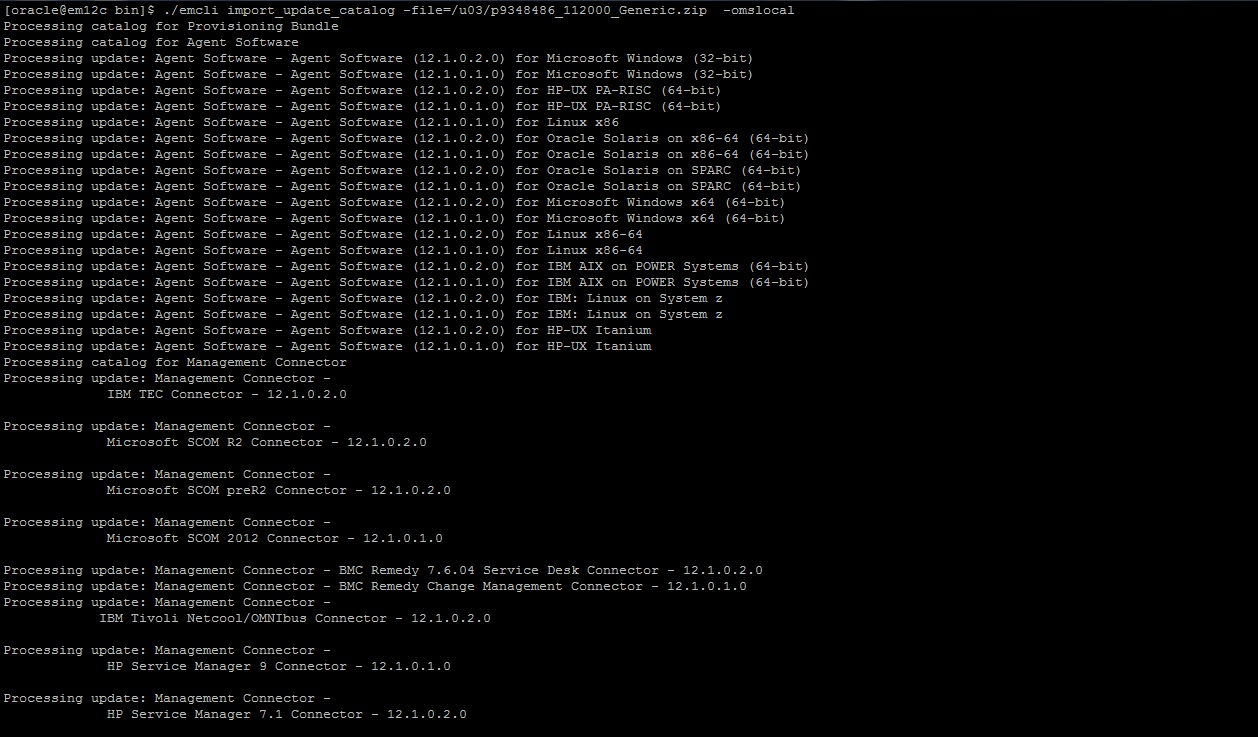
 ./emcli import_update_catalog -file=/u01/p9348486_112000_Generic.zip -omslocal

if the below error show up :

Error: The command name “import_update_catalog” is not a recognized command.
Run the “help” command for a list of recognized commands.
You may also need to run the “sync” command to synchronize with the current OMS.

Do the following :

 ./emcli login -username=’SYSTEM’
Enter password
Login successful

 ./emcli sync
Synchronized successfully

And Re-Run The Above Command Again,
The output will look like this 
after doing this will be able to see  all the agent Software in Self-update like the below.
now each kind of agent you need to download you have to install the patch and apply

 ./emcli import_update_catalog -file= ….. 

You can download the article from here

Thank you
Osama Mustafa

Expdp Error –> ORA-31617/ORA-19505/ORA-27037

Setup like the following :

Database 11gr2
Rac 11gr2

When trying to expdp the below error appear :

expdp dumpfile=tdmp_test.dmp logfile=1.log directory=expdp_folder schemas=siebel parallel=4

ORA-31693: Table data object “CS_XM_TEMP”.”CS_XM_TEMP_CC” failed to load/unload and is being skipped due to error:
ORA-31617: unable to open dump file “/u01/expdp /dump_test.dmp” for write
ORA-19505: failed to identify file “/u01/expdp/dump_test.dmp”
ORA-27037: unable to obtain file status

You need to make sure of the below :
–  Folder exdp_folder should be exists on the both nodes with same path.

even if you try to connect using tnsnames it will generate error so solution
-Remove parallel from your expdp command to be like this

expdp dumpfile=tdmp_test.dmp logfile=1.log directory=expdp_folder schemas=siebel 


-Use Cluster Option in expdp

expdp dumpfile=tdmp_test.dmp logfile=1.log directory=expdp_folder schemas=siebel cluster=n

Thank you
Osama mustafa