HTTP3094: 1 listen sockets could not be created / Oracle IPlant

When Trying to Startup iplant Instance the below error Appearing every-time :

TEST siebel: :/Siebel/iPlanet/webserver7/https-Osama_TST/bin\>./startserv
Oracle iPlanet Web Server 7.0.15 B04/19/2012 21:52
info: CORE5076: Using [Java HotSpot(TM) 64-Bit Server VM, Version 1.6.0_24] from [Sun Microsystems Inc.]
startup failure: could not bind to port 8080 (Address already in use)
failure: HTTP3127: http-listener-1: http://TEST:8080: Error creating socket (Address already in use)
failure: HTTP3094: 1 listen sockets could not be created
failure: server initialization failed

From the above error you notice that Port 8080 is already in use.

The Solution :

ps -ef |grep webservd

and Use Kill -9

Try Again Now

Thank you
Osama Mustafa

ORA-12505 SCAN Listener And JDBC

The Above Error Appears when trying to connect RAC database Using SCAN Listener through JDBC, I checked everything and it was working without any problem, I could not find any reason why this issue happened, nothing in the Listener.log.

So I Used the below connection String instead of above one.

jdbc:oracle:thin:@(DESCRIPTION=(ADDRESS=(PROTOCOL=TCP)(HOST=SCAN-LISTENER-NAME)(PORT=1530))(CONNECT_DATA=(SERVICE_NAME=Service-name)))

Thank you
Osama Mustafa 

Share Folder as File System From Windows to Linux

in this post i will show you how to share folder from windows to Linux , you can use smb but in this post i will use it in command line.

Option #1:
SMB

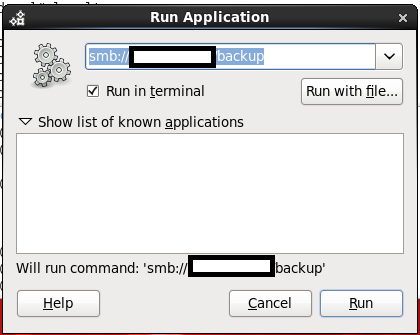
By Press ( ALT+F2 ) the new dialog will be opened just type in the box the below :

smb://windows-server-ip/shared folder 

Option #2: 
Using command line.
  • mkdir /windows-backup
  • as root user
  • mount -t cifs //windowsip/sharefolder -o username=administrator,password=administratorpassword /windows-backup.
  • run df -h to make sure the folder has been mounted.
Note :
If you are using RHEL 4 the above command will not work, check the below

mount -t smbfs -o username=administrator,password=administratorpassword //windowsip/backup /windwos-backup

Thank you
Osama mustafa

Reference :
1- cyberciti Here

Change OHS Port On Linux to Work on 80

Operating system : Oracle Linux 6.4
Oracle WebTier OHS 11.1.1.7

if you want to configure OHS ( WT ) to work on port 80 ( http ) avoiding insert Port.

For Example :

OHS default Port is 7777, if you want to leave it like this any call for the server should be like this :

http://:7777/console  

But if you are using port 80 you have to do the below :

http:///console 

But on Linux if you need to use port 80 you have to be root, to do this follow the below step :

  • As root user :

[root@TST-WT1 bin]# pwd
/u01/fmw/Oracle_WT1/ohs/bin 

[root@TST-WT1 bin]# chown root .apachectl
[root@TST-WT1 bin]# chmod 6750 .apachectl

  • As Oracle User

[oracle@TST-WT1 ~]$ cd /u01/fmw/admin/config/OHS/ohs1/ 

[oracle@SCADNP-WT1 ohs1]$ ls http*
 httpd.conf      

  • Edit the file using any Editor and modify Listen from 7777 to 80
  • Restart OHS using opmnctl command.

——–+———-+———–+——
ohs1                             | OHS                |   15732 | Alive    |  677601509 |   510840 |   0:00:11 | https:9999,https:4443,http:80
Thank you 
Osama Mustafa

WorkFlowCA: NullError : Could not Connect to the Remote Server

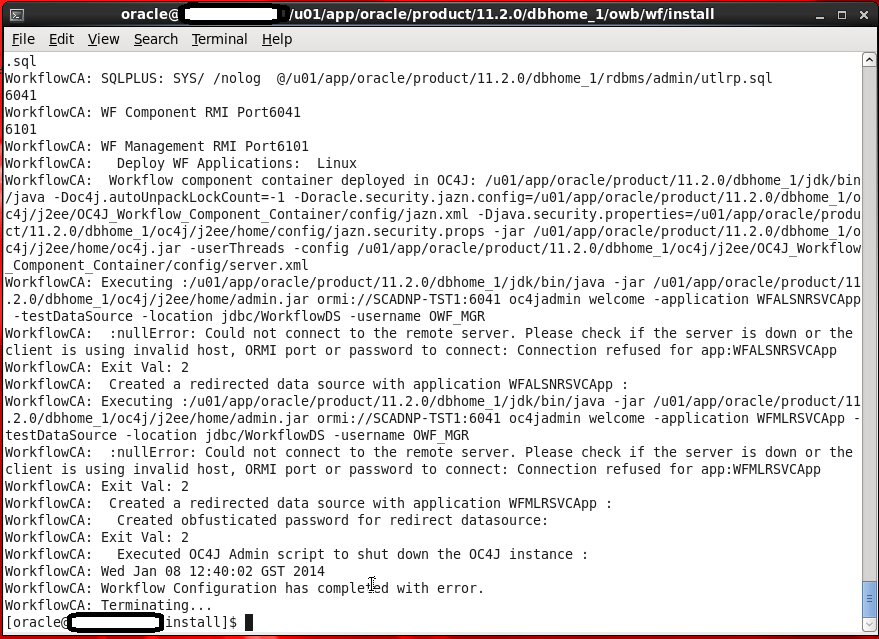
This Error Appear When Trying to Run Oracle Ware-House Builder On Linux , in this tools you are connecting to Database to Setup some configuration for Workflow in DWH, Every Thing Run Successfully Till i received the error in the picture :

WorkFlowCA: NullError : Could not Connect to the Remote Server

You Can ignore this error simply , I didn’t configure Oracle Enterprise manager in my database , which is the reason for this Error.if you want create enterprise manager and re run the tool again.

Thank you
Osama Mustafa