BLOG

java.lang.securityexception access denied. required roles admin

Weblogic Adminserver logs indicated to the below error :-

java.lang.securityexception access denied. required roles admin

To solve the above error, Follow the below steps :-

From the Navigation Tree –> Security Realms :-

New Page Will be Opened click on my Realms :-

From the configuration –> General 

Thank you 
Osama Mustafa

weblogic.socket.MaxMessageSizeExceededException

I recently encountered below error,Adminserver.log Indicate to :-

weblogic.socket.MaxMessageSizeExceededException: Incoming message of size: ‘10000080’ bytes exceeds the configured maximum of: ‘10000000’ bytes for protocol: ‘t3’.
weblogic.socket.MaxMessageSizeExceededException: Incoming message of size: ‘10000080’ bytes exceeds the configured maximum of: ‘10000000’ bytes for protocol: ‘t3’
        at weblogic.socket.BaseAbstractMuxableSocket.incrementBufferOffset(BaseAbstractMuxableSocket.java:230)
        at weblogic.rjvm.t3.MuxableSocketT3.incrementBufferOffset(MuxableSocketT3.java:351)
        at weblogic.socket.SocketMuxer.readFromSocket(SocketMuxer.java:989)
        at weblogic.socket.SocketMuxer.readReadySocketOnce(SocketMuxer.java:920)
        at weblogic.socket.SocketMuxer.readReadySocket(SocketMuxer.java:897)
        at weblogic.socket.EPollSocketMuxer.dataReceived(EPollSocketMuxer.java:215)
        at weblogic.socket.EPollSocketMuxer.processSockets(EPollSocketMuxer.java:177)
        at weblogic.socket.SocketReaderRequest.run(SocketReaderRequest.java:29)
        at weblogic.socket.SocketReaderRequest.execute(SocketReaderRequest.java:43)
        at weblogic.kernel.ExecuteThread.execute(ExecuteThread.java:145)
        at weblogic.kernel.ExecuteThread.run(ExecuteThread.java:117)

to fix this error follow the following steps :-

From Environment, Press on Adminserver  :-

Chose the tab like the below picture :-

Add the following parameter in arguments box, Save usually there is no need to restart :- 
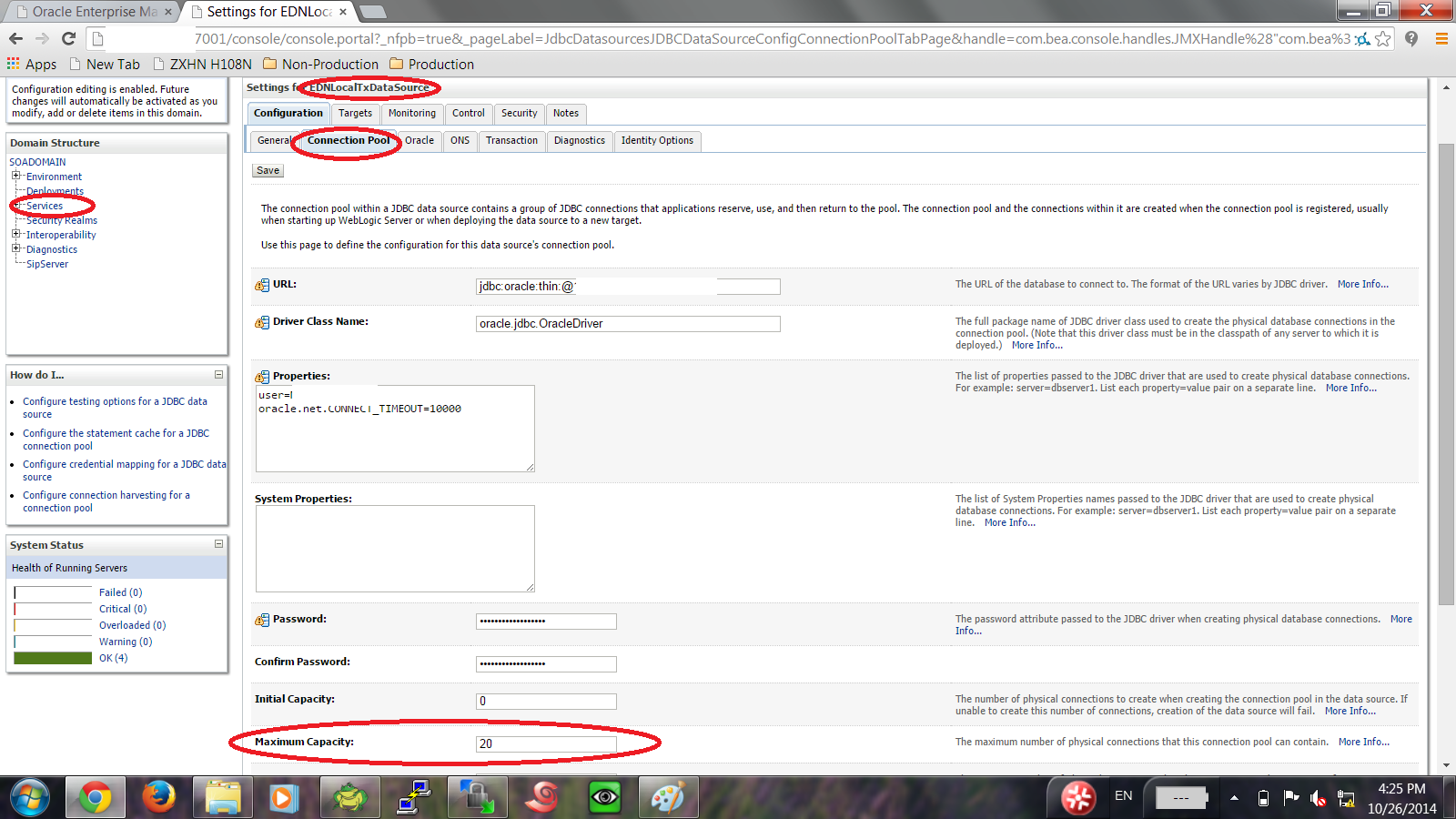
Or if you would like change MaxMessageSize Directly from the console follow the below screen :-

Option #2 :- 
From the navigation tree :- 

Click on Module-FMWDFW

After choose the above tab, 3 options will be appear, press on each of them and Uncheck on Enable Watch  :-

Increase Transaction timeout in SOA Server

I received the below error in soa_server1 :-

Transaction Rolledback.: weblogic.transaction.internal.TimedOutException: Transaction timed out after 603 seconds BEA1-3FB6FB464035C13E3227 at 

From the above error, transaction timeout should be increased regarding to heavy transaction on soa server.

to do this follow the following steps :-

access weblogic console –> Deployment –> and search for Soa_infra. ( expand it)

Check the below EJBS services and click on it configuration tab :-
BPELActivityManagerBean
BPELEngineBean
BPELInstanceManagerBean
BPELProcessManagerBean
BPELServerManagerBean

If this not working on you have to increase transaction timeout for JTA, Access Weblogic Console select Services > JTA
Thank you 
Osama Mustafa

WSM-02557 When Trying to Deploy On SOA Server.

AdminServer indicates to the following error:-

AdminServer-diagnostic.log:[2014-07-16T10:40:43.681+02:00] [AdminServer] [ERROR] [WSM-02353] [oracle.wsm.resources.policymanager] [tid: [ACTIVE].ExecuteThread: ‘0’ for queue: ‘weblogic.kernel.Default (self-tuning)’] [userId: admin] [ecid: bf57ca3361a7ecd1:-39746f30:1473e26749c:-8000-000000000000026a,0] [APP: em] Unable to get the Action Executor.

to solve this issue make sure the following Users were created in Weblogic console :-

From AdminConsole –> Security —> myrealms –> Choose Users and Group Tab.

Create the below user :-

OracleSystemUser

Create the below Group

OracleSystemGroup

The following Pictures describes users and Group ( how supposed to be ) :-

and assign this group to OracleSystemUser , Restart Console and managed Server Try again.

Thank you
Osama Mustafa

SOA_SERVER ( Managed Server ) Take too Long time to Start/Restart

On the weblogic console when trying to start managed Server it’s take too long time to start in my case it’s SOA_SERVER, almost 25 min only to start, which is not correct . to avoid this problem you need to follow the below steps simple but effective :-

Under Java Home ( That Used by Weblogic ) :-

cd /u01/app/fmw/jdk/jre/lib/security 

There’s file called Java.Security 

Edit this File using any Editor ( vi for example ).

Search for the following line :-

securerandom.source=file:/dev/urandom

And Change it to :-

securerandom.source=file:/dev/./urandom

Or Another way add the below line to startup script in weblogic :-

-Djava.security.egd=file:/dev/./urandom

Hope this will solve your problem.

Thank you
Osama Mustafa

Invalid User name and password OBIEE 11g (Analytics)

When trying to Access to the URL:// hostname:9704/analytics with username weblogic the below error generated in the Adminserver logs :-

java.security.AccessControlException: access denied (oracle.security.jps.service.credstore.CredentialAccessPermission context=SYSTEM,mapName=oracle.bi.system,keyName=system.user read)
at java.security.AccessControlContext.checkPermission(AccessControlContext.java:374)
at java.security.AccessController.checkPermission(AccessController.java:546)
at oracle.security.jps.util.JpsAuth$AuthorizationMechanism$3.checkPermission(JpsAuth.java:463)
at oracle.security.jps.util.JpsAuth.checkPermission(JpsAuth.java:523)
at oracle.security.jps.util.JpsAuth.checkPermission(JpsAuth.java:549)
at oracle.security.jps.internal.credstore.util.CsfUtil.checkPermission(CsfUtil.java:684)
at oracle.security.jps.internal.credstore.ssp.SspCredentialStore.getCredential(SspCredentialStore.java:562)
at oracle.bi.security.opss.CredentialReader.getPasswordCredential(CredentialReader.java:69)
at oracle.bi.security.opss.CredentialReader.getPasswordCredential(CredentialReader.java:57)
at oracle.bi.security.service.SystemUserValidator$ReadSystemUserCredentialsAction.run(SystemUserValidator.java:291)
at oracle.bi.security.service.SystemUserValidator$ReadSystemUserCredentialsAction.run(SystemUserValidator.java:278)
at oracle.bi.security.service.SystemUserValidator.readSystemUserCredential(SystemUserValidator.java:186)
at oracle.bi.security.service.SystemUserValidator.validateSystemUserCredentials(SystemUserValidator.java:146)
at oracle.bi.security.service.SystemUserValidator.access$000(SystemUserValidator.java:26)
at oracle.bi.security.service.SystemUserValidator$1.run(SystemUserValidator.java:107)
at oracle.bi.security.service.SystemUserValidator$1.run(SystemUserValidator.java:101)
at oracle.bi.security.service.SystemUserValidator.validate(SystemUserValidator.java:117)
at oracle.bi.security.service.SecurityServiceBean.initialise(SecurityServiceBean.java:89)
at oracle.bi.security.service.SecurityServiceBean.getAuthenticatedUserWithLanguageAndProperties(SecurityServiceBean.java:129)
at sun.reflect.NativeMethodAccessorImpl.invoke0(Native Method)

If you recive the above error, you don’t have permission to access to the analytics, permission saved  in Files called

system-jazn-data.xml

Located :-

 $DOMAIN_HOME/config/fmwconfig

Edit the files and add these lines :-


Or copy this file from another OBIEE Environment after backup the old one, and restart AdminServer and managed Server

Thank you
Osama Mustafa

Oracle database Version 12.1.0.2

Oracle database Version 12.1.0.2 released today .. available to download.. The important new feature in this release is the Oracle Database In-Memory other new features…
Oracle Database In-Memory
Oracle Big Data SQL
Advanced Index Compression
Zone Maps
Approximate Count Distinct
Attribute Clustering
Full Database Caching
Rapid Home Provisioning

Download Here

Thank you
Osama Mustafa