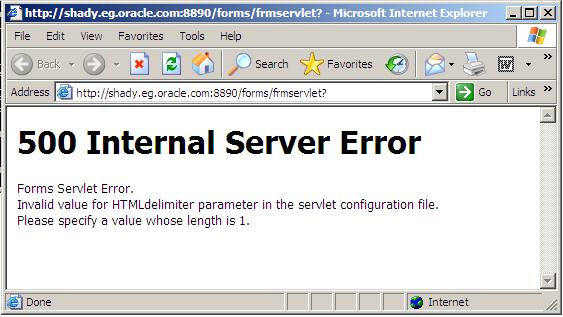
500 Internal Server Error / Oracle Application Server

There’s more than One Reason For this i will provide you with two solutions (Meta-link Note):

Solution One : 

1. Backup and edit the forms configuration file (Default= formsweb.cfg)
2. Modify the HTMLdelimiter to have only one character as a value 

HTMLdelimiter=%

3. Save and exit the file.

Solution Two :

Edit oracle_apache.conf and comment out the include related to the forms.conf  as the following :

# Oracle Forms Developer
#include “/oas/product/oas2/forms/server/forms.conf”

Thank You
osama mustafa

compile invalid objects in an APPS (EBS)

You need to know Count of Invalid Object for your APPS :

SELECT COUNT(*)
FROM DBA_OBJECTS
WHERE STATUS = 'INVALID';

For a more detailed query, use the following script :

SELECT OWNER, OBJECT_TYPE, COUNT(*)
FROM DBA_OBJECTS
WHERE STATUS = 'INVALID'
GROUP BY OWNER, OBJECT_TYPE;

To recompile an individual object, connect to SQL*PLUS as the owner of the object (generally apps) and use one of the following depending on the object type :

alter package compile; (package specification)
alter package compile body; (package body)
alter view compile; (view)

If the object compiles with warnings, use either of the following to see the errors that caused the warnings :

show errors

OR

select * from user_errors where name = '';

Another way to correct invalid objects is to run the adadmin utility as follows:

1. Log in as APPS User : /

2. Start the adadmin-Utility from the Unix prompt with this command :

adadmin

The utility will then ask you a series of questions.

3. Under the Maintain Applications Database Objects Menu, select Compile APPS schema(s)

Other Way :
 
Also try running $ORACLE_HOME/rdbms/admin/utlrp.sql ( as sysdba )

Within Applications, there is a script to compile INVALID objects – called ADCOMPSC.pls

 Arguments for ADCOMPSC.pls :

1 – Schema to run in
2 – Password for schema
3 – Check errors for objects starting with #3

NOTE: The order in which to compile Invalid Objects in schemas is SYS, SYSTEM, APPS and then all others. APPS_DDL and APPS_ARRAY_DDL should exist in all schema’s. In case of an ORA-1555 error while running adcompsc.pls, restart the script.

The script can be run as followed :

cd $AD_TOP/sql
sqlplus @adcompsc.pls SCHEMA_NAME SCHEMA_PASSWORD %

Example : SQL> @adcompsc.pls apps apps %

After the script completes, check for invalid objects again. If the number has decreased, but invalid objects still exist, run adcompsc.pls again. Keep running adcompsc.pls until number of invalid objects stops decreasing.

If there are any objects still left INVALID, verify them by using the script ‘aderrchk.sql’ to record the remaining INVALID objects. ‘Aderrchk.sql’ uses the same syntax as ‘adcompsc.pls’. This script is also supplied with the Applications. Send the aderrchk.sql to a file using the spool command in sqlplus.

e.g. sqlplus x/y @aderrchk.sql SCHEMA_NAME SCHEMA_PASSWORD %

For objects which will not compile, try the following :

select text
from user_source
where name = 'OBJECTNAME'
and text like '%Header%';

This script will provide the script that creates the packages/recreates the packages.

SQL>@packageheader
SQL>@packagebody

If recreating the package does not make the package valid, analyze the user_errors table to determine the cause of the invalid package :

select text
from user_errors
where name = '';

Thank You
Osama Mustafa
How To Secure/Unsecure your Oracle Application Server 10g

Regarding To Oracle Support Document Please Follow the below steps to Secure and Unsecured Oracle AS

Secure Oracle AS 10g :

1.Stop iasconsole

emctl stop iasconsole

2.Secure iasconsole 

emctl secure iasconsole

3.Start iasconsole 

emctl start iasconsole U

Unsecuring Oracle AS 10g

1.Stop iasconsole

emctl stop iasconsole

 2.Update Oracle As Console StandAlone OC4J to support unsecure port :

     $ORACLE_HOME/sysman/j2ee/config/emd-web-site.xml
Change 

<web-site <span="" display-name="Oracle Enterprise Manager iAS Console Website" host="[ALL]" port="" style="color: red;">

 to 


<web-site <span="" display-name="Oracle Enterprise Manager iAS Console Website" host="[ALL]" port="" style="color: red;">

3.In same File 

Change 

<ssl-config needs-client-auth="true" keystore="server/keystore.test" keystore-password="%EMD_KEYSTORE_PASSWORD%" />

To

<ssl-config needs-client-auth="false" keystore="server/keystore.test" keystore-password="%EMD_KEYSTORE_PASSWORD%" />

4.Update AS Console Local Management Agent to support the unsecure HTTP protocol.
The EMD_URL property in

$ORACLE_HOME/sysman/config/emd.properties

needs to get switched back to the HTTP (non-secure) protocol.

Change

EMD_URL=https://:/emd/main  

to


EMD_URL=http://:/emd/main

5.Update the standAloneConsoleURL property of oracle_ias target.
Edit the file

$ORACLE_HOME/sysman/emd/targets.xml

to change the StandaloneConsoleURL property of oracle_ias target to switch back to the HTTP (non-secure) protocol.

Change:

<target ...="" name="EnterpriseManager." type="oracle_ias"> <... <property 0);"="" 0,="" color:="" name="StandaloneConsoleURL" rgb(255,="" value="https://:/emd/console"/>
  to
<target ...="" name="EnterpriseManager." type="oracle_ias"> <... <property 0);"="" 0,="" color:="" name="StandaloneConsoleURL" rgb(255,="" value="http://:/emd/console"/>

6.Start iasconsole
emctl start iasconsole  

Install Oracle Application Server 10g R2 On RHEL 4

Installation Steps For Oracle Application Server 10g R2 On Linux Redhat 4 Update 6
(for people who wonder You can’t install it on RHEL 5 ).

Installation Steps : 
Pre-Installation Task


1) Check the required packages are installed in OS or not.
glibc-2.3.4-2.9
glibc-common-2.3.4-2.9
binutils-2.15.92.0.2-13
compat-libstdc++-296-2.96-132.7.2
gcc-3.4.3-22.1
gcc-c++-3.4.3-22.1
libstdc++-3.4.3-22.1
libstdc++-devel-3.4.3-22.1
openmotif21-2.1.30-11.RHEL4.4
pdksh-5.2.14-30
setarch-1.6-1
make-3.80-5
gnome-libs-1.4.1.2.90-44.1
sysstat-5.0.5-1
compat-db-4.1.25-9
control-center-2.8.0-12
xscreensaver-4.18-5.rhel4.2
you can check the status of package using rpm -qa | grep command. as a root user.
2) Add following in /etc/sysctl.conf

kernel.shmall = 2097152
kernel.shmmax = 4347483648
kernel.shmmni = 4096
# semaphores: semmsl, semmns, semopm, semmni
kernel.sem = 256 32000 100 142
fs.file-max = 201072
net.ipv4.ip_local_port_range = 10000 65000
kernel.msgmni = 2878
kernel.msgmax = 8192
kernel.msgmnb = 65535

3) Make entry of hostname and domain name in /etc/sysctl.conf
kernel.hostname=
kernel.domainname=

4) Make following changes in /etc/security/limits.conf

*        soft   nproc         2047
*        hard   nproc         16384
*        soft   nofile        2048
*        hard   nofile        65536

5) Add the following line to the /etc/pam.d/login file

session    required     /lib/security/pam_limits.so 

6)  Make the following entry in /etc/profile

if [ $USER = “oracle” ]; then
if [ $SHELL = “/bin/ksh” ]; then
ulimit -p 16384
ulimit -n 65536
else
ulimit -u 16384 -n 65536
fi
fi

7)  Create a group and user.

Primary Group – oinstall#groupadd oinstall
Secondary Group#groupadd dba
#useradd -g oinstall -G dba  oracle
Give the password
# passwd oracle
Changing password for user oracle.
New UNIX password:
Retype new UNIX password:
passwd: all authentication tokens updated successfully.

8) Make changes in /etc/hosts as root user and make following entry.
(IP Address)       (hostname.domain.name)       (hostname)

Installing Infrastructure Tier
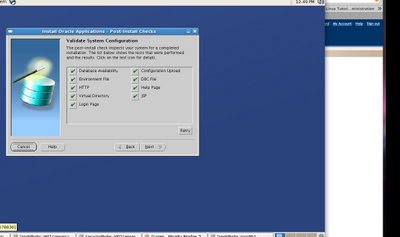
The installation of AS10g should be done in specific order only as explained before. This is because of the dependencies between the components. Here we are going to install Portal and Wireless option of mid tier, this needs database repository for storing the information of these components. So we will first install infrastructure tier and then install Mid tier. Please follow the below screen shots.

Installing Mid Tier components

 Thank You 
Osama mustafa

Upgrade 11.1.0.6 to 11.1.0.7 – APPS DBA

On each application tier server node,
shut down all server processes or services.

On the database tier server node,
shut down the database listener in the old Oracle home.

On the database server node,
as the owner of the Oracle 11g file system and database instance, unzip and extract the 11.1.0.7 patch set file for your platform.

Use the runInstaller in the patchset to start the OUI.

Once the OUi starts from the LOV s in the Oracle_home list choose the appropriate one to be upgraded and the location also.

The present oracle_home and its location will appear if the environment is set correctly.

Proceed with the next steps on the OUI screen.

On next Screen it will Say Configuration Assistant has failed.Skip this Step since its not required for Oracle E-Business Suite .

MOST IMPORTANT STEP IN UPGRADE .
After Installation you need to Apply the RDBMS patches7486407 and 7684818

Copy $APPL_TOP/admin/adstats.sql from the administration server node to the database server node.

$ sqlplus / as sysdba
SQL> shutdown normal;
SQL> startup restrict;
SQL> @adstats.sql
SQL> shutdown normal;
SQL> startup;
SQL> exit;

Thank You
Osama mustafa

steps to upgrade 11.1.0.6.0 to 11.1.0.7.0

O.S : Linux 64Bit
the steps the same for all Database with different patch .
Database : 11.1.0.6 (R1)

Let start upgrading :

1 – You need To install this patch p6890831_111070_Linux-x86-64.zip.
2-   Bring Down Database And Services Down And make sure it .
*Database :
sqlplus / as sysdba
SQL>shutdown immediate ;
$ps -ef | grep pmon “to make sure the database is not running”

Listener :
$lsnrctl status
$lsnrctl stop
$lsnrctl status

3-Just In case Take backup of your database .

4-unzip the patch , and run it under Oracle User 
$./runInstaller

Select the ORACLE_HOME to upgrade and then click next, the prerequisites steps will complete last click INSTALL. At the end up the installation it will ask to run root.sh as root user. We need root user password or sudo user privilege to run root.sh script.

5-After Upgrade do the following and its mandatory : 
cd $ORACLE_HOME/rdbms/admin
sqlplus  / as sysdba
SQL> startup upgrade;
SQL>spool pre_upgrade.log
SQL> @utlu111i.sql

6-cd $ORACLE_HOME/rdbms/admin
sqlplus / as sysdba
SQL> spool upgrade_date.log
SQL> @catupgrd.sql

Take check the validity, version of the installed components

sqlplus / as sysdba
sql>set pages 250
sql> set lines 1000
sql> col comp_name for a40
sql> select comp_name, version, status from dba_registry;

 7-SQL>shutdown immediate;

8-Recompiling the invalid objects
cd $ORACLE_HOME/rdbms/admin
sqlplus / as sysdba
SQL>startup;
SQL>spool recompile.log
SQL> @utlrp.sql

Cold Backup Steps for your Database :

Controlfiles, datafiles, redo logs, archive files, tempfiles must be included in the backup. If the files are in different paths, the same has to be backedup.

As Oracle User :

$mkdir /backup_date
$cp /u01/oracle/oradata/orcl/*.* /backup/backup_date
$cd $ORACLE_HOME/dbs
$cp inittest.ora inittest.ora_bkpdate
$cp spfiletest.ora spfiletest.or_bkpdate
$cp orapwtest.ora orapwtest.ora_bkpdate

**Take a backup of home path
$mkdir product_bkp
$cd /u01/oracle/product
$tar czf /backup/oracle_11106.tar.gz 11.1.0

**dbhome, coraenv,oraenv backup
As Root User :

#cd /usr/local/bin
#cp dbhome dhome_bkpdate
#cp coraenv coraenv_bkpdate
#cp oraenv oraenv_bkpdate

revert back to old version  :

1. untar the binary backup
2. Backup  the current database and then replace them with cold back taken before applying the patch.

 As Root User :

cd /usr/local/bin
#cp dbhome_bkpdate dbhome
#cp coraenv_bkpdate coraenv
#cp oraenv_bkpdate oraenv

 As Oracle User :
oracle binary restoration
cd /u01/oracle/product
$rm -rf 11.1.0
$mkdir 11.1.0
$cp /backup/oracle_11106.tar.gz 11.1.0
$cd 11.1.0
$gunzip oracle_11106.tar.gz
$tar -xvf oracle_11106.tar

Datafile backup restoration
cd /u01/oracle/oradata/orcl/
$rm *
$cd /backup/backup_date
$cp *.* /App1/oracle/oradata/orcl/
$cd $ORACLE_HOME/dbs
$cp inittest.ora_bkpdate inittest.ora
$cp spfiletest.ora_bkpdate spfiletest.ora
$cp orapwtest.ora_bkpdate orapwtest.ora

 sqlplus / as sysdba
SQL>startup;
SQL>select * from v$version;
SQL>select comp_name, version, status from dba_registry;

Osama mustafa 

Osamamustafa.blogspot.com

Change Enterprise manager password for 11g

For the DB Control Release 11.2 and higher, you need to set the environment variable ORACLE_UNQNAME to the value of the DB_UNIQUE_NAME database parameter.

Steps :

1.Stop the DB Control
On Unix
$ emctl stop dbconsole

On Windows
Open a Command Window and type
**> emctl stop dbconsole

2.Check that the DB Control is stopped
 On Unix
$ emctl status dbconsole
 

On Windows
Open a Command Window and type
 **>emctl status dbconsole

3.Connect to the database as a user with DBA privilege with SQL*Plus and execute:

SQL> alter user sysman identified by ;
 
4.Check the new password
SQL> connect sysman/[@database_alias]
 
5.From the database directory $ORACLE_HOME/bin, execute:
On Unix

$ emctl setpasswd dbconsole
Provide the new SYSMAN password
 
On Windows

**>: emctl setpasswd dbconsoleProvide the new SYSMAN password
 
6.Restart the DB Control
On Unix
$ emctl start dbconsole
 
On Windows
Open a DOS Command Window and type
**>: emctl start dbconsole
 

Thank you 

Osama Mustafa

Change Oracle Enterprise Manager 10g Password

How to change the password of the Database User SYSMAN when the database is hosting a DB Control Repository. 

1.Stop the DB Control
On Unix
$ emctl stop dbconsole

On Windows
Open a Command Window and type
**> emctl stop dbconsole

2.Check that the DB Control is stopped
On Unix

$ emctl status dbconsole

On Windows
Open a DOS Command Window and type
**> emctl status dbconsole


3.Connect to the database as a user with DBA privilege with SQL*Plus and execute:

SQL> alter user sysman identified by ;

4.Check the new password 

SQL> connect sysman/[@database_alias]
 

5.Go to $ORACLE_HOME/host_sid/sysman/config do the following :

    1. Save the file emoms.properties to emoms.properties.orig
    2. Edit the file emoms.properties
      1. Search for the line beginning with:
        oracle.sysman.eml.mntr.emdRepPwd=
        Replace the encrypted value by the new password value
        Example:
        oracle.sysman.eml.mntr.emdRepPwd=rainbow
      2. Search for the line:
        oracle.sysman.eml.mntr.emdRepPwdEncrypted=TRUE
        Replace TRUE by FALSE

6.Restart the DB Control
On Unix

$ emctl start dbconsole
 
Open a DOS Command Window and type
**> emctl start dbconsole
 
 
7.Check that the password has been encrypted
  1. Edit the file $ORACLE_HOME/host_sid/sysman/config/emoms.properties
    1. Search for the line beginning with:
      oracle.sysman.eml.mntr.emdRepPwd=
      Check that the password is encrypted
    2. Search for the line beginning with:
      oracle.sysman.eml.mntr.emdRepPwdEncrypted=
      Check that the value is TRUE

I Publish the same lesson but on 11g .

  Thank you 
Osama mustafa  


Oracle Application server 10g unable to start HTTP

Hi all

Today When I was Supporting for some customer , i faces issue in application server 10gthe solution is so simple


Let describe the problem :


when we use

./opmnctl startall


all service is up expect Http_server is down

Check Logs nothing , Check Application server logs nothing

And when you try to shutdown IAS again it will give you :

RCV : Permission denied

For first i was thought its permission issue but who can change the permission .


the solution like the following :


On Os


ps -ef | grep oracle


you must find 2 process
Oracle PID $PATH/opmn.d


kill them both
Kill PID PID
or
Kill -9 PID
kill -9 PID


After this
./opmnctl startall

Oracle EBS installation

Hi all ,
its taking long time for me to write new blog , any way in this article i am gonna talk about how to install oracle EBS on Linux – 64 V5 update 4, take in your consideration there’s no difference oracle ebs installation step,the difference is changing is the prerequisites for platforms .

you can check the prerequisites on meta-link DOC [ID 761566.1]
i will post link in the bottom of this article .

Before we begin the wild ride, there a few modifications that needs to be done to the system, a few packages need to be installed. I’ll assume that you have searched for quite a while and maybe you even tried to install the damn thing and ran into errors, so I’ll get right into the process. Here what we’re going to do:

  1. Install Development Tools
  2. Install required packages
  3. Modify the System Configuration and Kernel (don’t panic)
  4. Create Required Users
  5. Install Oracle Apps

1-install Development Tools

there’s easy way and hard way i prefer hard way since easy way take space on system and some package not needed for oracle

Easy way :

yum groupinstall "Development Tools"
Hard Way :
you need to check every package on OS if its installed or not

  • gcc-4.1.2-14.el5.x86_64
  • gcc-c++-4.1.2-14.el5.x86_64
  • glibc-2.5-18.i686 (32-bit)
  • glibc-2.5-18.x86_64
  • glibc-common-2.5-18.x86_64
  • glibc-devel-2.5-18.i386 (32-bit)
  • glibc-devel-2.5-18.x86_64
  • libgcc-4.1.2-14.el5.i386
  • libgcc-4.1.2-14.el5.x86_64
  • libstdc++-devel-4.1.2-14.el5.i386
  • libstdc++-devel-4.1.2-14.el5.x86_64
  • libstdc++-4.1.2-14.el5.i386
  • libstdc++-4.1.2-14.el5.x86_64
  • make-3.81-1.1.x86_64
  • gdbm-1.8.0-26.2.1.i386
  • gdbm-1.8.0-26.2.1.x86_64
  • libXp-1.0.0-8.1.el5.i386
  • libXp-1.0.0-8.1.el5.x86_64
  • libaio-0.3.106-3.2.i386
  • libaio-0.3.106-3.2.x86_64
  • libgomp-4.1.2-14.el5.x86_64
  • sysstat-7.0.0-3.el5.x86_64
  • util-linux-2.13-0.45.el5.x86_64
  • compat-libstdc++-296-2.96-138.i386
  • compat-libstdc++-33-3.2.3-61.i386

Additionally, the following RPMs are required for an 11gR1 Database (which is bundled with the 12.1.1 release) on the database tier:

  • compat-libstdc++-33-3.2.3-61.x86_64
  • elfutils-libelf-devel-0.125-3.el5.x86_64
  • elfutils-libelf-devel-static-0.125-3.el5.x86_64
  • libaio-devel-0.3.106-3.2.x86_64
  • unixODBC-2.2.11-7.1.i386
  • unixODBC-devel-2.2.11-7.1.i386
  • unixODBC-2.2.11-7.1.x86_64
  • unixODBC-devel-2.2.11-7.1.x86_64
  • kernel-headers-2.6.18-8.el5.x86_64
  • openmotif21-2.1.30-11.EL5.i3861
  • xorg-x11-libs-compat-6.8.2-1.EL.33.0.1.i386

Check Package by command : rpm -qa | grep “package name”
Ex:
rpm -qa | grep kernel-headers

if its installed the name of package will appear as result but if its not you need to install like the following :

rpm -ivh “package name that you need to install”.

* after install package called ” openmotif” you need to make the following command :

unlink /usr/lib/libXtst.so.6
ln -s /usr/X11R6/lib/libXtst.so.6.1 /usr/lib/libXtst.so.6

Modify the System Configuration and Kernel

Open /etc/sysctl.conf as root
then add the following lines at the end of the file :

#Oracle EBS R12.1.1 Kernel Settings
kernel.shmall = 2097152
kernel.shmmax = 4294967295
kernel.shmmni = 4096
kernel.sem = 256 32000 100 142
fs.file-max = 327679
net.ipv4.ip_local_port_range = 10000 65000
net.core.rmem_default=262144
net.core.rmem_max=262144
net.core.wmem_default=262144
net.core.wmem_max=4194304

Now lets apply the new settings
/sbin/sysctl –p

Add the following lines to the /etc/security/limits.conf file:

* hard nofile 65535
* soft nofile 4096
* hard nproc 16384
* soft nproc 2047

Add the following lines to the /etc/resolv.conf file:

options attempts:5
options timeout:15

Create Required Users

we need two Groups : groupadd oinstall groupadd dba
useradd -g oinstall -G dba oracle
passwd oracle
useradd -g oinstall -G dba apps
passwd apps

Create Oracle Base Folder

mkdir -p /u01/oracle/PROD
chown -R oravis:oinstall /u01
chmod -R 775 /u01/

Before installation make sure all media (STAGE) owned by Oracle:oinstall and permission is 775 .
before installation you need to change permission for ./rapidwiz like Following
chmod u+x STAGE_PATH/startCD/DISK1/rapidwiz/

Apply patch number 6078836 before installation becuase if you don’t the Post installation check will fail on HTTP error : RW-50015 , you find this patch in the bottom .

Start the installation and Good luck : ./rapidwiz


If you need patch or any thing please contact me here .

Downloadable Files :
Package May you will need : Redhat 5.4
Patch 6078836