In This Article I will Show you how to install oracle Timesten In-Memory Database
You Can Download the Document From Here.
You Can Download the Document From Here.
Thank you
Osama Mustaf
For the people who think differently Welcome aboard
Thank you
Osama Mustaf
SQL> drop user PRD_MDS cascade ;
drop user PRD_MDS cascade
*
ERROR at line 1:
ORA-01940: cannot drop a user that is currently connected
Which is very normal error and the first thing you are trying to check is v$session
SQL> select sid,serial# ,username from v$session where username like ‘%PRD%’;
SID SERIAL# USERNAME
———- ———- ——————————
745 821 PRD_MDS
SQL> alter system kill session ‘745,821’ immediate ;
System altered.
After this i should be able to drop this user without any problem BUT !!!!
SQL> drop user PRD_MDS ;
drop user PRD_MDS
*
ERROR at line 1:
ORA-01940: cannot drop a user that is currently connected
I tried to figure out what is going on , Even i tried alter system kill session 10 times the above error will appear BUT there’s always solutions :
SQL> startup force restrict;
ORACLE instance started.
Total System Global Area 7686086656 bytes
Fixed Size 2228032 bytes
Variable Size 1811939520 bytes
Database Buffers 5729419264 bytes
Redo Buffers 142499840 bytes
Database mounted.
Database opened.
SQL> drop user PRD_MDS cascade ;
User dropped.
NAME TYPE VALUE
———————————— ———– ——-
archive_lag_target integer 0
db_flashback_retention_target integer 1440
fast_start_io_target integer 0
fast_start_mttr_target integer 0
memory_max_target big integer 26048M
memory_target big integer 0
parallel_servers_target integer 2048
pga_aggregate_target big integer 6502M
sga_target big integer 19520M
SQL> ALTER SYSTEM SET MEMORY_MAX_TARGET = 16384M scope=spfile ;
You can Download or view document from SlideShare Here
Thank you
Osama mustafa
Step by Step Restore RMAN to New Host Here
Thank you
Osama Mustafa
SQL> select name from v$pdbs ;
NAME
——————————
PDB$SEED
TEST_1
TEST_2
[oracle@test12c u01]$ mkdir clone
[oracle@test12c u01]$ cd clone/
[oracle@test12c clone]$ pwd
/u01/clone
Open Test_1 Read Only :
SQL> alter pluggable database test_1 close immediate;Pluggable database altered.
SQL> alter pluggable database test_1 open read only ;Pluggable database altered.
Set this parameter to our created directory above :
SQL> show parameter db_create_file_dest ;
NAME TYPE VALUE
———————————— ———–
db_create_file_dest string
SQL> alter system set db_create_file_dest=’/u01/clone’; System altered.
SQL> show parameter db_create_file_dest ;
NAME TYPE VALUE
———————————— ———–
db_create_file_dest string /u01/clone
SQL> create pluggable database clone from test_1 ;Pluggable database created.
SQL> alter pluggable database clone open ;Pluggable database altered.
[oracle@test12c ~]$ sqlplus sys/sys@test12c:1521/clone as sysdba
SQL*Plus: Release 12.1.0.1.0 Production on Sat Jul 13 20:20:24 2013
Copyright (c) 1982, 2013, Oracle. All rights reserved.Connected to:
Oracle Database 12c Enterprise Edition Release 12.1.0.1.0 – 64bit Production
With the Partitioning, OLAP, Advanced Analytics, Real Application Testing
and Unified Auditing options
SQL> show con_name ;CON_NAME
——————————
CLONE
SQL> select name from v$pdbs ;
NAME
——————————
PDB$SEED
TEST_1
TEST_2
CLONE
You can drop Clone Database using the below command
SQL > Alter Pluggable database Clone Including Datafiles ;
SQL> select name from v$pdbs ;
NAME
——————————
PDB$SEED
TEST_1
TEST_2
TEST_3
Shutdown database , to configure database archivelog
SQL> shutdown immediate ;
Database closed.
Database dismounted.
ORACLE instance shut down.
SQL> startup mount ;
ORACLE instance started.
Total System Global Area 1252663296 bytes
Fixed Size 2287864 bytes
Variable Size 838862600 bytes
Database Buffers 402653184 bytes
Redo Buffers 8859648 bytes
Database mounted.
SQL> alter database archivelog ;
Database altered.
SQL> alter database open
Database altered.
SQL> alter pluggable database all open;
Pluggable database altered.
SQL> alter system set db_recovery_file_dest_size = 2G scope=both;
System altered.
SQL> alter pluggable database all open;
Pluggable database altered.
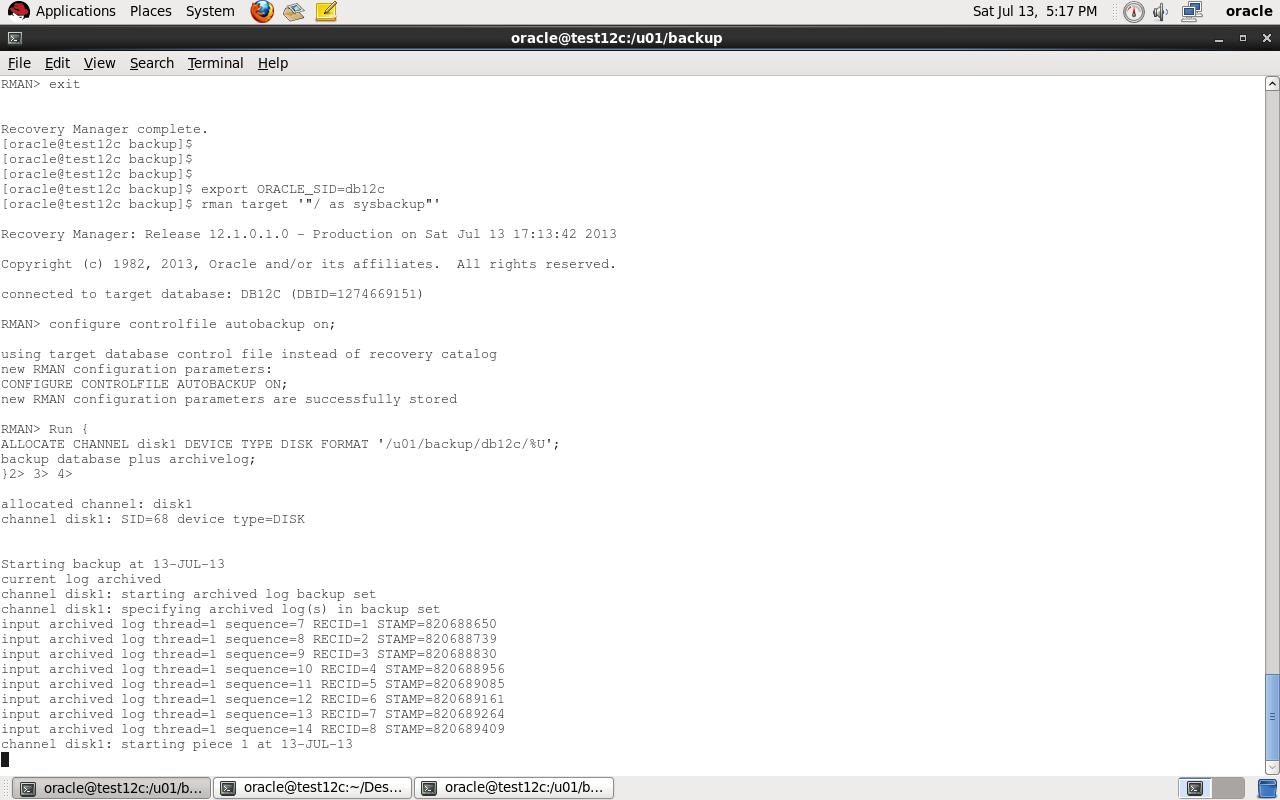
Export ORACLE_SID for container database and enter rman to backup like below
[oracle@test12c backup]$ export ORACLE_SID=db12c
[oracle@test12c backup]$ rman target ‘”/ as sysbackup”‘
Recovery Manager: Release 12.1.0.1.0 – Production on Sat Jul 13 17:13:42 2013
Copyright (c) 1982, 2013, Oracle and/or its affiliates. All rights reserved.
connected to target database: DB12C (DBID=1274669151)
Auto Backup controlfile :
RMAN> configure controlfile autobackup on;
using target database control file instead of recovery catalog
new RMAN configuration parameters:
CONFIGURE CONTROLFILE AUTOBACKUP ON;
new RMAN configuration parameters are successfully stored
Backup Script that we need :
Run {
ALLOCATE CHANNEL disk1 DEVICE TYPE DISK FORMAT ‘/u01/backup/db12c/%U’;
backup database plus archivelog;
}
Where
Format ‘/u01..’: Location for backup
now move to our pluggable database
SQL>alter session set container=test_1 ;
SQL>create tablespace test_1 datafile ‘/u01/app/oracle/oradata/db12c/test_1/test_1.dbf’ size 10m;
SQL>create user test identified by test temporary tablespace temp default tablespace test_1;
SQL>grant create session, create table, unlimited tablespace to test ;
SQL>create table data (id varchar2(100)) tablespace test_1;
Enter Data using The Below code in above table :
begin
for i in 1.. 10000 loop
insert into data values (‘osama’);
end loop;
commit;
end;
After you insert data close pluggable database to start restore.
alter pluggable database test_1 CLOSE ;
Restore script :
run {
set until SCN = 1832026 ;
restore pluggable database test_1;
recover pluggable database Test_1 auxiliary destination=’/u01/backup/db12c’;
alter pluggable database TEST_1 open resetlogs;
}
Note : To get SCN for database before insert use the query below :
SQL > select timestamp_to_scn(sysdate) from v$database;
After Restore :
sqlplus sys/sys@test12c:1521/test_1 ;
SQL> select count(*) from data ;
select count(*) from data
*
ERROR at line 1:
ORA-00942: table or view does not exist
Thank you
Osama Mustafa
[oracle@test12c Desktop]$ ps -ef | grep pmon
oracle 3230 1 0 04:04 ? 00:00:09 ora_pmon_db12c
oracle 12112 1 0 08:20 ? 00:00:07 ora_pmon_NonCDB
oracle 29621 3203 0 18:47 pts/1 00:00:00 grep pmon
[oracle@test12c Desktop]$ export ORACLE_SID=NonCDB
SQL> select instance_name from v$instance ;
INSTANCE_NAME
—————-
NonCDB
SQL> shutdown immediate ;
Database closed.
Database dismounted.
ORACLE instance shut down.
SQL> startup mount exclusive
ORACLE instance started.
Total System Global Area 939495424 bytes
Fixed Size 2295080 bytes
Variable Size 348130008 bytes
Database Buffers 583008256 bytes
Redo Buffers 6062080 bytes
Database mounted.
SQL> alter database open read only;
Database altered.
SQL> exec dbms_pdb.describe(pdb_descr_file=>’/u01/noncdb.xml’);
PL/SQL procedure successfully completed.
SQL> shutdown immediate ;
Database closed.
Database dismounted.
ORACLE instance shut down.
I already working on the same host so no need to copy datafiles,if you are not working on same host copy datafiles to same location.
Let’s Work On Container Database .
after copy datafiles to folder, On Os Level , Create directory to use file_name_convert.
[oracle@test12c oradata]$ mkdir newnoncdb
[oracle@test12c newnoncdb]$ pwd
/u01/app/oracle/oradata/newnoncdb
[oracle@test12c Desktop]$ export ORACLE_SID=db12c
[oracle@test12c Desktop]$ sqlplus / as sysdba
SQL> create pluggable database non_cdb as clone
2 using ‘/u01/noncdb.xml’
3 file_name_convert=(‘/u01/app/oracle/oradata/NonCDB’,’/u01/app/oracle/oradata/newnoncdb’) copy;
Pluggable database created.
Where
SQL> alter pluggable database non_cdb open ;
Pluggable database altered.
SQL> alter pluggable database non_cdb close ;
Pluggable database altered.
SQL> alter pluggable database non_cdb open ;
Pluggable database altered.
NAME OPEN_MODE
—————————— ———-
PDB$SEED READ ONLY
NEWDB_PLUG MOUNTED
NEW_PLUG_COPY MOUNTED
NEW_PLUG_MOVE MOUNTED
NON_CDB READ WRITE
SQL> alter session set container=Non_cdb;
Session altered.
[oracle@test12c newnoncdb2]$ sqlplus sys/sys@test12c:1521/Non_cdb as sysdba ;
SQL> @$ORACLE_HOME/rdbms/admin/noncdb_to_pdb.sql

Thank you
Osama mustafa
In This topic :
SQL> select name, con_id from v$active_services ;
NAME CON_ID
——————————— ———-
new2 4
new 3
db12cXDB 1
db12c 1
SYS$BACKGROUND 1
SYS$USERS 1
SQL> alter pluggable database new close immediate ;
Pluggable database altered.
SQL> alter pluggable database new2 close immediate ;
Pluggable database altered.
SQL> alter pluggable database new unplug into ‘/u01/app/oracle/oradata/new.xml’;Pluggable database altered.
SQL> alter pluggable database new2 unplug into ‘/u01/app/oracle/oradata/new_2.xml’;Pluggable database altered.
SQL> drop pluggable database new keep datafiles ;Pluggable database dropped.
SQL> drop pluggable database new2 keep datafiles ;Pluggable database dropped.
make sure you drop database :
SQL> select pdb_name, status from cdb_pdbs ;
PDB_NAME STATUS
———– ————-
PDB$SEED NORMAL
Before Plug Database to any Container you need to make sure from compatibility , there’s PL/SQL code written by Oracle to check compatibility.
SQL > DECLARE
compatible BOOLEAN := FALSE;
BEGIN
compatible := DBMS_PDB.CHECK_PLUG_COMPATIBILITY(
pdb_descr_file => ‘/u01/app/oracle/oradata/new.xml’);
if compatible then
DBMS_OUTPUT.PUT_LINE(‘Is pluggable PDB1 compatible? YES’);
else DBMS_OUTPUT.PUT_LINE(‘Is pluggable PDB1 compatible? NO’);
end if;
END;
/
Is pluggable PDB1 compatible? YES
PL/SQL procedure successfully completed.
The Same will be for new2.xml
Now Let’s Create Database Using With Two Way :
SQL> create pluggable database newdb_plug using ‘/u01/app/oracle/oradata/new.xml’ nocopy tempfile reuse ;
Pluggable database created.
SQL> select pdb_name, status from cdb_pdbs;
PDB_NAME STATUS
—————— ————-
NEWDB_PLUG NEW
PDB$SEED NORMAL
Another method to plug database :
SQL> create pluggable database new_plug_copy using ‘/u01/app/oracle/oradata/new_2.xml’
2 copy
3 FILE_NAME_CONVERT=(‘/u01/app/oracle/oradata/New2′,’/u01/app/oracle/oradata/new_plug_copy’);
Pluggable database created.
SQL> select name,open_mode from v$pdbs;
NAME OPEN_MODE
—————————— ———-
PDB$SEED READ ONLY
NEWDB_PLUG MOUNTED
NEW_PLUG_COPY MOUNTED
Therefore
The above error is normal because i already create pluggable database using new_2.xml to solve it
SQL> create pluggable database new_plug_move as clone using ‘/u01/app/oracle/oradata/new_2.xml’
2 move
3 FILE_NAME_CONVERT=(‘/u01/app/oracle/oradata/New2′,’/u01/app/oracle/oradata/move’);
Pluggable database created.
SQL> select pdb_name, status from cdb_pdbs;
PDB_NAME STATUS——————- ————-NEWDB_PLUG NEWPDB$SEED NORMALNEW_PLUG_COPY NEWNEW_PLUG_MOVE NEW
You can open any database now and work on them.
This article uploaded to Slide Share here.
Reference
1-Oracle Documentation here
Thank you
Osama Mustafa
 Technology Geek