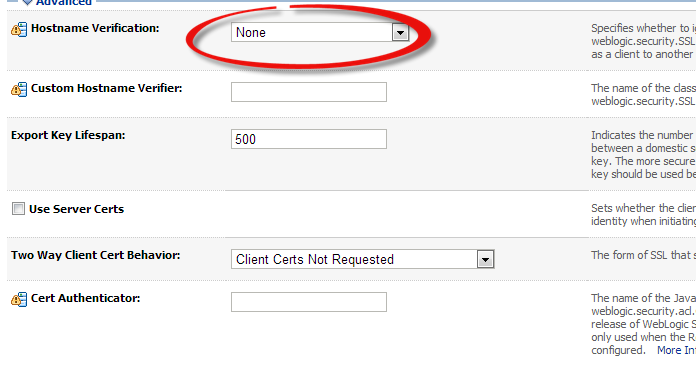
The Below Error Appeared when you are trying to start Managed server , the main root for this error different hostname in weblogic configuration
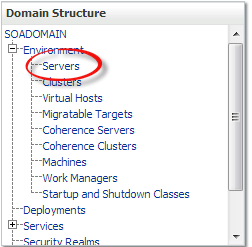

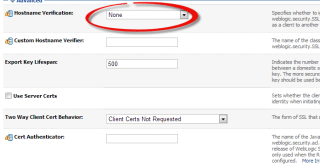
Solution

Thank you
Osama mustafa
For the people who think differently Welcome aboard
This section related to Oracle Fusion middleware
Solution
Thank you
Osama Mustafa
You can Download the Document Here.
Thank you
Osama Mustafa
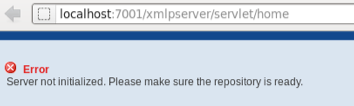
This error Related to OBIEE, if you received this error Then Simple
cd $OFM_WM/admin/obiee/bin
check that opmnctl is worked using
./opmnctl status
./opmnctl startall
Thank You
Osama Mustafa
Caused by: java.net.ConnectException: t3://exalytic.domain:8001: Destination unreachable; nested exception is:
The Above Error Appear when i was trying to access BPM, the main Cause for this error there’s no configuration protocol on SOA Server Which mean No Listening Host.
To Avoid and Solve this error Follow the below Steps :

Name: Loopback
Protocol: t3
Listen Address: localhost
Listen Port: 8001 (same as Server Host/port)
Thank you
Osama Mustafa
Absolutely Not When you install Weblogic any Version Oracle Provide you with Command Line Utility to administrate weblogic, what you can do it using Console can be done with this tool.
change to weblogic-directory/common/bin
./wlst.sh
Now follow the below Steps to change port :
wls:/offline> readDomain (‘/u01/app/fmw/domains/IDDomains’)
wls:/offline/IDDomains> cd (‘Server’)
wls:/offline/IDDomains/Server> ls ()
Choose your Server Here
wls:/offline/IDDomains/Server> cd (‘AdminServer’)
wls:/offline/IDDomains/Server/AdminServer> ls ()
Search for Old Port ListenPort
wls:/offline/IDDomains/Server/AdminServer> set (‘ListenPort’,New Port)
wls:/offline/IDDomains/Server/AdminServer> updateDomain ()
wls:/offline/IDDomains/Server/AdminServer> exit ()
Done you can now Test your new port
http://Server-ip:/console
Thank you
Osama Mustafa
You Can download Document From Here
Thank you
Osama Mustafa
cd /u01/app/fmw/Oracle_ODI1/common/bin
./wlst.sh
and do the below
Jython scans all the jar files it can find at first startup. Depending on the system, this process may take a few minutes to complete, and WLST may not return a prompt right away.
Welcome to WebLogic Server Administration Scripting Shell
Type help() for help on available commands
wls:/offline> connect (‘weblogic’,’welcome1′,’t3://localhost:7001′)
Connecting to t3://10.40.74.210:7001 with userid weblogic …
Successfully connected to Admin Server ‘AdminServer’ that belongs to domain ‘IDDomains’.
Warning: An insecure protocol was used to connect to the
server. To ensure on-the-wire security, the SSL port or
Admin port should be used instead.
wls:/IDDomains/serverConfig> createCred(map=”oracle.odi.credmap”, key=”SUPERVISOR”, user=”SUPERVISOR”, password=”sysadmin1″, desc=”Key for Supervisor”)
Location changed to domainRuntime tree. This is a read-only tree with DomainMBean as the root.
For more help, use help(domainRuntime)
wls:/IDDomains/serverConfig> createCred(map=”oracle.odi.credmap”, key=”odi11g”, user=”weblogic”, password=”welcome1″, desc=”WLS SUPERVISOR Credential”)
wls:/IDDomains/serverConfig> disconnect()
Disconnected from weblogic server: AdminServer
wls:/offline>
wls:/offline>
wls:/offline>
wls:/offline> exit()
The Red Line for to define 3 command you will use.
Some Link :
1- How To Configure The ODI JavaEE Agent and ODI Console On WebLogic Server (Doc ID 1300550.1)
2- Working with ODI Here
Thank you
Osama Mustafa
In old Version Oracle EDQ was no available on Linux Only Windows Operating system as Setup File, But there’s always solution if you want it on Linux you need to use application server in our case weblogic to deploy EDQ on it , some pre requisites need to be done before you do this Please check http://support.oracle.com Document
How To Install EDQ On Linux Using Oracle DB And Apache Tomcat (Doc ID 1462376.1)
Download Document Here
Thank you
Osama mustafa
As Usual I upload it to my slide share account here
Thank you
Osama mustafa
 Technology Geek