The Below Error Appeared when you are trying to start Managed server , the main root for this error different hostname in weblogic configuration
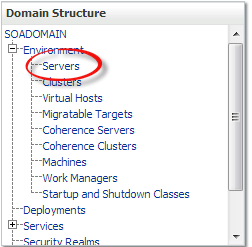

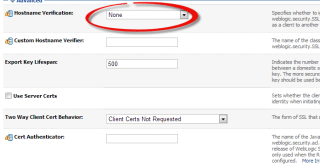
Solution

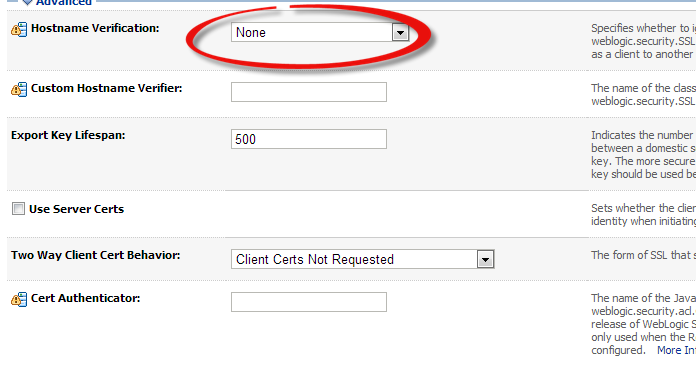
Thank you
Osama mustafa
For the people who think differently Welcome aboard
Solution
NFS file system usually read from Source Called Server , If this server goes down, it will not be available for the other resource, From this we understand that i should configure NFS On both Side Server and Client.
Read More About it Here.
Note :
Server IP : 192.168.1.100
Client IP : 192.168.1.101
In this Blog I will Use NFSV4
1- You need to install two Package ( as root user )
**nfs-ultis-lib
**portmap ( if you are asking nfs4 this is not needed anymore )
2- As Root Run the below Command to Start nfs Serivces :
[root@TEST share]# /etc/init.d/nfs start
Starting NFS services: [ OK ]
Starting NFS quotas: [ OK ]
Starting NFS mountd: [ OK ]
Stopping RPC idmapd: [ OK ]
Starting RPC idmapd: [ OK ]
Starting NFS daemon: [ OK ]
3- Create folder under /u01/app/shared , give permission to oracle and chmod 775
4- on NFS Server ( you will own the folder ) , vi /etc/exports add the below line :
/u01/app/shared [Client-IP] (rw,sync,no_root_squash)
5- NFS Server is done , Go to NFS Client ( Node 2 ) as root user run the below command :
#/etc/init.d/nfs start
#showmount -e 192.168.1.101
The Output Will be like the below :
Export list for 192.168.1.100:
/u01/app/shared 192.168.1.101
6-On Node 2 ( As Root User ) –> # mount -t nfs 192.168.1.100:/u01/app/shared/ /u01/app/shared/
7- Check using df -h
**Remove:-
8- umount /u01/app/shared ( on Node 2 )
Important Command :
showmount -e : Shows the available shares on your local machine
exportfs -v : Displays a list of shares files and options on a server
Thank you
Osama Mustafa
Thank you
Osama Mustaf
Thank you
Osama Mustafa
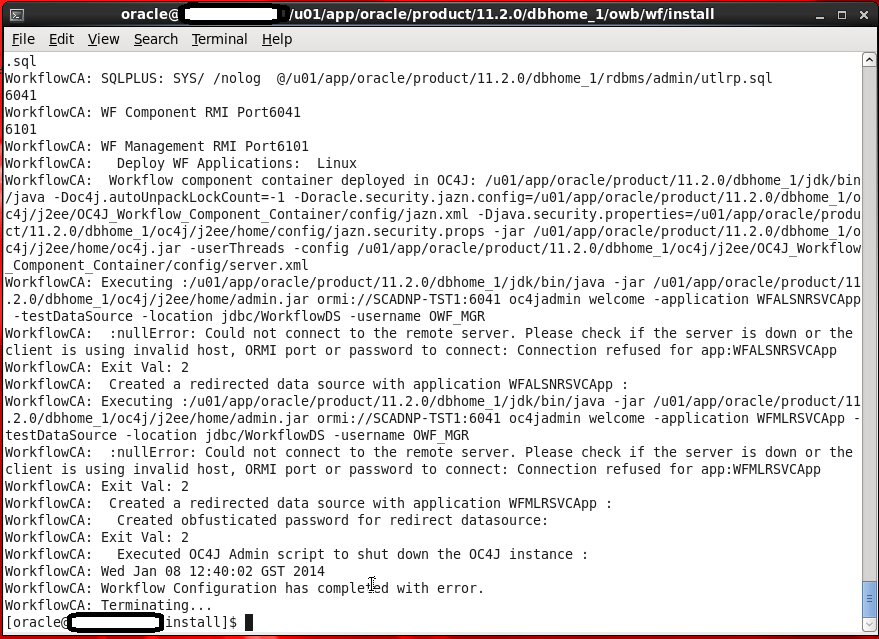
This Error Appear When Trying to Run Oracle Ware-House Builder On Linux , in this tools you are connecting to Database to Setup some configuration for Workflow in DWH, Every Thing Run Successfully Till i received the error in the picture :
WorkFlowCA: NullError : Could not Connect to the Remote Server
You Can ignore this error simply , I didn’t configure Oracle Enterprise manager in my database , which is the reason for this Error.if you want create enterprise manager and re run the tool again.
Thank you
Osama Mustafa
Caused by: java.net.ConnectException: t3://exalytic.domain:8001: Destination unreachable; nested exception is:
The Above Error Appear when i was trying to access BPM, the main Cause for this error there’s no configuration protocol on SOA Server Which mean No Listening Host.
To Avoid and Solve this error Follow the below Steps :

Name: Loopback
Protocol: t3
Listen Address: localhost
Listen Port: 8001 (same as Server Host/port)
Thank you
Osama Mustafa
lxc stand for Linux Container.
Now i will start to describe how to create container using this command
[root@OEL6 ~]# cat /etc/lxc/default.conf
lxc.network.type = veth
lxc.network.link = docker0
lxc.network.flags = up
Sample output for ifconfig command :
docker0 Link encap:Ethernet HWaddr 00:00:00:00:00:00
inet addr:172.17.42.1 Bcast:0.0.0.0 Mask:255.255.0.0
inet6 addr: fe80::28ce:eeff:fe80:1fc8/64 Scope:Link
UP BROADCAST MULTICAST MTU:1500 Metric:1
RX packets:17 errors:0 dropped:0 overruns:0 frame:0
TX packets:4 errors:0 dropped:0 overruns:0 carrier:0
collisions:0 txqueuelen:0
RX bytes:1112 (1.0 KiB) TX bytes:408 (408.0 b)
[root@OEL6 container]# lxc-start –name test-container
lxc-start: failed to attach ‘vethaITNmu’ to the bridge ‘virbr0’ : No such device
lxc-start: failed to create netdev
lxc-start: failed to create the network
lxc-start: failed to spawn ‘test-container’
mkdir /container will solve the problem.
Now Let’s Start Creating new container called Test-container :
[root@OEL6 lxc]# lxc-create -n test-container -t oracle — -R 6.5
lxc-create: No config file specified, using the default config /etc/lxc/default.conf
Host is OracleServer 6.5
Create configuration file /container/test-container/config
Downloading release 6.5 for x86_64
Loaded plugins: refresh-packagekit, security
ol6_u5_base | 1.4 kB 00:00
ol6_u5_base/primary | 3.2 MB 00:32
ol6_u5_base 8573/8573
Setting up Install Process
Complete!
Rebuilding rpm database
Configuring container for Oracle Linux 6.5
Added container user:oracle password:oracle
Added container user:root password:root
Container : /container/test-container/rootfs
Config : /container/test-container/config
Network : eth0 (veth) on virbr0
‘oracle’ template installed
‘test-container’ created
[root@OEL6 lxc]# lxc-start -n test-container
Welcome to Oracle Linux Server
Setting hostname test-container: [ OK ]
Checking filesystems
[ OK ]
Mounting local filesystems: [ OK ]
No such file or directory
Enabling /etc/fstab swaps: [ OK ]
Entering non-interactive startup
Bringing up loopback interface: [ OK ]
Bringing up interface eth0:
Determining IP information for eth0… failed.
[FAILED]
Starting system logger: [ OK ]
Mounting filesystems: [ OK ]
Generating SSH1 RSA host key: No such file or directory
[ OK ]
Generating SSH2 RSA host key: No such file or directory
[ OK ]
Generating SSH2 DSA host key: No such file or directory
[ OK ]
Starting sshd: [ OK ]
Oracle Linux Server release 6.5
Kernel 3.8.13-16.2.1.el6uek.x86_64 on an x86_64
test-container login:
lxc-destroy -n test-container
Reference :
1- Oracle Linux containers Here
2- Oracle Linux 6.5 and Docker Here
Thank you
Osama mustafa
Enable Docker , What is the Docker you can check the official Website to take look what i mean by Docker here .
If you tried to install Docker Directly you will get the below error :
[root@OEL6 u01]# rpm -ivh docker-io-0.7.0-14.el6.x86_64.rpm
warning: docker-io-0.7.0-14.el6.x86_64.rpm: Header V3 RSA/SHA256 Signature, key ID 0608b895: NOKEY
error: Failed dependencies:
lxc is needed by docker-io-0.7.0-14.el6.x86_64
[root@OEL6 Packages]# rpm -ivh lxc-0.9.0-2.0.5.el6.x86_64.rpm
warning: lxc-0.9.0-2.0.5.el6.x86_64.rpm: Header V3 RSA/SHA256 Signature, key ID ec551f03: NOKEY
error: Failed dependencies:
libvirt is needed by lxc-0.9.0-2.0.5.el6.x86_64
root@OEL6 Packages]# rpm -ivh libvirt-0.10.2-29.0.1.el6.x86_64.rpm
warning: libvirt-0.10.2-29.0.1.el6.x86_64.rpm: Header V3 RSA/SHA256 Signature, key ID ec551f03: NOKEY
error: Failed dependencies:
/usr/bin/qemu-img is needed by libvirt-0.10.2-29.0.1.el6.x86_64
ebtables is needed by libvirt-0.10.2-29.0.1.el6.x86_64
libnetcf.so.1()(64bit) is needed by libvirt-0.10.2-29.0.1.el6.x86_64
libnetcf.so.1(NETCF_1.0.0)(64bit) is needed by libvirt-0.10.2-29.0.1.el6.x86_64
libnetcf.so.1(NETCF_1.2.0)(64bit) is needed by libvirt-0.10.2-29.0.1.el6.x86_64
libnetcf.so.1(NETCF_1.3.0)(64bit) is needed by libvirt-0.10.2-29.0.1.el6.x86_64
libnetcf.so.1(NETCF_1.4.0)(64bit) is needed by libvirt-0.10.2-29.0.1.el6.x86_64
lzop is needed by libvirt-0.10.2-29.0.1.el6.x86_64
numad is needed by libvirt-0.10.2-29.0.1.el6.x86_64
radvd is needed by libvirt-0.10.2-29.0.1.el6.x86_64
[root@OEL6 Packages]# rpm -ivh lzo
lzo-2.03-3.1.el6.x86_64.rpm lzop-1.02-0.9.rc1.el6.x86_64.rpm
[root@OEL6 Packages]# rpm -ivh lzop-1.02-0.9.rc1.el6.x86_64.rpm
warning: lzop-1.02-0.9.rc1.el6.x86_64.rpm: Header V3 RSA/SHA256 Signature, key ID ec551f03: NOKEY
Preparing… ########################################### [100%]
1:lzop ########################################### [100%]
[root@OEL6 Packages]# rpm -ivh numa
numactl-2.0.7-8.el6.i686.rpm
numactl-2.0.7-8.el6.x86_64.rpm
numactl-devel-2.0.7-8.el6.i686.rpm
numactl-devel-2.0.7-8.el6.x86_64.rpm
numad-0.5-9.20130814git.el6.x86_64.rpm
[root@OEL6 Packages]# rpm -ivh numad-0.5-9.20130814git.el6.x86_64.rpm
warning: numad-0.5-9.20130814git.el6.x86_64.rpm: Header V3 RSA/SHA256 Signature, key ID ec551f03: NOKEY
Preparing… ########################################### [100%]
1:numad ########################################### [100%]
[root@OEL6 Packages]# rpm -ivh augeas-libs-1.0.0-5.el6.x86_64.rpm
warning: augeas-libs-1.0.0-5.el6.x86_64.rpm: Header V3 RSA/SHA256 Signature, key ID ec551f03: NOKEY
Preparing… ########################################### [100%]
1:augeas-libs ########################################### [100%][root@OEL6 Packages]# rpm -ivh netcf-libs-0.1.9-4.el6.x86_64.rpm
warning: netcf-libs-0.1.9-4.el6.x86_64.rpm: Header V3 RSA/SHA256 Signature, key ID ec551f03: NOKEY
Preparing… ########################################### [100%]
1:netcf-libs ########################################### [100%]
[root@OEL6 Packages]# rpm -ivh libgfortran-4.4.7-4.el6.x86_64.rpm
warning: libgfortran-4.4.7-4.el6.x86_64.rpm: Header V3 RSA/SHA256 Signature, key ID ec551f03: NOKEY
Preparing… ########################################### [100%]
package libgfortran-4.4.7-4.el6.x86_64 is already installed[root@OEL6 Packages]# rpm -ivh qemu-img-0.12.1.2-2.415.el6.x86_64.rpm
warning: qemu-img-0.12.1.2-2.415.el6.x86_64.rpm: Header V3 RSA/SHA256 Signature, key ID ec551f03: NOKEY
error: Failed dependencies:
libgfapi.so.0()(64bit) is needed by qemu-img-2:0.12.1.2-2.415.el6.x86_64
libusbredirparser.so.1()(64bit) is needed by qemu-img-2:0.12.1.2-2.415.e l6.x86_64
[root@OEL6 Packages]# rpm -ivh glusterfs-api-3.4.0.36rhs-1.0.1.el6.x86_64.rpm
warning: glusterfs-api-3.4.0.36rhs-1.0.1.el6.x86_64.rpm: Header V3 RSA/SHA256 Si gnature, key ID ec551f03: NOKEY
Preparing… ########################################### [100%]
1:glusterfs-api ########################################### [100%]
[root@OEL6 Packages]# rpm -ivh qemu-img-0.12.1.2-2.415.el6.x86_64.rpm
warning: qemu-img-0.12.1.2-2.415.el6.x86_64.rpm: Header V3 RSA/SHA256 Signature, key ID ec551f03: NOKEY
error: Failed dependencies:
libusbredirparser.so.1()(64bit) is needed by qemu-img-2:0.12.1.2-2.415.e l6.x86_64
[root@OEL6 Packages]# rpm -ivh usbredir-0.5.1-1.el6.x86_64.rpm
warning: usbredir-0.5.1-1.el6.x86_64.rpm: Header V3 RSA/SHA256 Signature, ke ID ec551f03: NOKEY
Preparing… ########################################### [100%]
1:usbredir ########################################### [100%][root@OEL6 Packages]# rpm -ivh qemu-img-0.12.1.2-2.415.el6.x86_64.rpm
warning: qemu-img-0.12.1.2-2.415.el6.x86_64.rpm: Header V3 RSA/SHA256 Signature, key ID ec551f03: NOKEY
Preparing… ########################################### [100%]
1:qemu-img ########################################### [100%]
[root@OEL6 Packages]# rpm -ivh ebtables-2.0.9-6.el6.x86_64.rpm
warning: ebtables-2.0.9-6.el6.x86_64.rpm: Header V3 RSA/SHA256 Signature, key ID ec551f03: NOKEY
Preparing… ########################################### [100%]
1:ebtables ########################################### [100%]
[root@OEL6 Packages]# rpm -ivh libvirt-0.10.2-29.0.1.el6.x86_64.rpm
warning: libvirt-0.10.2-29.0.1.el6.x86_64.rpm: Header V3 RSA/SHA256 Signature, key ID ec551f03: NOKEY
Preparing… ########################################### [100%]
1:libvirt ########################################### [100%]
we have to download two more package
[root@OEL6 Packages]# rpm -ivh lxc-0.9.0-2.0.5.el6.x86_64.rpm
warning: lxc-0.9.0-2.0.5.el6.x86_64.rpm: Header V3 RSA/SHA256 Signature, key ID ec551f03: NOKEY
Preparing… ########################################### [100%]
1:lxc ########################################### [100%]
[root@OEL6 u01]# rpm -ivh docker-io-0.7.0-14.el6.x86_64.rpm
warning: docker-io-0.7.0-14.el6.x86_64.rpm: Header V3 RSA/SHA256 Signature, key ID 0608b895: NOKEY
Preparing… ########################################### [100%]
1:docker-io ########################################### [100%]
 Technology Geek