Add Target Manually / Enterprise Manager 12c

previously I mentioned how to deploy agent in enterprise manager using Auto Discovery, But today I will Post about the second way which called “Add target Manually” all you have to do is follow the screen shot and the instruction :

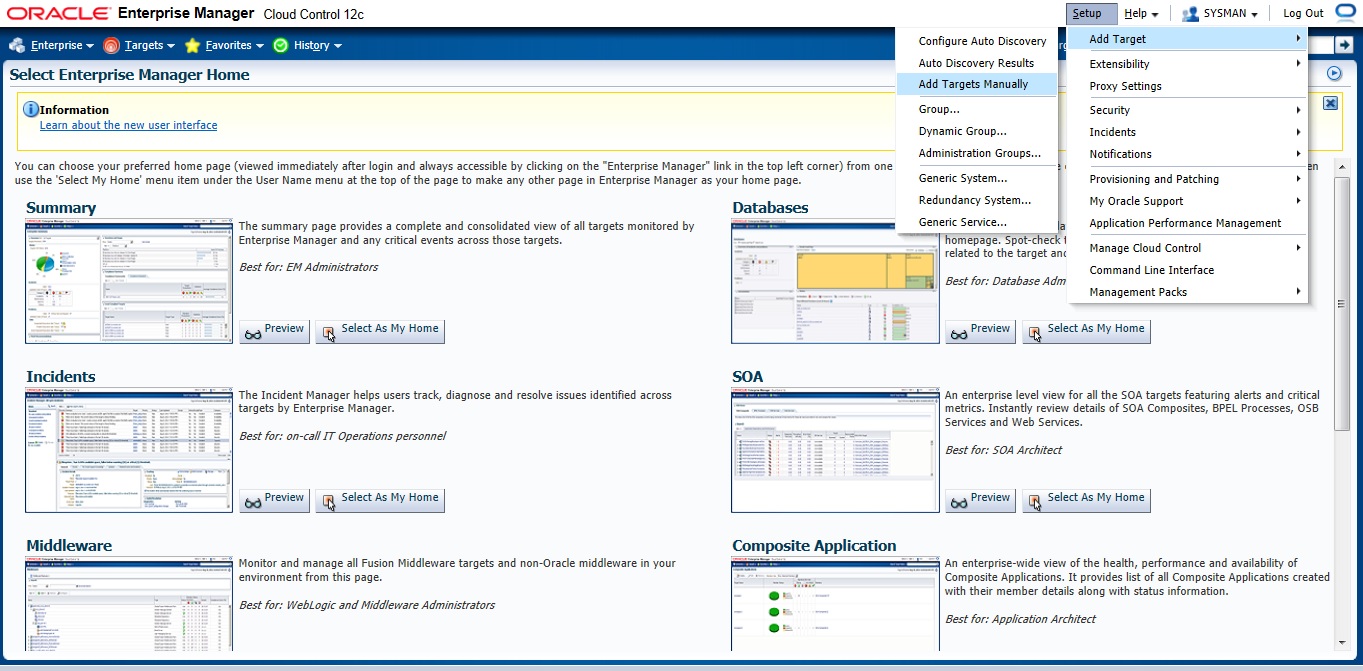
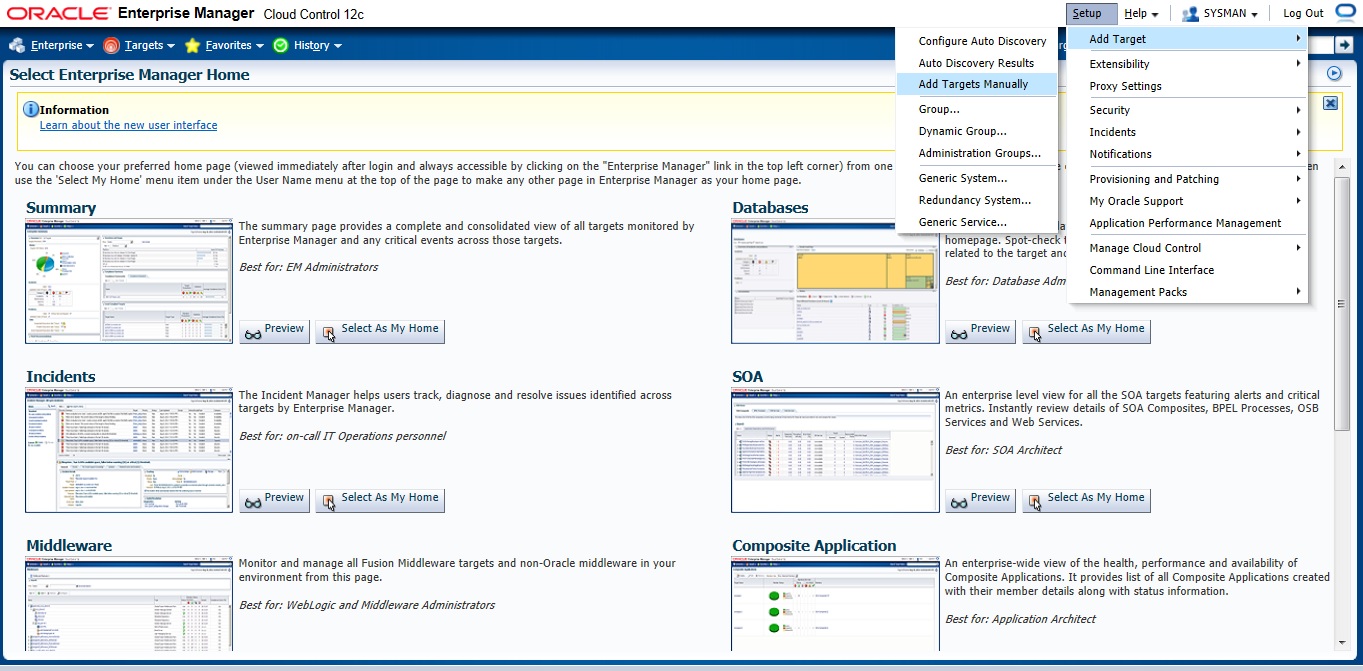
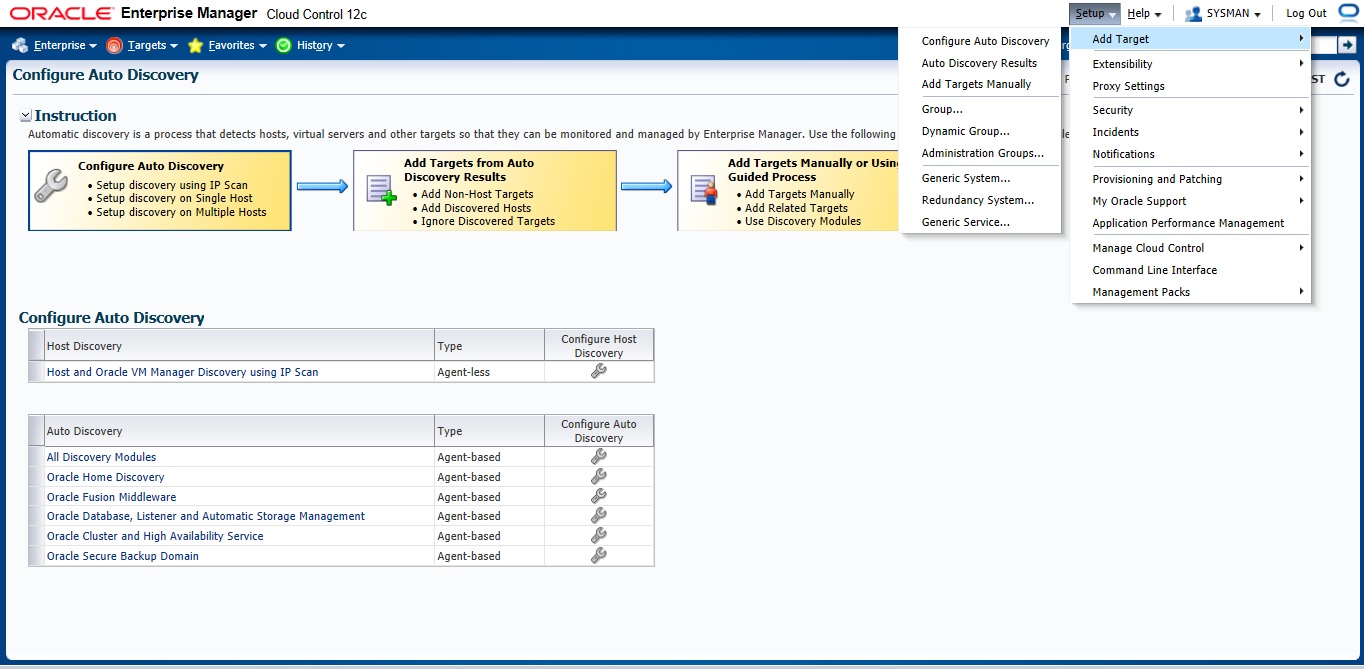
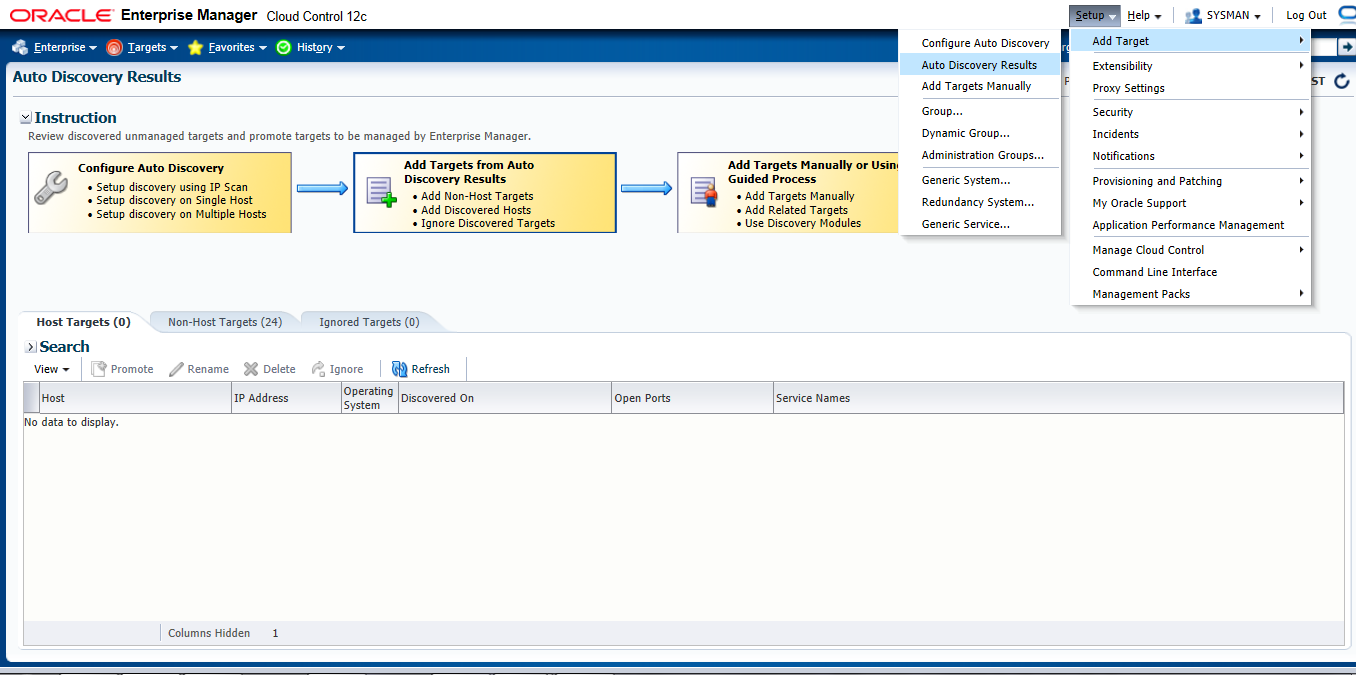
Setup –> Add target –> Add Target manually

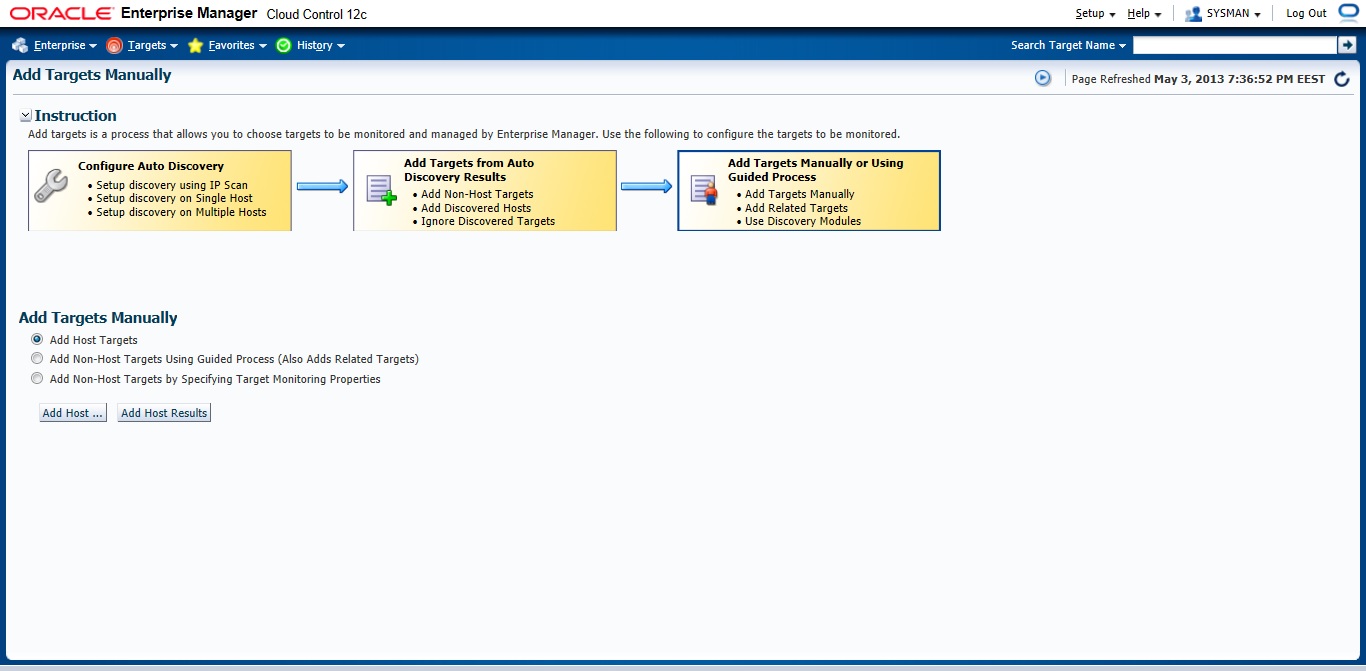
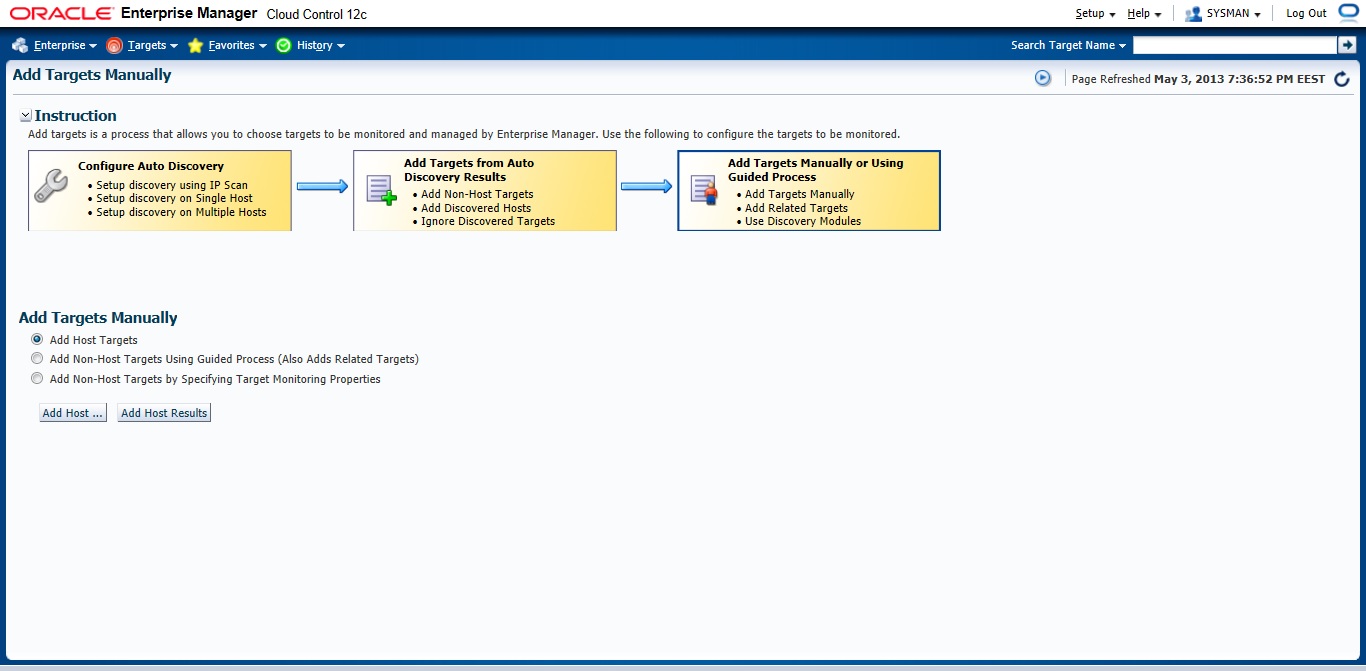
Choose the first Option

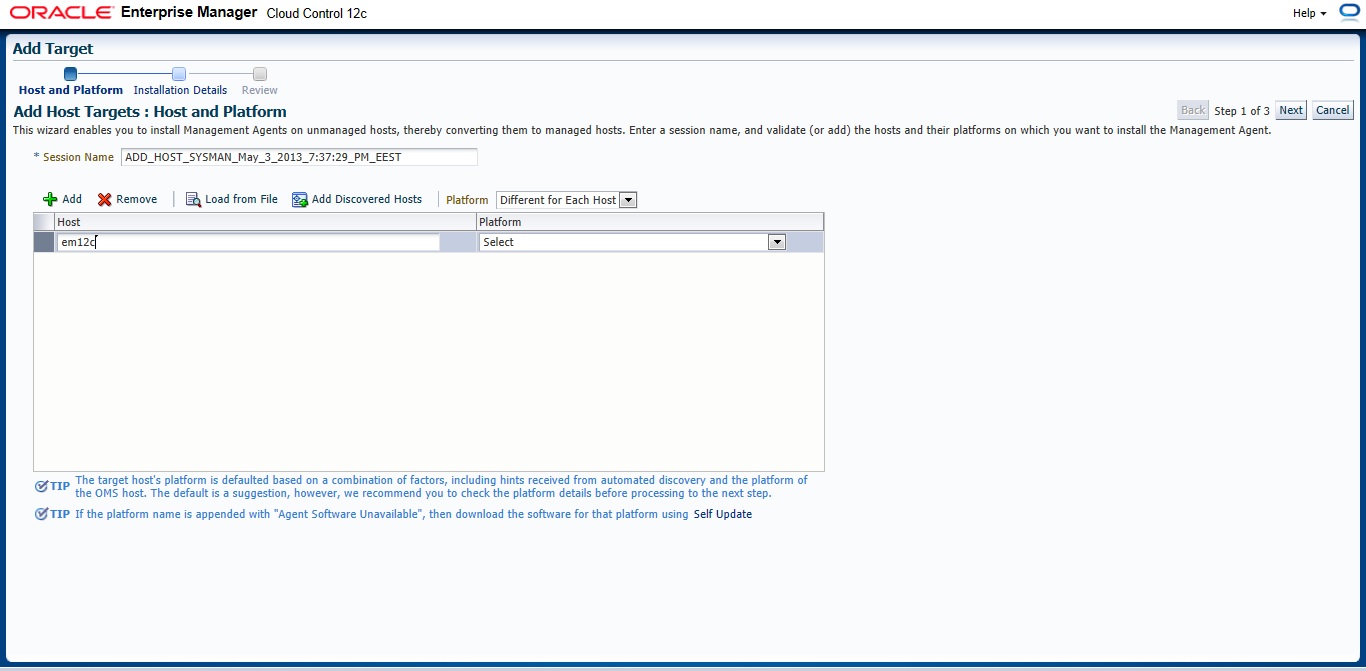
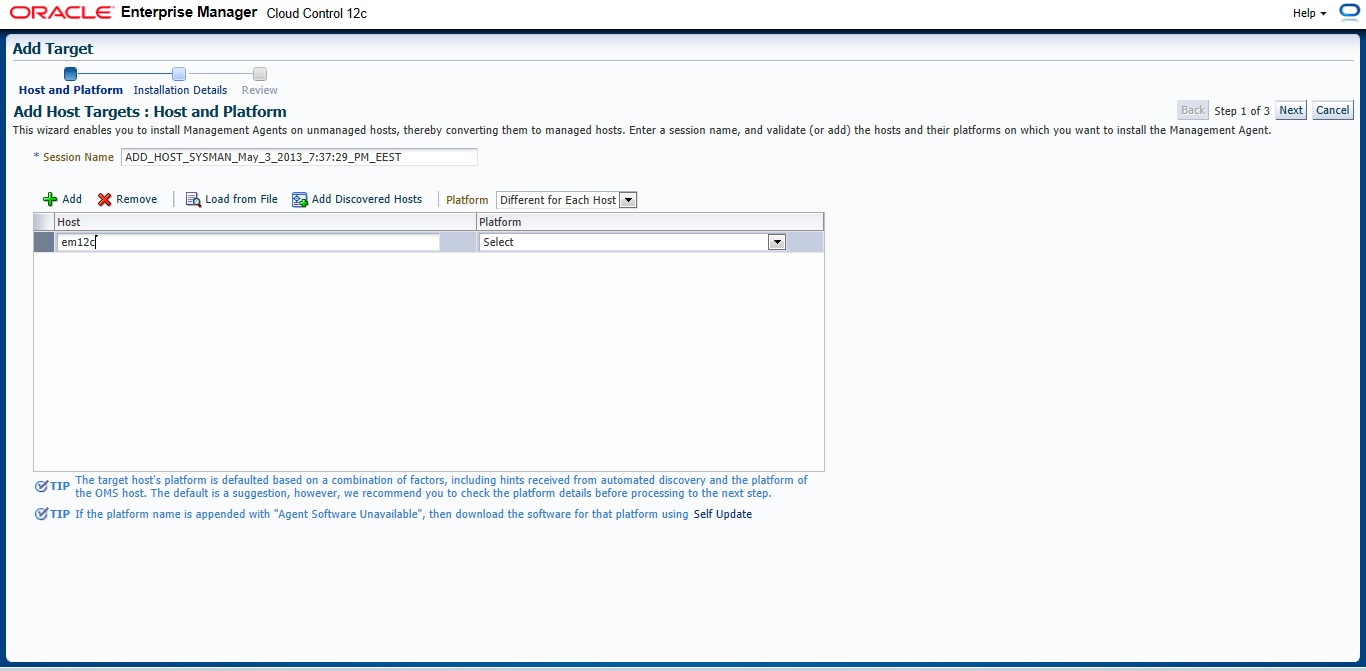
 New Page will appear — > Press add and Type Hostname for the server and which Operating system installed it on it.

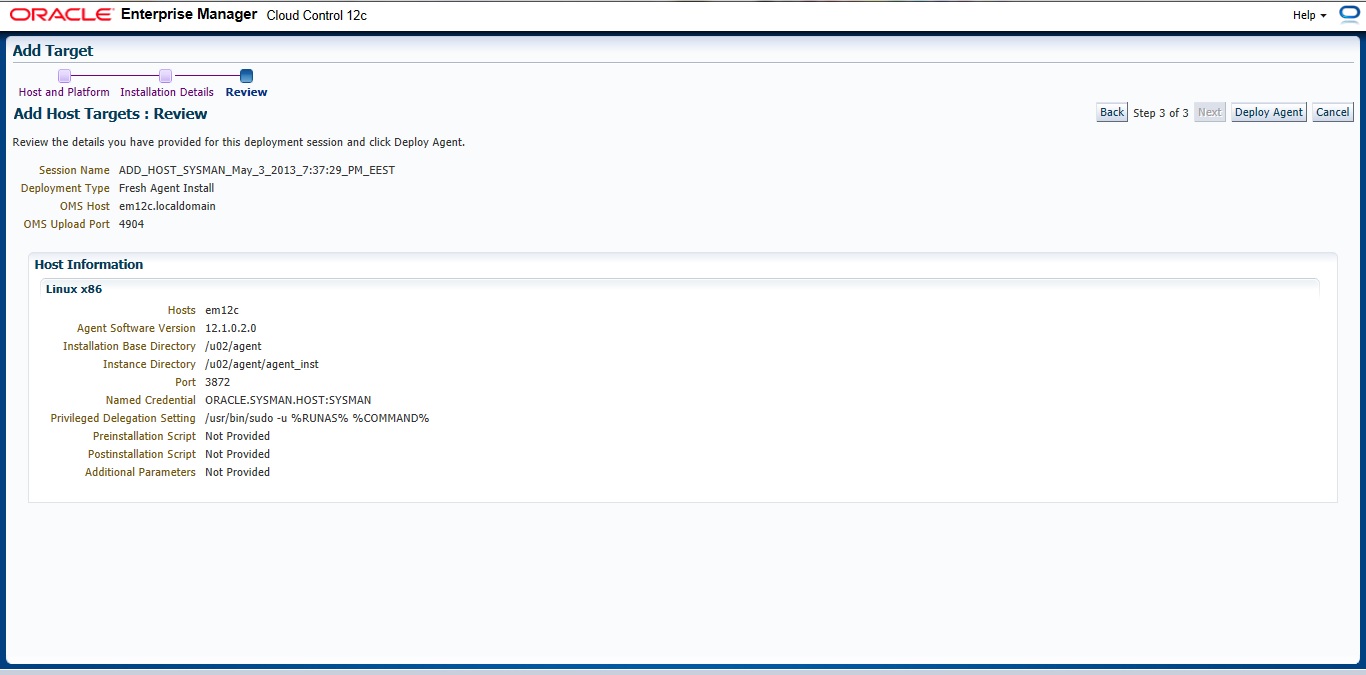
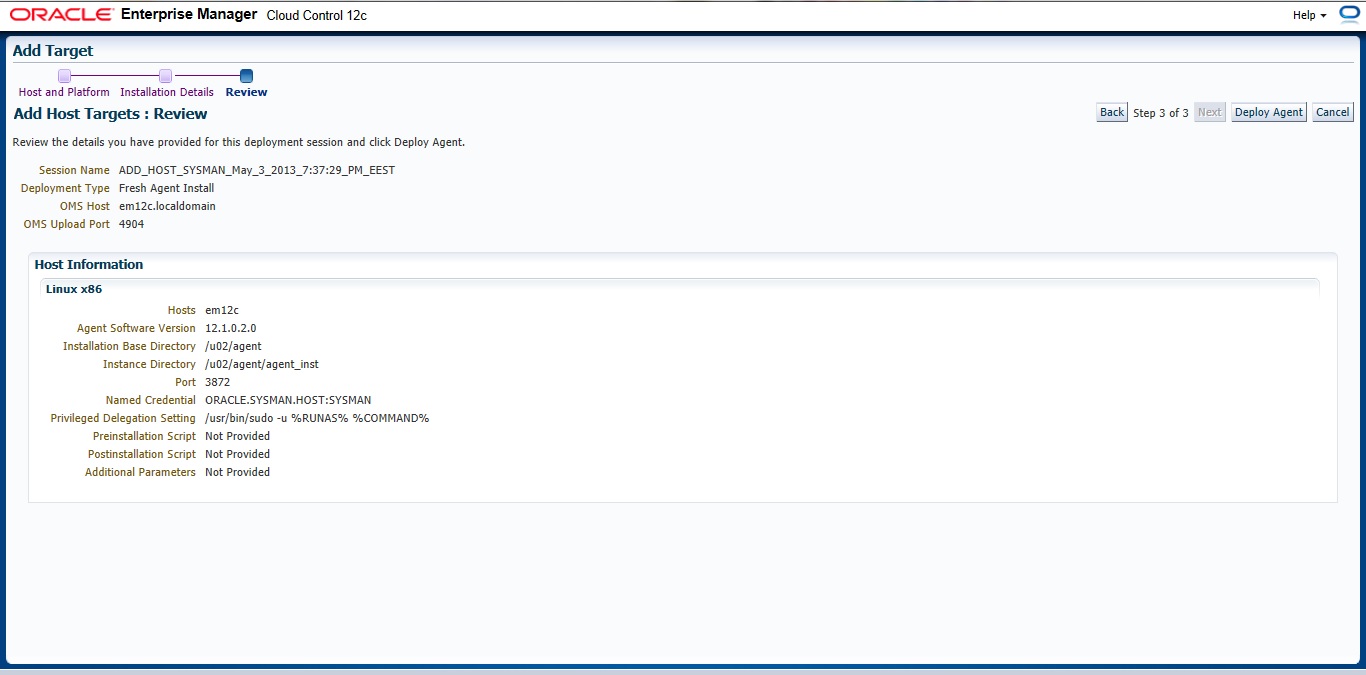
Insert your Agent Path ( where you want to install agent ) and username

Review and then Deploy Agent

You can download this article here

Thank you
Osama Mustafa

Deploy Agent In Enterprise Manager 12c

After I post about how to install Oracle Enterprise manager ( em12c ) today i will talk how to deploy em12c agent

there’s two method to do that

1) Configuring Automatic Discovery
2) Adding targets Manually

I will describe the both 🙂 each one separately

Before deploy you need to decide if you want to use Oracle user or root user the below steps you have to do before using oracle :

[root@em12c ~]# vi /etc/sudoers

and change and add the following lines :
Comment this line :

#Defaults    requiretty

add the below line

oracle  ALL=(ALL)       ALL

and remove ! from this line :

Defaults   visiblepw

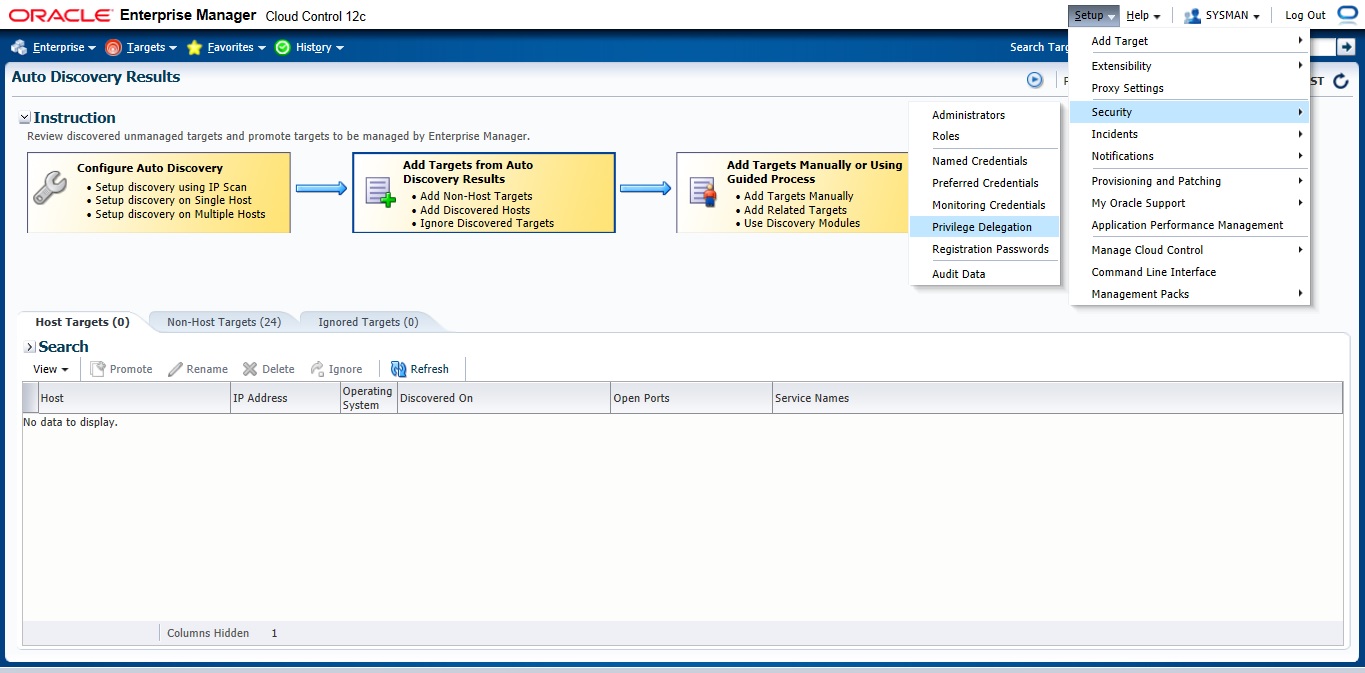
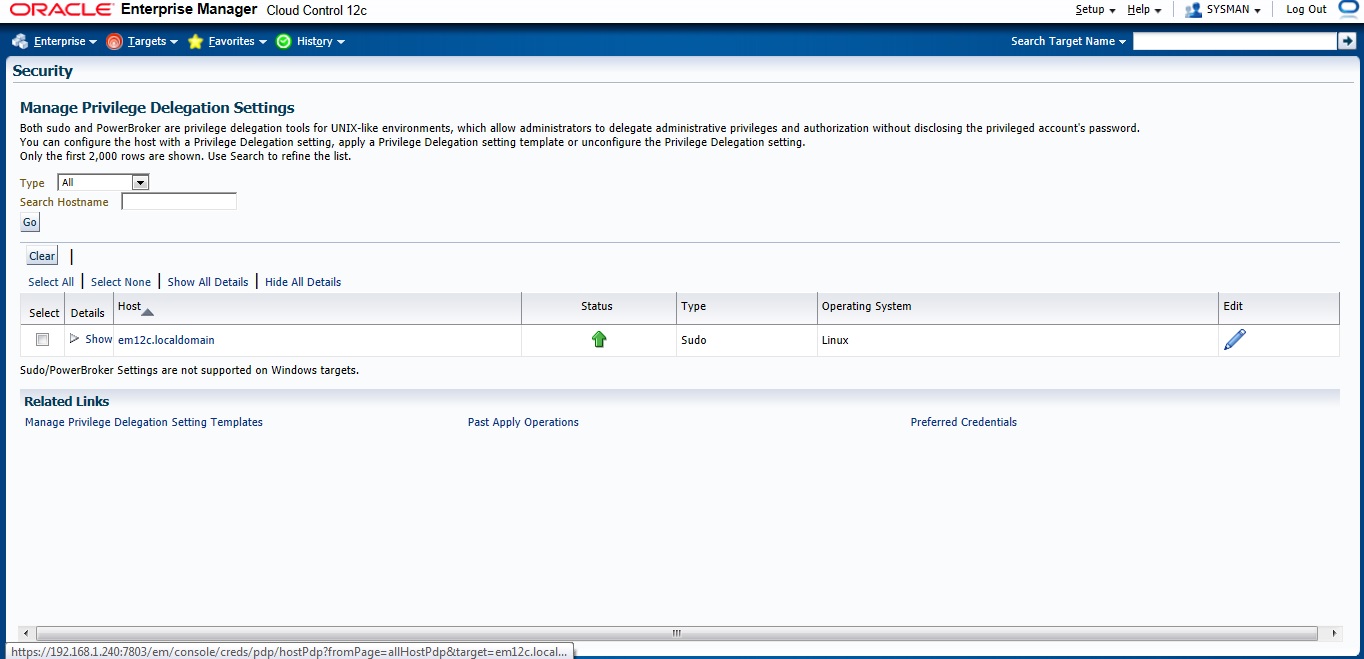
Now On em12c There’s something called privilege delegation

Privilege delegation allows a logged-in user to perform an activity with the privileges of another user. Sudo and PowerBroker are privilege delegation tools that allow a logged-in user to be assigned these privileges. These privilege delegation settings will be used for all provisioning and patching activities on these hosts.

Read more here.

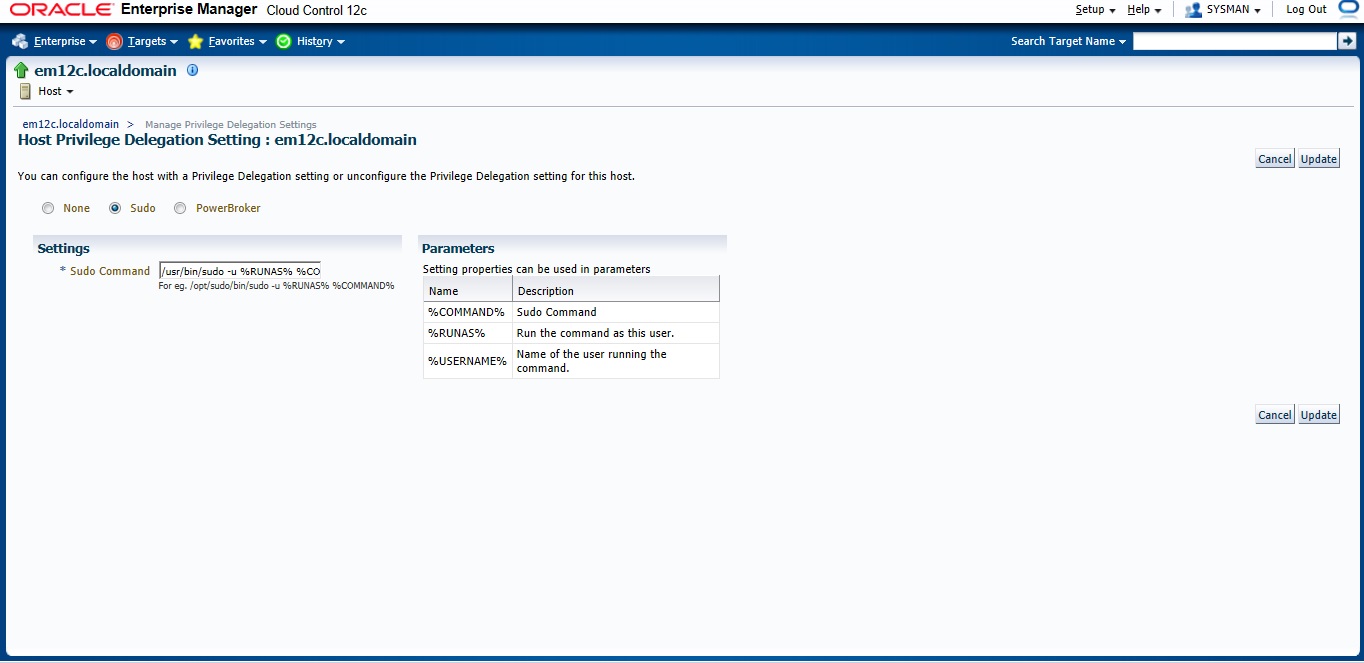
in the screen below add these lines :
/usr/bin/sudo -u %RUNAS% %COMMAND%

/usr/bin/sudo —> location for sudo command.

 after all the above steps are done let’s configure Auto Discovery

Setup –> add target –> configure auto discovery  the below screen will open, choose the first option “Host and oracle vm manager Discovery using Ip scan”

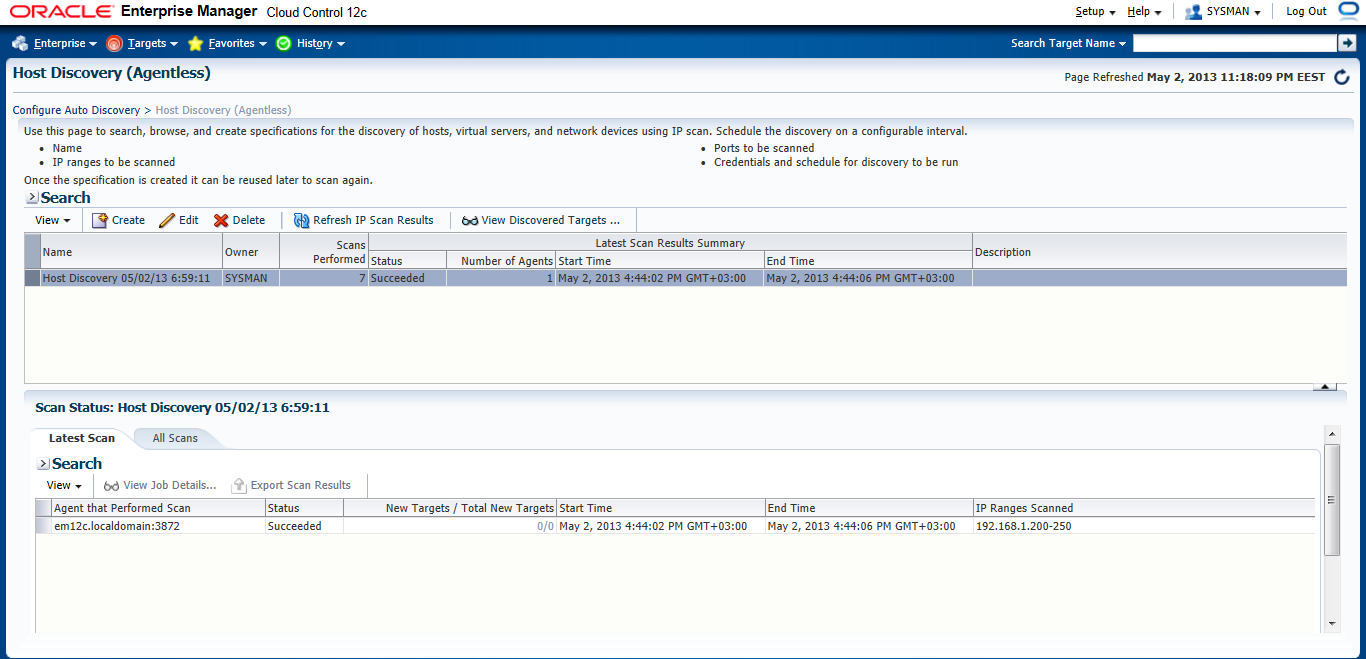
 Press create Button

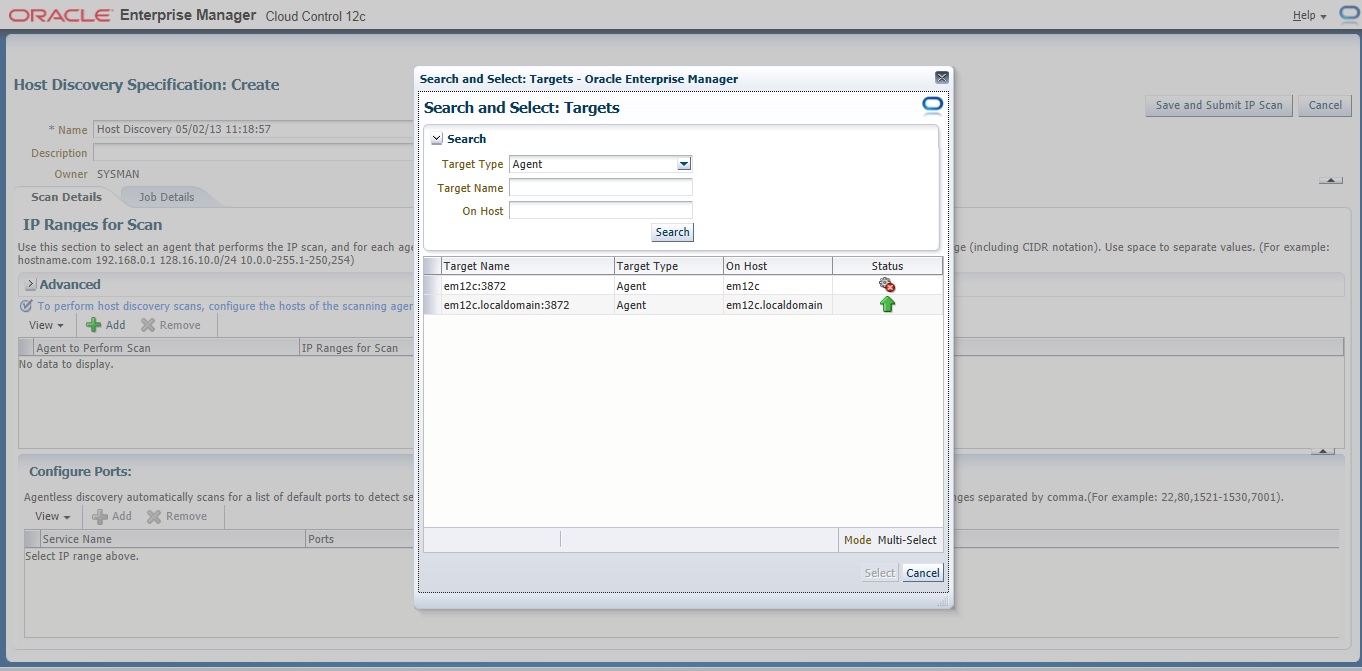
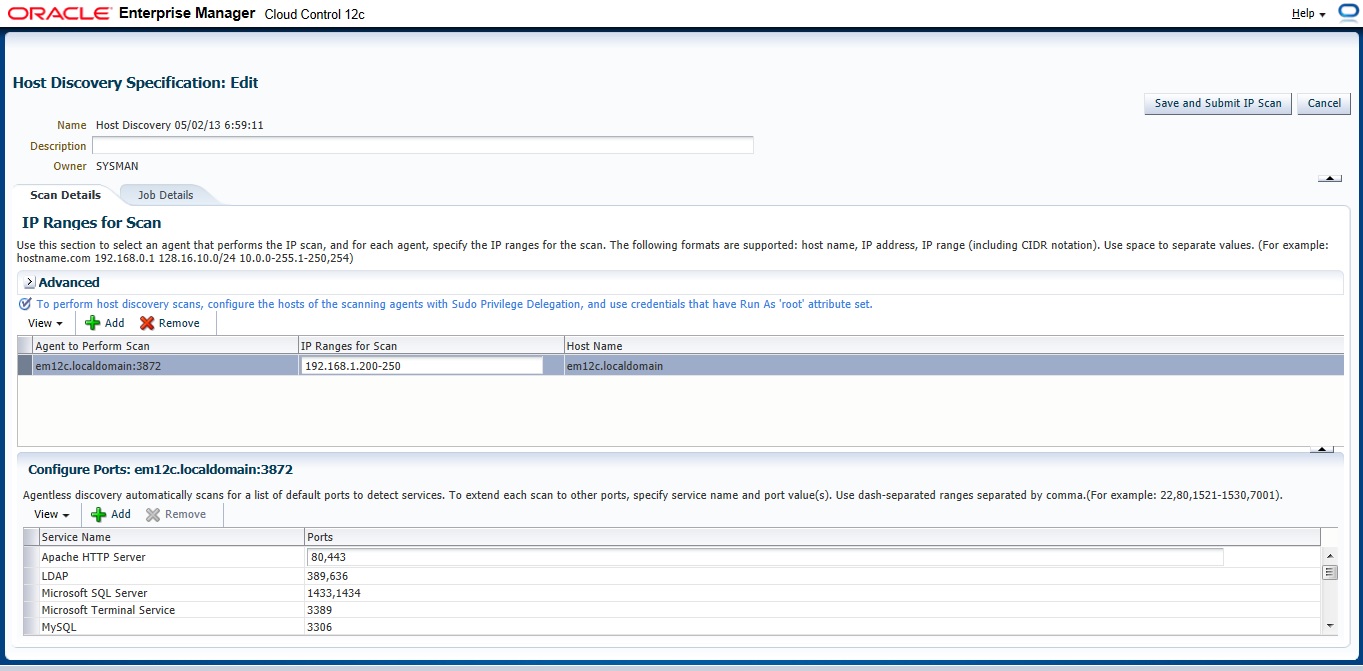
On add Button new Panel Will open , Choose your Host and Choose the Range Ip for scan The Format Mentioned above examples :

192.168.1.240-250
192.168.240/10
192.168.240,241

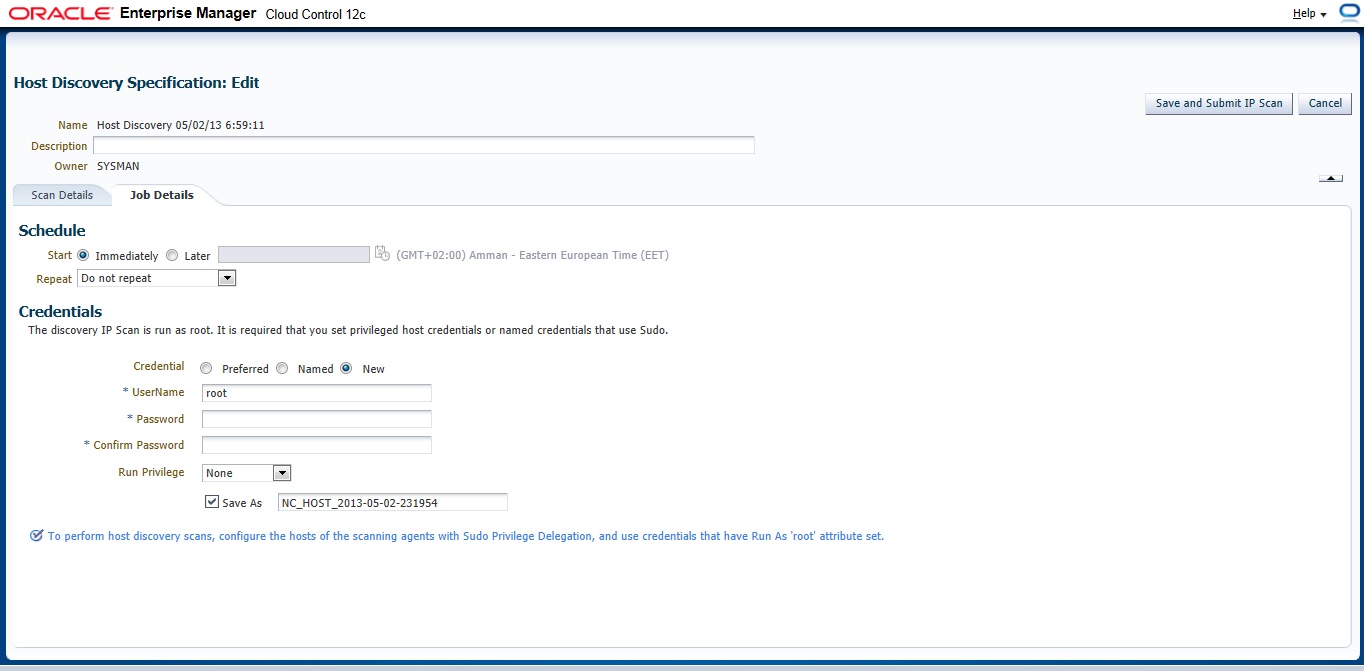
 Now you need to configure Job Summary

the job will start immeditaly as we choose press “Refresh Ip Scan Result” to check The result. you can check it also from here :

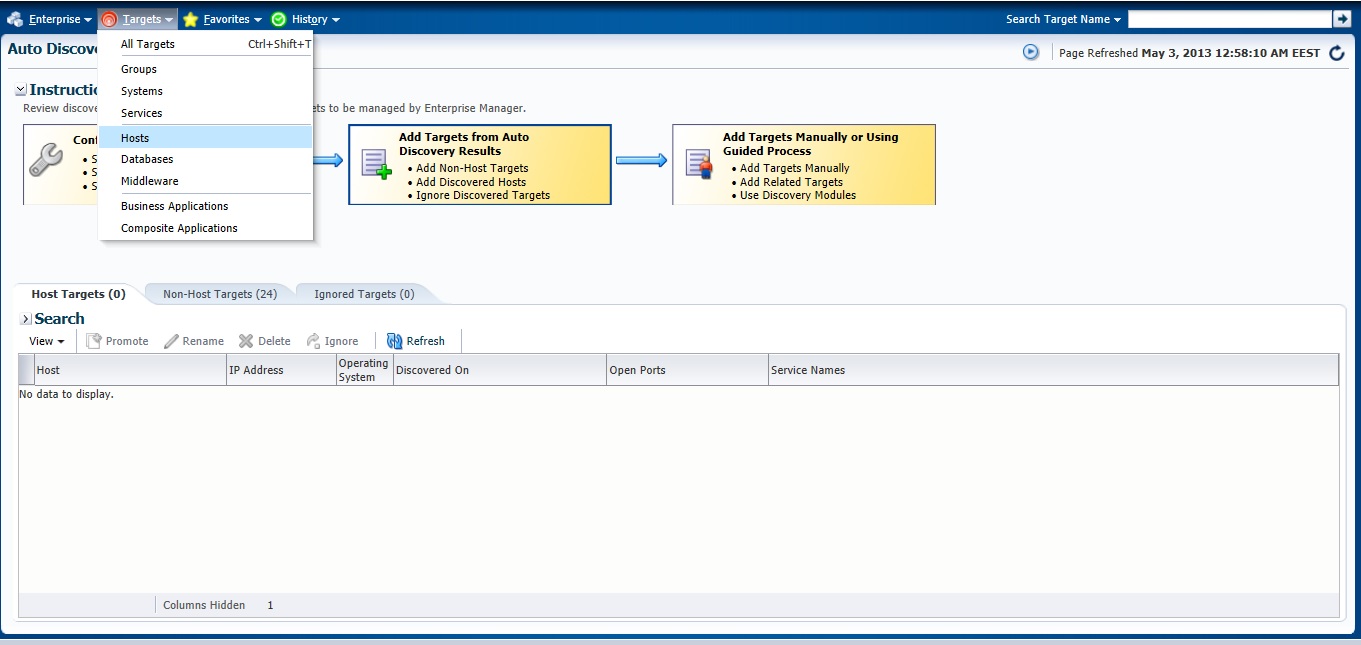
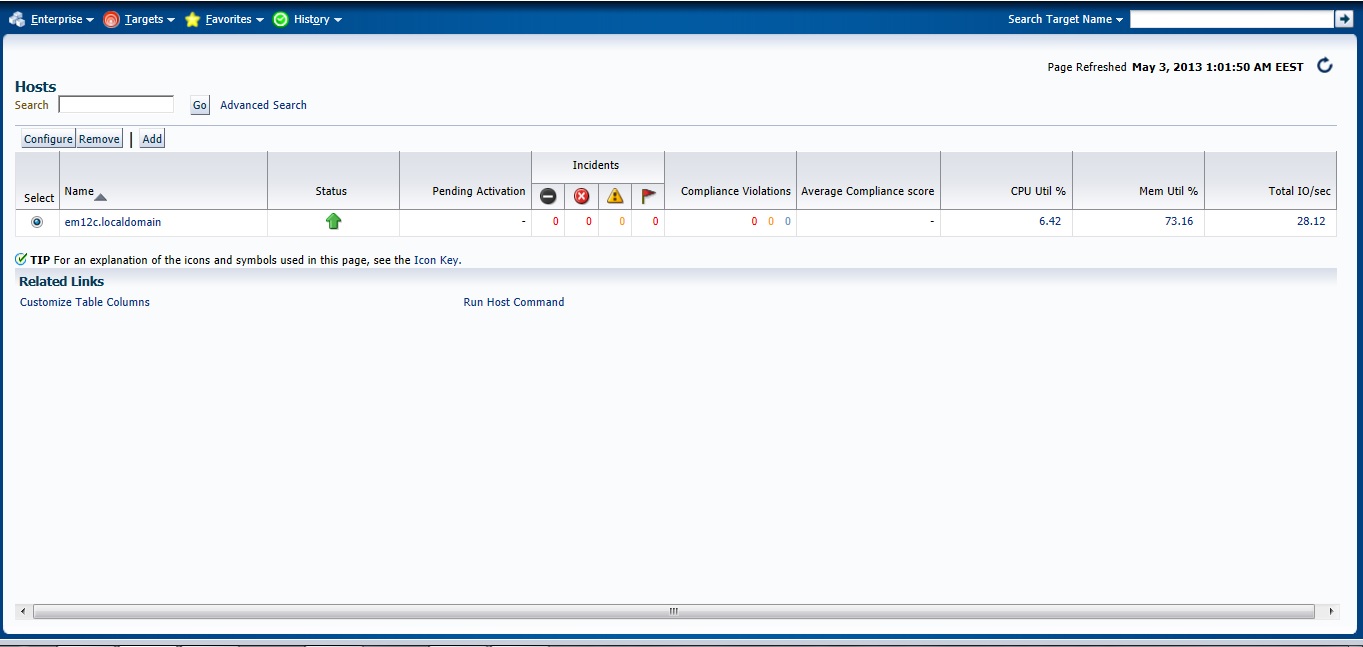
Check the Host

Next Post will be How to Add Agent Manually .

You can Download this Article From here.

Thank you
Osama Mustafa
3872 Actual Result: Port 3872 passed is busy Check complete

This error appear while trying to deploy agent for Enterprise manager 12c (em12c) and the cause for this error that port 3872 is already in use :

solution

[root@em12c Middleware]# netstat -anp | grep 3872

tcp        0      0 :::3872                     :::*                        LISTEN      2391/java    
     
[root@em12c Middleware]# kill -9 2391

[root@em12c Middleware]# netstat -anp | grep 3872

Deploy Again

Thank you
Osama Mustafa
Start/Stop Oracle Enterprise Manager 12c

To Start enterprise manager 12c you need to follow the below steps :

export ORACLE_HOME=/u01/app/oracle/product/11.2.0/dbhome_1
export OMS_HOME=/u03/app/oracle/Middleware/om12c/oms/
export AGENT_HOME=/u03/app/oracle/Middleware/agent12c/agent_inst/

  • ensure database and listener is running
  • Run the below command from $OMS_HOME

emctl start oms

  • Run the below command from $AGENT_HOME

emctl start agent 

to Stop all the services you need to do the below :

 export ORACLE_HOME=/u01/app/oracle/product/11.2.0/dbhome_1
export OMS_HOME=/u03/app/oracle/Middleware/om12c/oms/
export AGENT_HOME=/u03/app/oracle/Middleware/agent12c/agent_inst/

  • Run the below command from $OMS_HOME

emctl stop oms -all

  • Run the below command from $AGENT_HOME

emctl stop agent 

  • Now you can shutdown database and listener.

Thank you
Osama mustafa


ORA-00838: Specified value of MEMORY_TARGET is too small,

SQL> startup
ORA-00838: Specified value of MEMORY_TARGET is too small, needs to be at least 3072M

make your calculation 3072*1024*1024 = 3221225472

SQL > create pfile=’/u02/backup.init’ from spfile;

edit file and put the above number in memory_target.

SQL > Create spfile from pfile=’/u02/backup.init’ ;

SQL > Startup ;

Thank you
Osama mustafa

SQL92_SECURITY Parameter

SQL> show parameter sql92_

NAME                                 TYPE        VALUE
———————————— ———– ——————————
sql92_security                       boolean     FALSE

SQL92_Security seems it’s parameter related to Security But what is it ? what is the benefits of using this parameter ?

I will describe this example since it will be understandable 🙂

SQL> create user test1 identified by test1 ;

User created.

SQL> grant create session , Create table to test1 ;

Grant succeeded.

SQL>
SQL>
SQL> create user test2 identified by test2 ;

User created.

 SQL> create user test3 identified by test3 ;

User created.

SQL> grant create session to test3 ;

Grant succeeded.

SQL> conn test1/test1 ;
Connected.
SQL> create table new ( id number(20)) ;

Table created.

SQL> BEGIN
    FOR v_LoopCounter IN 1..50 LOOP
    INSERT INTO new (id)
    VALUES (v_LoopCounter);
     END LOOP;
         END;
   / 

PL/SQL procedure successfully completed.

SQL> conn test1/test1 ;
Connected.
SQL>
SQL>
SQL>
SQL> grant update on test1.new to test2 ;

Grant succeeded.

SQL> grant update on test1.new to test3;

Grant succeeded.

SQL> grant select on test1.new to test3;

 SQL> conn test2/test2 ;
Connected.
SQL> update test1.new set id=1 where id=10 ;

1 row updated.

SQL> conn test3/test3 ;
Connected.
SQL> update test1.new set id=10 where id=1 ;

2 rows updated.

Now let’s set SQL92_Security to TRUE and Restart Database and re fire the same query by each user.


Conn test2/test2

SQL>update test1.new set id=1 where id=10 ;

ERROR at line 1:
ORA-01031: insufficient privileges

SQL> conn test3/test3;
Connected.
SQL> update test1.new set id=10 where id=1 ;

2 rows updated.

What Happening Here , Each of users have Privileges on test1.new but why after set SQL92_Security to true test2 not working ?

Simply  SQL92_SECURITY need Update/delete and Select Privileges for the same user if you grant the user one of these privileges then it will be useless.

Amazing 🙂

Thank you
Osama Mustafa
Short Look for Oracle Privileges

Oracle Database Contain two type of privileges one called System and other called Objects each one grant it to use as they need, But interesting entity called Public. it’s more Role than users , and every user created in database assign to Public by default unfortunately nothing can be done to change that. so we can say it’s seems like User Group, so if you grant anything of privileges to public this means that everyone of users database will have this privilege ( System or Object ) So you need to becareful of you doing while dealing with public.

Public is everyone access to database .PUBLIC is an entity that can be granted any privilege and assigned any role. All database users automatically inherit all the rights assigned to PUBLIC. It’s a simple concept designed for convenience. Granting permissions to PUBLIC is easy to do, and often the easiest way to get a system working, however, the security implications of using the PUBLIC group to assign permissions are significant.PUBLIC should be treated with care and used sparinglyPUBLIC should be treated with care and used sparingly.

Before go deeply with this subject we need to understand Role and Privileges in oracle database,as you all know Oracle Privileges control the rights to see, you could Modify, create or alter database depend on privileged you have,as i mention earlier two Privileges in database exists System and Object.

System privileges are not related to any specific object or schema. Object privileges are just the opposite, those that are directly related to a specific object or schema.check the examples below

System Privilege
Object Privilege
GRANT ANY PRIVILEGE
GRANT
ALTER ANY ROLE
ALTER
ALTER DATABASE
SELECT

to check system privileges in database you need to check the following DBA_ DICTIONARY :

SQL> desc dba_sys_privs;
 Name                                      Null?    Type
 —————————————– ——– —————————-
 GRANTEE                                   NOT NULL VARCHAR2(30)
 PRIVILEGE                                 NOT NULL VARCHAR2(40)
 ADMIN_OPTION                                            VARCHAR2(3)

Sample data From table :

GRANTEE                        PRIVILEGE                                ADM
—————————— —————————————- —
SYS                            CREATE OPERATOR                                 NO
SYS                            EXECUTE ANY OPERATOR                     NO
SYS                            CREATE DIMENSION                                NO
SYS                            ADMINISTER RESOURCE MANAGER     NO

Another example i want to check scott and his system privileges :

SQL> select * from dba_sys_privs where GRANTEE = ‘SCOTT’;
GRANTEE                        PRIVILEGE                                ADM
—————————— —————————————- —
SCOTT                          UNLIMITED TABLESPACE                     NO

Now Let’s Talk About Object Privileges :

SQL> desc dba_tab_privs;
 Name                                      Null?    Type
 —————————————– ——– —————————-
 GRANTEE                                   NOT NULL  VARCHAR2(30)
 OWNER                                     NOT NULL  VARCHAR2(30)
 TABLE_NAME                          NOT NULL  VARCHAR2(30)
 GRANTOR                                 NOT NULL VARCHAR2(30)
 PRIVILEGE                                 NOT NULL VARCHAR2(40)
 GRANTABLE                                                  VARCHAR2(3)
 HIERARCHY                                                   VARCHAR2(3)

more complex huh ? Read Oracle Documentation Here

SQL> select OWNER, TABLE_NAME, PRIVILEGE, GRANTABLE from dba_tab_privs where GRANTEE = ‘SCOTT’;
no rows selected.

What about Roles ? as you we knows Oracle Comes with Pre defined such as DBA, Resource , and connect also you can create your own Role which is Set of privileges to manage Users Privileges.
 user can be a member of more then one role, and roles can even be members of other roles.
Users in company leaves their jobs , Travel or even don’t need privileges in futures Create Oracle Role will make all this Manage is easy since . Privileges are then granted only to the roles, never to a specific user,if the privileges ever change, they are changed on the role and automatically take effect for all users with the role.and you check

SQL> desc dba_roles ;
 Name                                      Null?    Type
 —————————————– ——– —————————-
 ROLE                                      NOT NULL         VARCHAR2(30)
 PASSWORD_REQUIRED                                  VARCHAR2(8)

For information about this table you can Read Oracle documentation here.

SQL> desc dba_role_privs
 Name                                      Null?    Type
 —————————————– ——– —————————-
 GRANTEE                                                   VARCHAR2(30)
 GRANTED_ROLE                  NOT NULL VARCHAR2(30)
 ADMIN_OPTION                                       VARCHAR2(3)
 DEFAULT_ROLE                                       VARCHAR2(3)

The above table checks the privileges granted to Role, you can refer to Oracle Documentation here
check the below query to determine Which User Have DBA Role :

SQL> select GRANTEE, ADMIN_OPTION, DEFAULT_ROLE from dba_role_privs where
GRANTED_ROLE = ‘DBA’;  2
GRANTEE                        ADM DEF
—————————— — —
SYS                                  YES YES
SYSMAN                         NO  YES
SYSTEM                         YES YES

As conclusion Public can be Granted any of Roles or users,While it is easy and fully supported to grant roles to PUBLIC i don’t recommended to do that  give one case why to do that ?
Check the user who has Public  :

SQL> select * from dba_role_privs where GRANTEE = ‘PUBLIC’;
no rows selected

And this exactly what we want not Public roles to any users.
Thank you 
Osama Mustafa
what is oracle inventory

While installing Oracle software new folder Directory created in ORACLE_BASE called oinventory  what is it ? and what the benefits of using this folder ? What kind of information will be stored ?

The inventory is created once you install Database or used for upgrades and patches. two kind of oracle inventory  one called central inventory per server and another one called local inventory for each ORACLE_HOME, the difference between each of them central inventory basically contains a high-level list of components installed on the server. It is updated each time components are installed or uninstalled but it does not have detailed information such as the patch level of each ORACLE_HOME. on another hand  local inventory  contains some component information included with patch-level information.

another different is The Central Inventory contains the information related to all Oracle products installed on a host. and consists of a file called inventory.xml, which lists all the Oracle Homes installed on the node.

for local inventory ( $ORACLE_HOME/inventory ) that contains the detail of the patch level for that ORACLE_HOME. The Local Inventory gets updated whenever a patch is applied to the ORACLE_HOME, using OUI. If the Local Inventory becomes corrupt or is lost, this is very difficult to recover, and may result in having to reinstall the ORACLE_HOME and re-apply all patchsets and patches.
For More Information about this topic refer to MOS : 
 Global and Local Inventory explained [ID 360079.1]
FAQs on Central Inventory and Oracle Home Inventory (Local Inventory) in Oracle RDBMS [ID 564192.1]
Thank you 
Osama mustafa

Disable Auditing Using Oradebug

in 2011 Laszlo Toth Show some Oracle tricks to disable Auditing In Oracle Database included with SYS auditing using simple command Called oradebug, Just as note oradebug is undocumented in all oracle versions and if you have sysdba role privileges you can do a lot of things with this command :

the below is the demonstration :

sqlplus / as sysdba

SQL> — get the offset for oradebug

SQL> select fsv.KSMFSNAM,sga.*
from x$ksmfsv fsv, x$ksmmem sga
where sga.addr=fsv.KSMFSADR
and fsv.ksmfsnam like ‘kzaflg_%’;

KSMFSNAM ADDR INDX INST_ID KSMMMVAL
—————- ———- ———- —————-
kzaflg_ 0000000060031BB0 26652 1 0000000000000001

SQL> show parameter audit;

NAME TYPE VALUE
———————————— ———– ——————————
audit_file_dest string /u01/app/oracle/admin/PSALES/adump
audit_sys_operations boolean TRUE
audit_syslog_level string
audit_trail string DB, EXTENDED

SQL> oradebug poke 0x60031bb0 1 0
BEFORE: [060031BB0, 060031BB4) = 00000001
AFTER: [060031BB0, 060031BB4) = 00000000

Just as note with oradebug you Audit vault become useless. another tricks that we can use oradebug to call Database command using OS 🙂 

SQL> oradebug call system    “ls -la >/tmp/hacktivity.txt”

Thank you
Osama mustafa

Oracle Security –> Where to Start ? What to do ?

When you start reading the title you start thinking of Race, Mostly you can think of that since technology going fast, But my article it’s not about race it’s talking about where should i look when i secure my database what should i secure ? I post another articles talking about security and how to secure your database what is the benefits of securing database ? I will try to mention the most important points to secure and protecting database specially internal users.

Database is complex, so DBA ( Database administrator ) must understand potential security impacts  and The three components Triangle which i mentioned before in “Top ten Threats to Database” For example when DBA looking for availability they ignore right configuration which cause security vulnerability and this can lead to expose confidential data. it’s not about database if you have application you need to take over and start secure this application. but what can i do ? Where to start and how to start ? 

The Basic Steps to Start like i mentioned in my post “basic Steps to Secure Oracle”  is to discuss the risk management that lead to this, and you can secure your database by looking for the below keys  :

  • Auditing
  • Database Configuration
  • Access to database
  • Authentication 


I need to Remind you in something Secuirty Not means i will protect my database 100% it’s way to prevent attacks and make it harder, But what if the attackers get in database 

Auditing 


Auditing allow us to monitor database users,or anything that happened on database,first audit_sys_operations parameter should be set to TRUE to monitor sys user operation. The audit_trail parameter ( DB|OS) where the location of Audit files will goes ? For example Audit Files could be written on Database  or On File System if you set this parameter to OS. let’s talk about database here :

SQL> SELECT * FROM dba_obj_audit_opts;

SQL> SELECT * FROM dba_priv_audit_opts;
SQL> SELECT * FROM dba_stmt_audit_opts

 you cannot enable auditing to monitor all database activities but at least you can enable it for action such as create session , by fire this command —> audit create session;

What i love in 11gR2 documentation is that Oracle has create it’s own list for recommended auditing list which mean you should enable it. another type of auditing called FGA allow you to create policy to run on certain event for example when scott read from table emp column Sal i want to record this transaction on table. simple way read more about : —> DBMS_FGA.ADD_POLICY, and check this event to you need to have access on sys.fga$.

After you enable auditing it’s very important to Create your own reports to monitor database.Oracle gives you products to centralize this audit logs called audit vault the benefits of this products it’s automatically clean up the old data ( only if transferred to server ) and remove them.

 Database Configuration

When start talking about secure configuration lot of steps came to my mind, but i will try make simple since i can’t cover everything in this topics, i will divide it to more than one topics and Post on my blog, as you know in this part you have to look at network, Listener , Client side , Parameters , and Backup i am apology if i forget something, each part of this compentents are very important but let’s talk about parameters as we all know Database have something called spfile/pfile which is parameter file for database, Some of parameter set for TRUE by default while i don’t need them vice versa, change the value of this parameter are important to avoid any Weakness in the futures some of this parameters are :

  • OS_ROLES —-> Should be False 
  • os_authent_prefix —> Ops$ 
  • o7_dictionary_accessibility –> Should be False 
  • audit_sys_operations –> Should be True
  • Global_name —> Should be True
  • Remote_listener —> use it only if you need it
  • remote_login_passwordfile –> none 
  • sec_case_sensitive_logon –> Should be True
  • sql92_security —> Should be True 
  • remote_os_roles –> Should be False

lot of parameters, but i mention some of them.

Also Don’t forget to secure your Listener set password for listener, change default port simple steps but make you avoid future attack.
Another point don’t forget to patch your database check oracle site for you new CPU and PSU patch this will fix security vulnerability, Read More here.
 Another way also to secure configuration using Database firewall ( i will post topic about it later ) , network firewall and create policy inside the company.

Access to database


in each topic i post i am talking about this, i am will mention it in every topics in the future it’s important and the most of hacking cases happened because user has privileges more than he needs why ?  is your data not important !!! when the user authenticated to database first thing you need to check what this user allow to do ? especially for developers and application user ( dose he need DBA role to execute procedure ) 

 SQL> SELECT * FROM dba_sys_privs;
SQL> SELECT * FROM dba_role_privs;
SQL> SELECT * FROM dba_col_privs;
SQL> SELECT * FROM dba_tab_privs;

it’s not only about privileges , Create Development , test and QA database is important not everything works on Production is correct , create new users with different privileges some of them to monitor some of them to manege, Boring but Useful , Don’t forget Database links i mention before in my topics about database link security and how this could effect on your database, well Links create new privileges escalation, Review database link and check who access to them , who use them , how he use them and is it valid any more ?

SQL> SELECT * FROM sys.link$;

as conclusion you have to check user privileges , Application users , Users , Database links and Create new instance for new jobs ,  not all company spend money to secure database but why should i buy new products while i am not doing the basic steps before that , it’s maybe avoid company small fortune and they will loves for that.

Authentications

Well , I should mention it first but it’s all about security why should i care ? the first thing happened in database is authentications obtaining user information , Password the problem is The mutli way for doing that make risk is high you have OS authentications …. etc check my post about “Effect of Default Password” and you will be surprised what i can do with default password !!! in 11g you can check the Deafult password in new View :

SQL >  select * from dba_users_with_defpwd;

But you can’t also forget about

SQL > Select * from dba_users;

each of them has different job, not everything mentioned in dba_users_with_defpwd , Once you change password and Create new one ( hard to guess ) now you need to provide new rules for password here we start talking about profiles

SQL > Select * from dba_profiles ;

Example for how to create profile in oracle :

CREATE PROFILE Example LIMIT
  FAILED_LOGIN_ATTEMPTS 3 
  PASSWORD_LOCK_TIME 5    
  PASSWORD_LIFE_TIME 30   
  PASSWORD_GRACE_TIME 3   
  PASSWORD_REUSE_TIME 120 
  PASSWORD_REUSE_MAX 10   
/

Also read Oracle documentation here.

I will take later about Authentications type In oracle provided with Examples and talk about which one is more secure and when i need to use it ?

Don’t forget that Oracle Provide Password complexity that located in $ORACLE_HOME/rdbms/admin with Script called –> utlpwdmg.sql just run it / as sysdba and new rules will be applied to passwords you can create your own one. but this script do the below

  • The password contains  eight characters or more.

  • Password not same as username.
  • password should not be simple 
  • password should contain Numeric and alphabetic.
  • password should be different from the last password.

and other’s features simple and amazing Right 🙂

as conclusion i will post more topics about security and more examples will be waiting, and i wish it’s useful and simple, i can’t cover all things in one article i will be huge i will try to do my best.

Thank you
Osama Mustafa