EBS 11i MOS notes

Cloning

NOTE.362473.1 : Cloning E-Business Suite Using Hot Backup for Minimal
NOTE.216212.1 : Business Continuity for Oracle Applications Release 11i
NOTE.233428.1 : Sharing the Application Tier File System in Oracle
NOTE.230672.1 : Cloning Oracle Applications Release 11i with Rapid Clone
NOTE.216664.1 : FAQ: Cloning Oracle Applications Release 11i
NOTE.135792.1 : Cloning Oracle Applications Release 11i

Patching

NOTE.174436.1 : Oracle Applications Patching FAQ
NOTE.175485.1 : How to Apply an 11i Patch When adpatch is Already Running
NOTE.181665.1 : Release 11i Adpatch Basics

Autoconfig:

NOTE.218089.1 : Autoconfig FAQ
NOTE.165195.1 : Using AutoConfig to Manage System Configurations with
NOTE.270519.1 :Customizing an AutoConfig Environment

General Notes:

165195.1 “Using Autoconfig to Manage System Configurations with Oracle Applications 11i”.
218089.1 “Frequently Asked Questions about Using Autoconfig with Oracle Applications Release 11i”.
217368.1 “Advanced Configurations and Topologies for Enterprise Deployments of E-Business Suite 11i”.
362135.1 “Configuring Oracle Applications Release 11i with 10g Release2 Real Application Clusters and Automatic Storage Management”
123718.1 “A Guide to Understanding and Implementing SSL with Oracle Applications 11i”.
125767.1 “Upgrading Developer 6i with Oracle Applications 11i”.189708.1 Oracle Reports 6i Setup Guide for Oracle Applications 11i
273888.1 Steps to Upgrade Oracle Apps 11.5.4 to Latest Version or 11.5.9
437794.1 Database Status Check Before, During And After Migrations and Upgrades
362202.1 Oracle Applications Release 11i with Oracle 10g(10.1.0.4)
165195.1 for more information on how to run autoconfig
233436.1 Installing Oracle Application Server 10g with Oracle E-Business Suite Release 11i
313418.1 Using Discoverer 10.1.2 with Oracle E-Business Suite 11i.
352843.1 HOW TO RUN A PATCH IMPACT ANALYSIS IN OAM
Check Session For Specific Request in EBS

Sqlplus apps/apps

Select request_id,oracle_process_id,phase_code,status_code from
apps.fnd_concurrent_requests where status_code=’R’
where request_id in(Request_ID #1,Request_ID #2,Request_ID #3);

select r.request_id,
  r.oracle_process_id spid,
  r.oracle_session_id,s.inst_id,
  r.os_process_id process,
  s.sid,
  s.serial#,
  s.status,to_char(logon_time,’YYYYMMDD HH24:MI:SS’) time,s.program,s.sql_address,
  s.paddr
  from apps.fnd_concurrent_requests r,
     gv$session s
 where r.request_id =31082866
  and r.oracle_session_id = s.audsid(+);

Thank you
Osama Mustafa

ORA-01031: insufficient privileges When Start Windows Services

this common error in windows, and you can be occur for more than one reason and you need to check them all to make sure you did everything is right, the error prevent the oracle services to start automatically and if you check

ORADIM.LOG….
**************************
C:\Oracle\Ora11g\bin\oradim.exe -startup -sid ptdb -usrpwd * -log oradim.log -nocheck 0
Thu Nov 15 15:16:15 2012
ORA-01031: insufficient privileges

You have to check :

1- startup type for the services ( if it’s set automatically )
2- Group to user ( the user should be in ORA_DBA Group )
3 – you can check log on tab in the service properties and set the username and password who responsible about this services and can do it by:

Go to Control Panel -> Administrative Tools -> Services .

Choose oracle services and then
click “properties”. Select the “Log On” tab and note the account that is set to run the service.

Thank you
Osama mustafa

Remote Diagnostic Agent

RDA : It’s utility collect diagnostics information about an Oracle environment, And could be downloaded from https://support.oracle.com for every Operating system there’s specific version for RDA.

RDA is Command Line diagnostic tool that is executed by an engine written in the Perl programming language,The data captured provides Oracle Support with a comprehensive picture of the customer’s environment which aids in problem diagnosis, You can check the below MOS Note :
Remote Diagnostic Agent (RDA) 4 – FAQ [ID 330363.1]

Oracle Support encourages the use of RDA because it greatly reduces service request resolution time by minimizing the number of requests from Oracle Support for more information.RDA Support Most Of Operating system.and also it’s supported for Most Oracle Products.

But why should i use RDA, as i mention before oracle support encourages to use RDA to collect information and also there’s another reasons to use it :

  •  Oracle Fusion Middleware issues
  • Oracle Collaboration products.
  • Oracle Application issues.
  • Installation/configuration issues
  • Performance issues
  • ORA-600, ORA-7445, ORA-3113.
  • Upgrade and migration.
  • Developer issues
  • Oracle Database issues

The Simplest way to review RDA Output is using Html , Web browsing since after run rda.sh the output will generate on the same RDA Folder. (RDA_Output).

After review MOS note :
RDA 4 – Health Check / Validation Engine Guide [ID 250262.1]

after finishing from  a prerequisite system you need to need check before installation of an oracle product.This special check should be done in addition to the installation document and the check inside the installer,The utility called RDA with a module for Health Check called HCVE.

./rda.sh -T hcve

The sample output could be like the below :

Test Results
~~~~~~~~~~~~
ID NAME RESULT VALUE
===== ====================

20 User in /etc/passwd? PASSED userOK
30 Group in /etc/group? PASSED GroupOK

 Thank you
Osama Mustafa


Use Order By With Delete Statement

if you are using order by in sub query with delete statement like the below :

 delete from tAccountScoring where riskscoring_id=1 and id in
(select * from tAccountScoring where last_update <= sysdate-3 AND rownum < 3  AND ACC_ID = 251 over (order by last_update desc))

You will have an error :

Error report:
SQL Error: ORA-00907: missing right parenthesis
00907. 00000 –  “missing right parenthesis”
*Cause:   
*Action:

The workaround to solve this issue is simple like the below :

delete from tAccountScoring
where riskscoring_id=1 and id in
(select ID  from (select * from tAccountScoring
where last_update <= sysdate-3 AND rownum < 3  AND ACC_ID = 251 order by last_update))

Thank you
Osama Mustafa

Nmap and Oracle – Security Topics

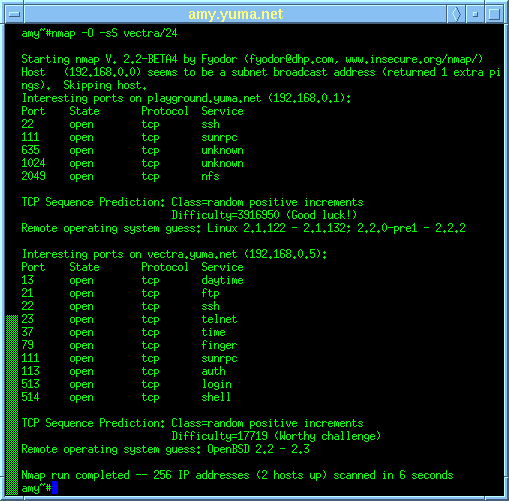
The First Question came to my mind when post this topic, What is the relation between NMAP and Oracle ? for the people who doesn’t know what is the NMAP i will talk about it but it will not be enough to give this amazing tool what its deserve .

Nmap is a powerful tool that is capable of generating a multitude of signatures depending on how it is used. However, if we understand the operation of the tool in general, it is easier to recognize its overall signature in network traffic. Dissecting the signature into sub-patterns one can differentiate between fingerprinting attempts that were successful and those that were not. It is important to understand that we have examined only one of the scan types that nmap can perform, the SYN half-open stealth scan. Several other scans are supported by Nmap: Tcp connect, FIN, Xmas, NULL, udp, ping, and even ftp-bounce. Expect to see these in the near future.

There’s lot of features Nmap can provide it to you : Host discovery, Port Scanning , OS detection , Auditing the security of a device by identifying the network connections, and Version detection

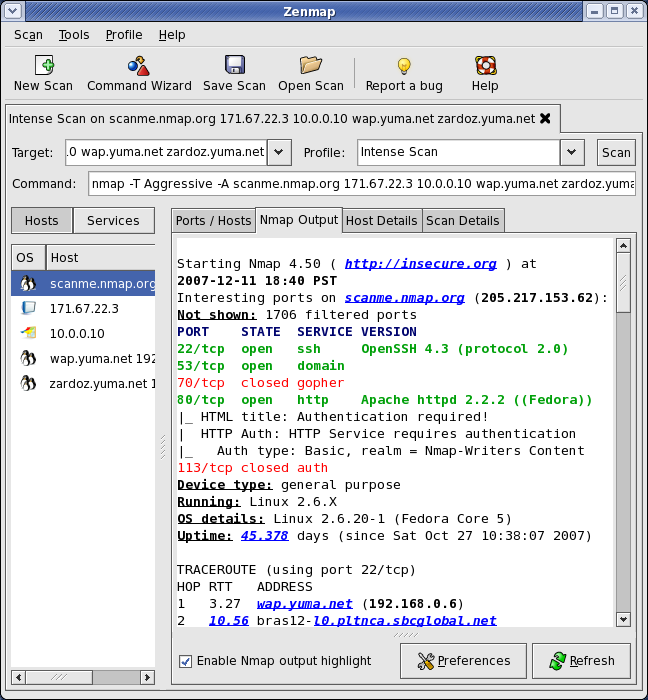
They Are two version of this Tools Command line version ( powerful one ) and GUI Version This tools available on  Windows and Linux and if you decide to go with Command line you need to be experts to do that since its need lot of practice.

You can check how the GUI and Command line look like in the below pictures :

provides all the information that is needed for a well-informed, full-fledged, precisely targeted assault on a network. Such an attack would have a high probability of success, and would likely go unnoticed by organizations that lack intrusion detection capabilities.

But how can i use Nmap with Oracle, when i do some penetration testing i use this tool as command line to dicover the vulnerability, when oracle database installed on server it‘s allow to use ports in server which maybe cause vulnerability ( the simplest Way to describe ) I cannot post everything about NMAP here since i will need new book to talk about it.
  
the Below some examples that you could use note that I use command line version, For Example something Called Oracle Query runs a given query against the Oracle database server and returns the results   

nmap -p 1521 –script oracle-query –script-args 

another one could be used called Oracle hash dump which dump the database password hashes from Oracle and MS-SQL. The results are returned in format suitable and could be store in file.

For Example : CVE-2012-3137 vulnerability,. The vulnerability exists in Oracle 11g R1/R2 and allows linking the session key to a password hash. When initiating an authentication attempt as a valid user the server will respond with a session key and salt. Once received the script will disconnect the connection thereby not recording the login attempt. The session key and salt can then be used to brute force the users password, there’s patch to fix this security issue.

To avoid such an issue you should Apply Oracle security Patches, CPU patches , And OS Patches by doing maintenance like this you can minimize Vulnerability that could be happened

Thank you 
Osama Mustafa

AWR Vs StatPack

When you face performance issue in database the first thing coming to your mind is Automatic Workload Repository (AWR) or STATPACK reports but what is the difference between them, in this article i will try to mention as much as i can the difference between them.

1-you should be aware that AWR not exists in database 9i so you forced to use statepack, include to that steps to generate AWR much easier than STATPACK.

2-AWR hold all the information and statistics that exists in STATPACK, include to that AWR hold Additional Information.

3- in AWR you will find information called Active Session History ( ASH ) which is not exists in STATPACK.

4- To generate STATPACK you should Run Procedure to enable snapshot, you can use DBMS_JOB or schedule it using crontab.

5- AWR snapshots provide a persistent view of database statistics. A snapshot is a collection of performance statistics that are captured at a specific point in time,AWR snapshots are scheduled every 60 minutes by default.

 6- Statspack snapshot purges must be scheduled manually otherwise AWR snapshots are purged automatically using MMON.

Thank you
Osama Mustafa

Check Oracle Process On Windows Using SQL

Usually When You want to check oracle process on Linux OS you are using “ps” command but what if you want to check and display all the oracle process on windows :

sqlplus / as sysdba

select a.sid,a.serial#, a.program, p.pid, p.spid, a.osuser, b.name, b.DESCRIPTION, p.PGA_USED_MEM   from v$session a,v$process p, v$bgprocess b where a.paddr=b.paddr
and    a.paddr=p.addr and p.background=1;

The above picture taken by SQL Developer.

RunLevel Mode In Linux

As Database administrator you dealing with Different operating system everyday, most of this operating system is Linux/Unix, During the boot up for Linux the init command open files called “/etc/initab”  this file linux start decide which run level the system should booted to. After start the OS you can check “/etc/initab” using Editor (vim command).

there’s different type of run level in linux you should know about them :

  • 0 – halt (Do NOT set initdefault to this).
  • 1 – Single user mode.
  • 2 – Multiuser, without NFS (The same as 3, if you do not have networking).
  • 3 – Full multiuser mode.
  • 4 – unused.
  • 5 – X11.
  • 6 – reboot (Do NOT set initdefault to this).

The Above modes available in /etc/initaband you can check them, when you open the files you will see lines

 id:5:initdefault:

 Which indicate for default level. and you can change it.

Short Description for the RunLevels :

Runlevel 0:

Cause the system shutdown , and you can’t set this as default. no reason to do that.

RunLevel 1:

in this Level System start in something called Single User Mode which mean root user only who can log in to the system.and notice there’s no networking in this mode it will be useful for repair and maintenance.

RunLevel 2:

The System Will log in to mutli user mode which mean you can log in to any users but without networking .

RunLevel 3:

Its same as Runlevel 2 but with networking, This level is common for most linux.

RunLevel 4:

Custom Level, or Custom Boot Level ( Undefined one).

RunLevel 5:

Networking, Multi user Mode With X window Which mean when the OS end of boot the GUI screen will appear to users “Welcome Screen” and can log in, this is what you see in the Linux For example Redhat.

RunLevel 6:

Reboot your Operating System, Sure you don’t want to set this to default.

you can use any runlevel by command –> init ‘run-level-number’

Thank you
Osama Mustafa

ORA-27086: unable to lock file – already in use

In Alert log :

Thu Feb 14 09:34:57 EST 2013
Errors in file /u01/app/oracle/admin/rdmetdev/udump/rdmetdev_ora_6321.trc:
ORA-27050: function called with invalid FIB/IOV structure
Additional information: 2
ORA-27086: unable to lock file – already in use
Linux-x86_64 Error: 37: No locks available
Additional information: 10

usually this problem occurred because NFS is Hanged,and can check OS logs to find “statd: server localhost not responding, timed out”.

1- Check rpc.stat is working and you can restart again , and you have to Restart NFS Services also

Stop :

# service nfslock stop
# service nfs stop
# service portmap stop
# umount /proc/fs/nfsd

 Start :

# service portmap start
# service nfs start
# service nfslock start
# mount -t nfsd nfsd /proc/fs/nfsd

Please follow the order, also note that when you restart the NFS service the server could hang at most for 1 minute.

Finally you should Reboot your server.

Thank you
Osama Mustafa