In this post i created Terraform/terragrunt to bulid fully infrastructure enviroment, i uploaded the code to my GitHub, You can find the code HERE
Enjoy the automation
Osama
For the people who think differently Welcome aboard
In this post i created Terraform/terragrunt to bulid fully infrastructure enviroment, i uploaded the code to my GitHub, You can find the code HERE
Enjoy the automation
Osama
The following project having these requriment:-
Another Things to add to this project which is the follwong :-
The Link for the Project HERE
Enjoy the automation
Osama
Imagine you are having multiple instances and you want to change something, if you will do this manually it will take time from you why not to automte the process ?
I upladed one of the projects to automate the process, this will allow to automate the simplest things for example new employee joined and you need to add his SSH key to your instances (You can even choose which VM you want to him/her to acces) , just add the key in the roles and configure the pipeline on your rep and the code will run Automtically.
I uploaded the project on my github HERE.
Ragards
Enjoy the power of automation.
Osama
Okay, I love to post free examples/projects on my github from while to while, i choose docker and kubernetes this time, the project idea it’s very nice and easy to implement.
What this project do ?
This can be a simple web app that reads a ‘hello world’ string from the MySQL database.Run a database app. Data volume should be persistent.Application from step 1 needs to discover the database from step 2 using Kubernetes native features.
Database credentials should NOT be hardcoded in application or helm chart code.The application should be accessible from the outside of Kubernetes.Create a helm chart which implements all these steps
I Choose to use Java as programing language because the springboot framework it’s already defined and easy to use.
Please follow the readme file and everything will working fine without any issue, if you have any question comment below and i will answer
GitHub Link HERE
Enjoy the free learning
Osama
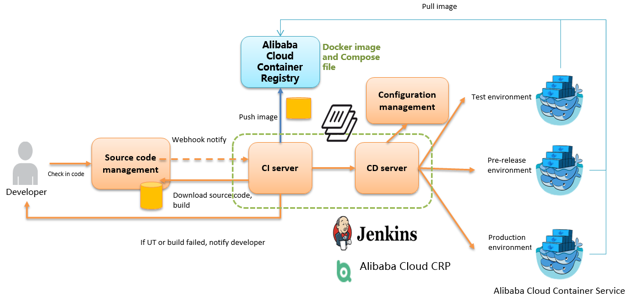
As an important step in agile development, continuous integration is designed to maintain high quality while accelerating product iteration. Every time when the codes are updated, an automatic test is performed to test the codes and function validity. The codes can only be delivered and deployed after they pass the automatic test, This post describes how to combine Jenkins, one of the most popular integration tools, with Alibaba Cloud Container Service to realize automatic test and image building pushing.

Deploying Jenkins Applications and the Slave Nodes
1. Create a Jenkins orchestration template.
Create a new template and create the orchestration based on the following content.
jenkins: image: 'registry.aliyuncs.com/acs-sample/jenkins:latest' ports: - '8080:8080' - '50000:50000' volumes: - /var/lib/docker/jenkins:/var/jenkins_home privileged: true restart: always labels: aliyun.scale: '1' aliyun.probe.url: 'tcp://container:8080' aliyun.probe.initial_delay_seconds: '10' aliyun.routing.port_8080: jenkins links: - slave-nodejs slave-nodejs: image: 'registry.aliyuncs.com/acs-sample/jenkins-slave-dind-nodejs' restart: always volumes: - /var/run/docker.sock:/var/run/docker.sock labels: aliyun.scale: '1'
2. Use the template to create Jenkins applications and slave nodes.
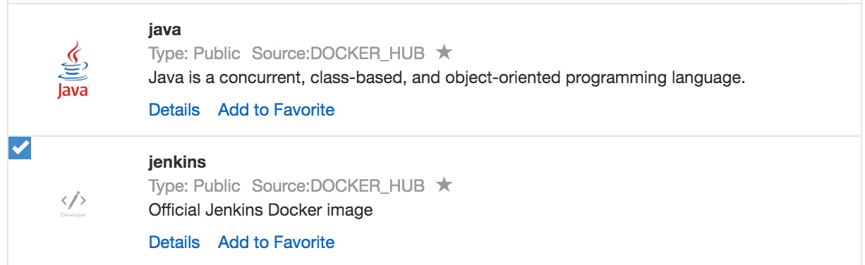
You can also directly use a Jenkins sample template provided by Alibaba Cloud Container Service to create Jenkins applications and slave nodes.

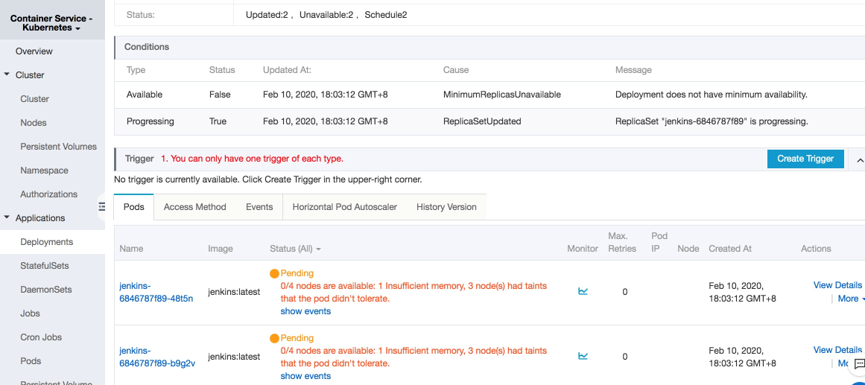
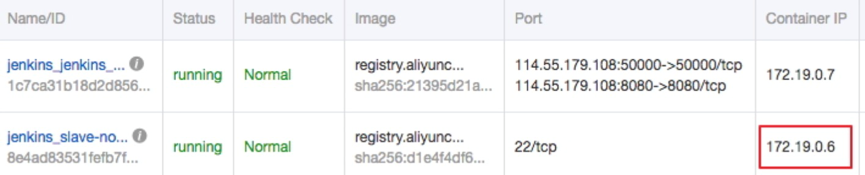
3. After the successful creation, Jenkins applications and slave nodes will be displayed in the service list.

4. After opening the access endpoint provided by the Container Service, you can use the Jenkins application deployed just now.

Realizing Automatic Test and Automatic Build and Push of Image
Configure the slave container as the slave node of the Jenkins application.
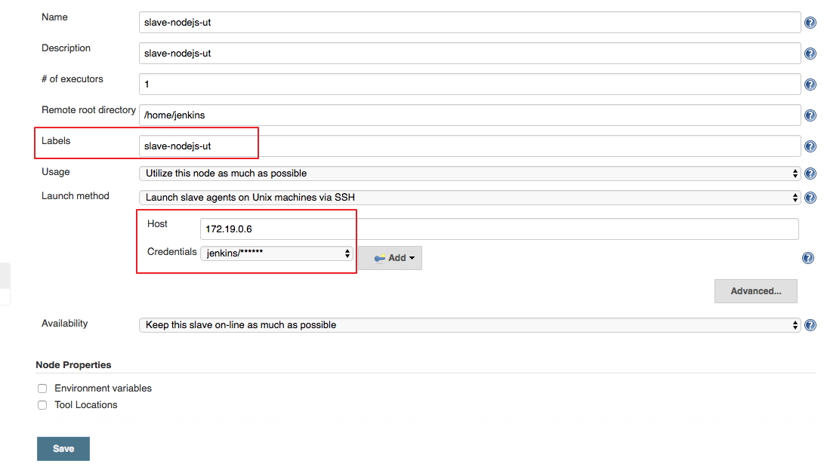
Open the Jenkins application and enter the System Settings interface. Select Manage Node > Create Node, and configure corresponding parameters. See the figure below.

Note: Label is the only identifier of the slave. The slave container and Jenkins container run on the Alibaba Cloud platform at the same time. Therefore, you can fill in a container node IP address that is inaccessible to the Internet to isolate the test environment.

Use the jenkins account and password (the initial password is jenkins) in Dockerfile for the creation of the slave-nodejs image when adding Credential. Image Dockerfile address HERE
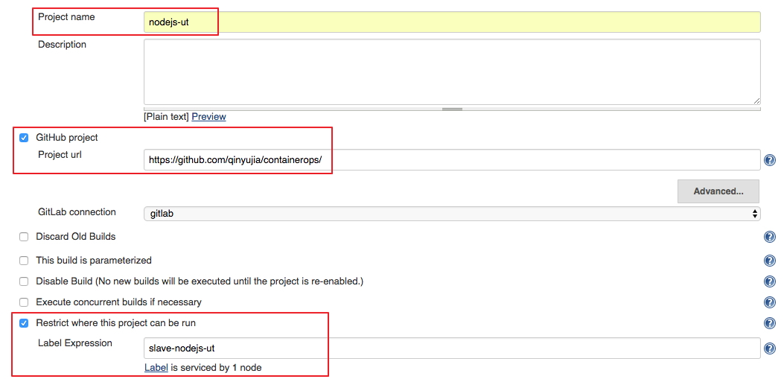
1. Create a project to implement the automatic test.

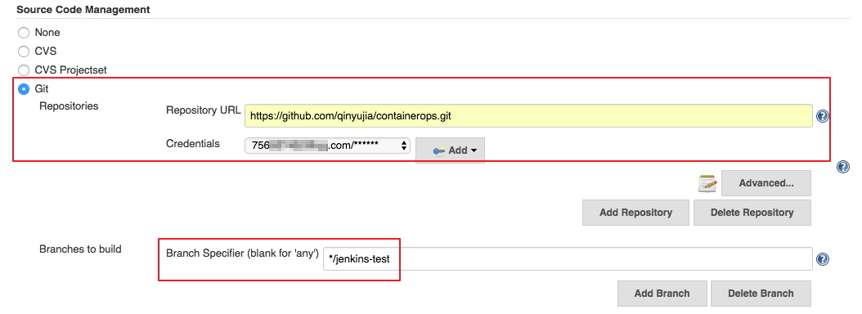
Configure the source code management and code branch. In this example, use GitHub to manage source codes.

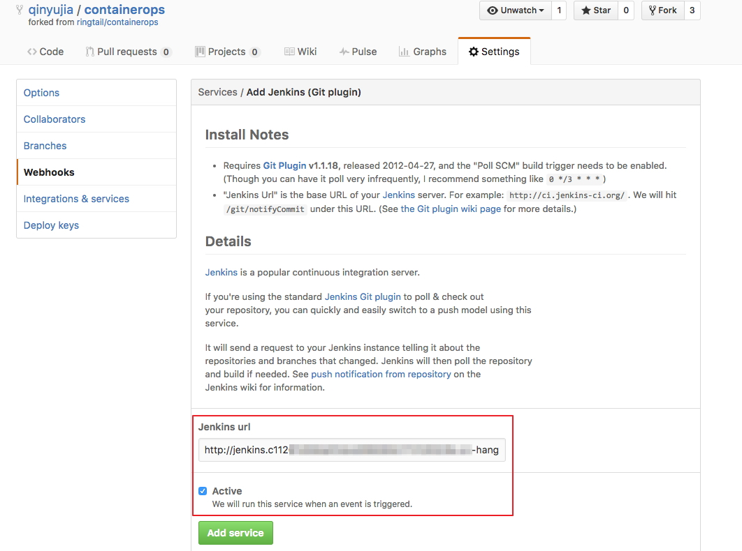
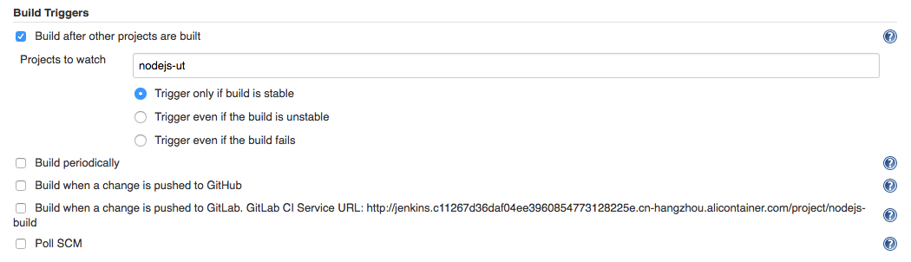
Configure the trigger for building. In this example, automatically trigger project execution by combining GitHub Webhooks and services.

Add the Jenkins service hook to GitHub to implement automatic triggering.
Click the Settings tab on the Github project homepage, and click Webhooks & services > Add service and select Jenkins (Git plugin). Enter ${Jenkins IP}/github-webhook/ in the Jenkins hook URL dialog box.
1. http://jenkins.cd****************.cn-beijing.alicontainer.com/github-webhook/

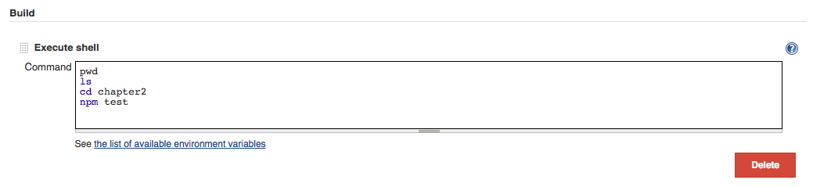
Add a build step of Executes shell type and write shell scripts to execute the test.

The command in this example is as follows.
1. pwd
2. ls
3. cd chapter2
4. npm test
Create a project to automatically build and push images.

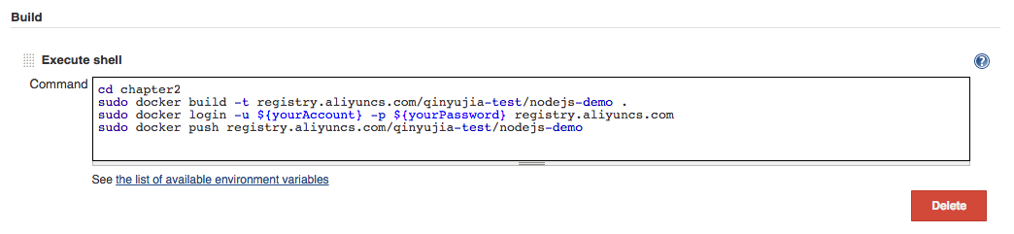
Write shell scripts for building and pushing images.

The command in this example is as follows.
a.cd chapter2 b.docker build -t registry.aliyuncs.com/qinyujia-test/nodejs-demo . c.docker login -u ${yourAccount} -p ${yourPassword} registry.aliyuncs.com d.docker push registry.aliyuncs.com/qinyujia-test/nodejs-demo
Automatically Redeploy the Application
Deploy the application for the first time
Use the orchestration template to deploy the image created above to the Container Service and create the nodejs-demo application.
Example
1.
2. express:
3. image: 'registry.aliyuncs.com/qinyujia-test/nodejs-demo'
4. expose:
5. - '22'
6. - '3000'
7. restart: always
8. labels:
9. aliyun.routing.port_3000: express
10.
1. Select the application nodejs-demo just created, and create the trigger.

Add a line to the shell scripts you wrote in Realize automatic test and automatic build and push of image. The address is the trigger link given by the trigger created above.
i.curl 'https://cs.console.aliyun.com/hook/trigger?triggerUrl=***==&secret=***'
Change the Command in the example from Realize automatic test and automatic build and push of image as follows.
i. cd chapter2
ii. docker build -t registry.aliyuncs.com/qinyujia-test/nodejs-demo .
iii. docker login -u ${yourAccount} -p ${yourPassword} registry.aliyuncs.com iv.docker push registry.aliyuncs.com/qinyujia-test/nodejs-demo
v. curl 'https://cs.console.aliyun.com/hook/trigger?triggerUrl=***==&secret=***'
After pushing the image, Jenkins automatically triggers redeployment of the nodejs-demo application.
Configure The Email Notification for the Results
If you want to send the unit test or image configuration results to relevant developers or project execution initiators through email, perform the following configurations.
On the Jenkins homepage, click System Management > System Settings, and configure a Jenkins system administrator email.

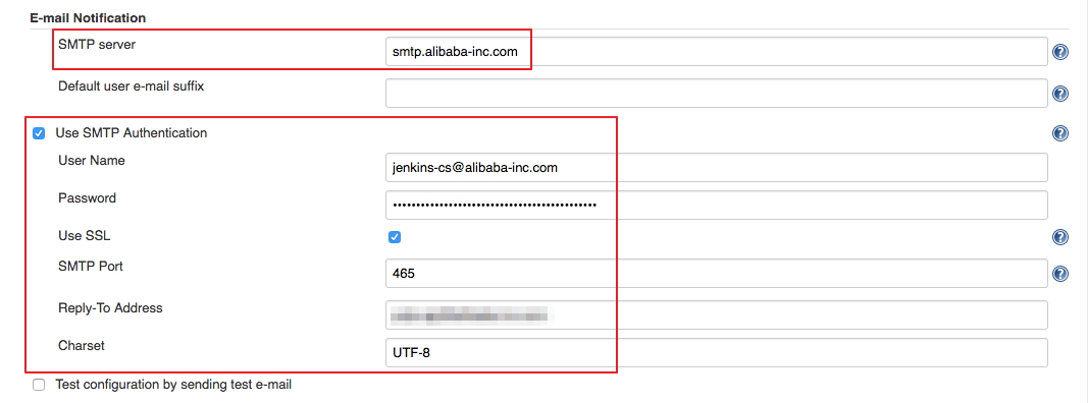
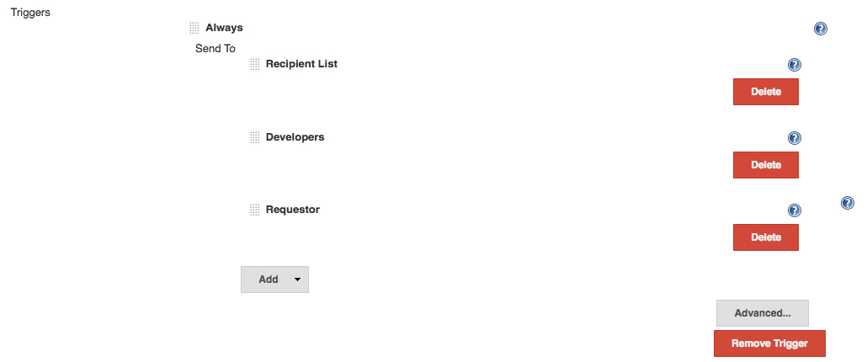
Install the Extended Email Notification plugin, configure SMTP server and other relevant information, and set the default recipient list. See the figure below.

The above example shows the parameter settings of the Jenkins application system. The following example shows the relevant configurations for Jenkins projects whose results are to be pushed through email.
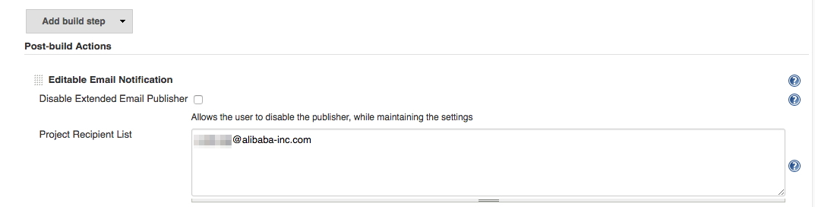
1. Add post-building operation steps in the Jenkins project, select Editable Email Notification, and enter a recipient list.

2. Add a mailing trigger.

Cheers
Osama
Regarding to Wikipedia, Serverless computing is a cloud computing execution model in which the cloud provider runs the server, and dynamically manages the allocation of machine resources. Pricing is based on the actual amount of resources consumed by an application, rather than on pre-purchased units of capacity
Today i will show you an example how to create serverless website but this time not using Amazon AWS, Azure or OCI but Alibaba Cloud Provider.
Create a Function Compute Service
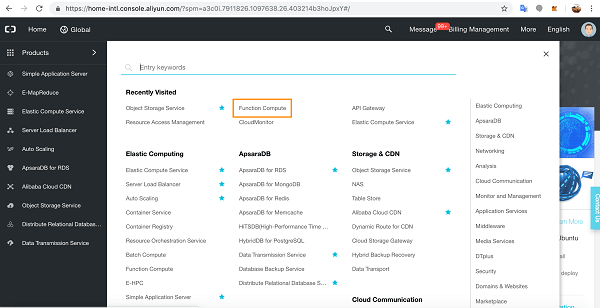
Go to the console page and click through to Function Compute.

Click the add button beside Services.

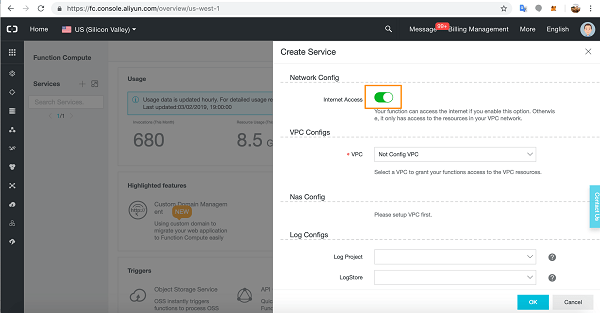
In the Service slide out, give your service a name, an optional description, and then slide open the Advanced Settings.

In Advanced Settings you can grant access for Functions to the Internet, to VPC resources, and you can attach storage and a log service to a Function. You can also configure roles.
For our tutorial, we will need Internet access so make sure this configuration is on.
We will leave VPC and Log Configs as they are.

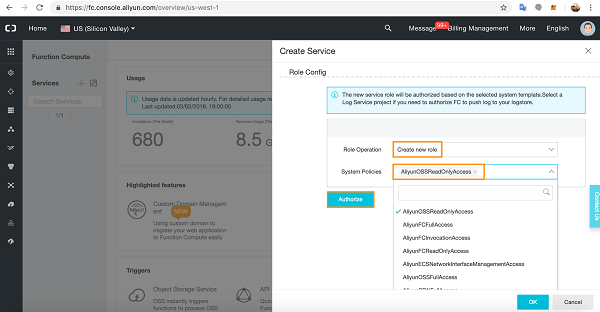
In the Role Config section, select Create New Role, and in the dropdown list pick AliyunOSSReadOnlyAccess as we will be accessing our static webpages from an Object Storage Service bucket.
Click Authorize.

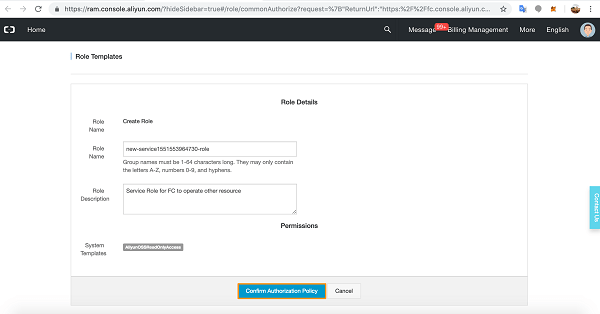
You will see a summary of the Role you created.
Click Confirm Authorization Policy.

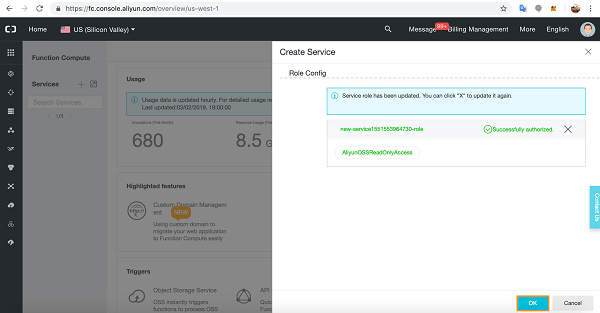
You have successfully added the Role to the Service.
Click OK.

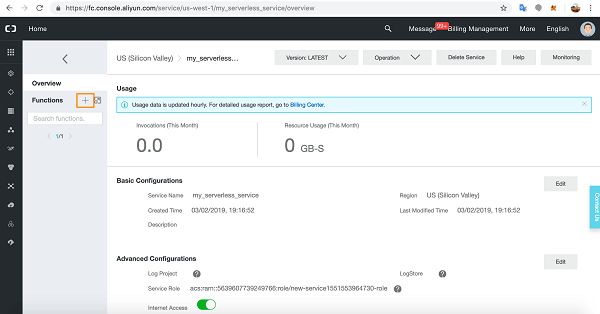
ou will see the details of the Function Compute Service you just created.
Now let’s create a Function in the Service. Click the add button next to Functions.

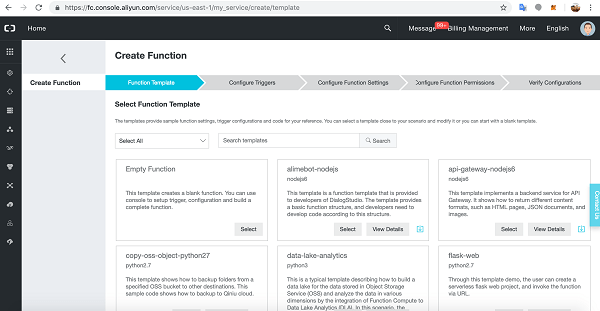
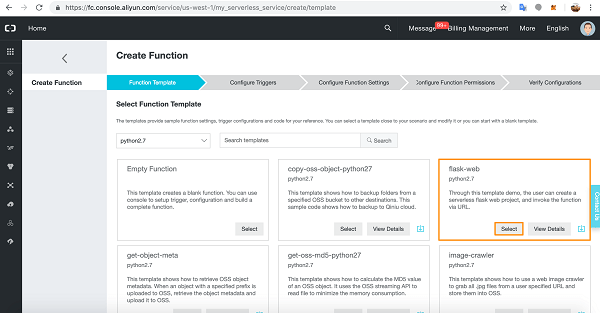
You will see the Create Function process. The first part of the process is Function Template.
There are many Function Templates available, including an empty Function for writing your own bespoke Functions.
Alibaba Cloud-supplied Template Functions are very useful as they have relevant method invocation and demo code for getting started quickly with Function Compute.

let’s choose the flask-web Function written in Python2.7.
Click Select.

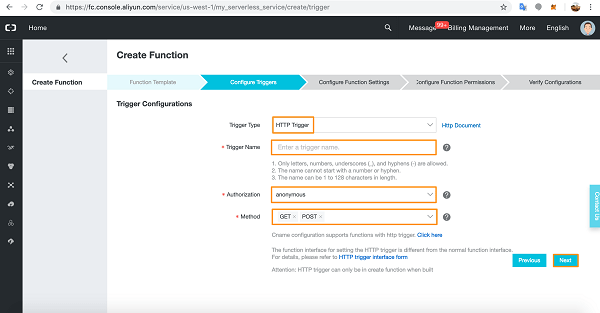
We are now at the Configure Triggers section of creating a Function.
Select HTTP Trigger from the dropdown list. Give the Trigger a name and choose Authorization details (anonymous does not require authorization).
Choose your HTTP methods and click Next. We are going to build a simple web-form application so we will need both the GET and POST HTTP methods.

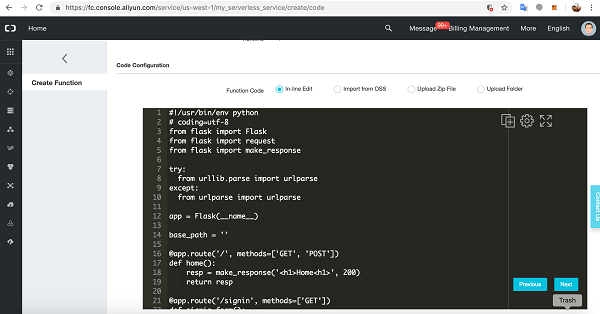
Now we arrive at the Configure Function Settings.
Give the Function a name then scroll down to Code details.

We’ll leave the supplied code for now. Scroll down to below the code sample.

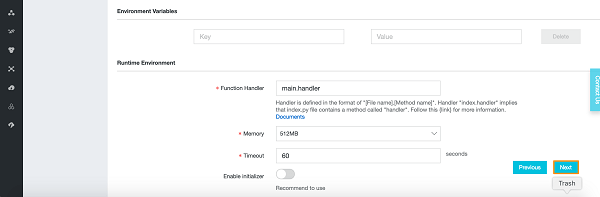
You will see Environment Variable input options and Runtime Environment details.
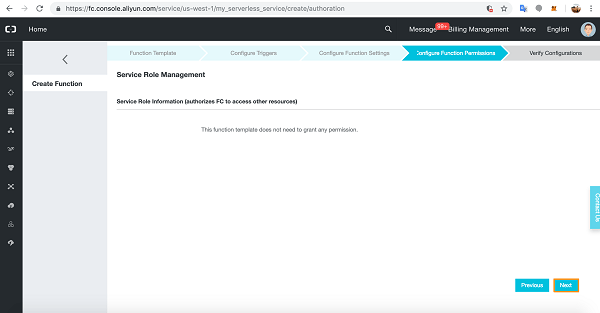
Click Next.

Click Next at Configure Function Permissions.

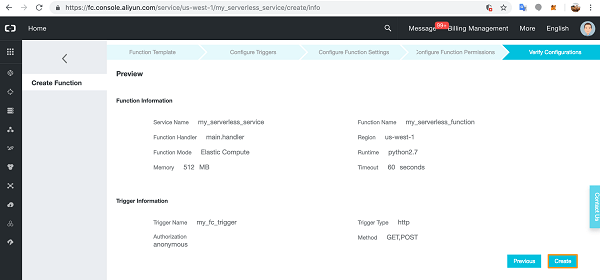
Verify the Configuration details and click Create.

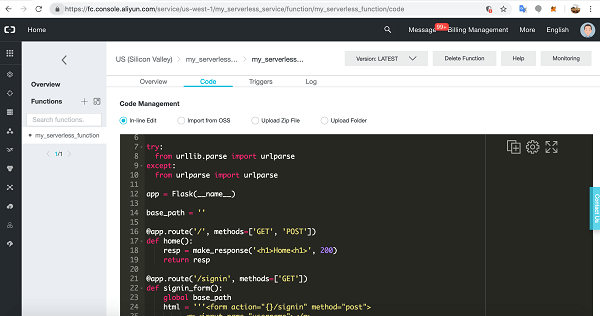
You will arrive at the Function’s IDE. Here you can enter new code, edit the code directly, upload code folders, run, test, and fix your code.
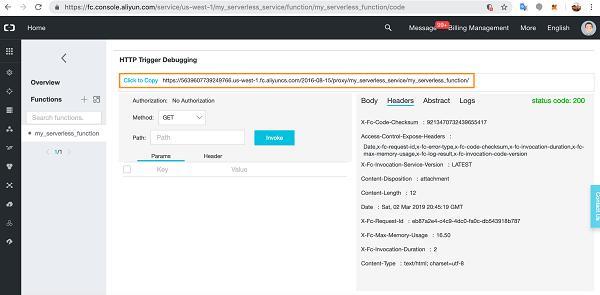
Scroll down.

Copy the URL as we will need to add this to our static webpages so they can connect to our Function Compute Service and Function.

Set Up and Configure an OSS Bucket
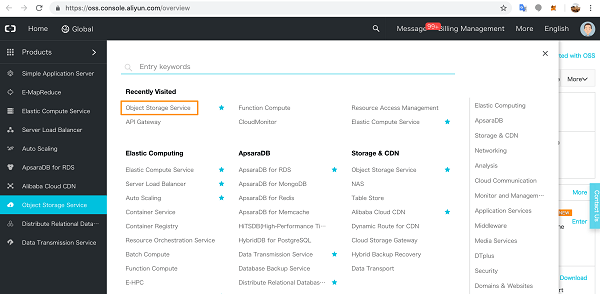
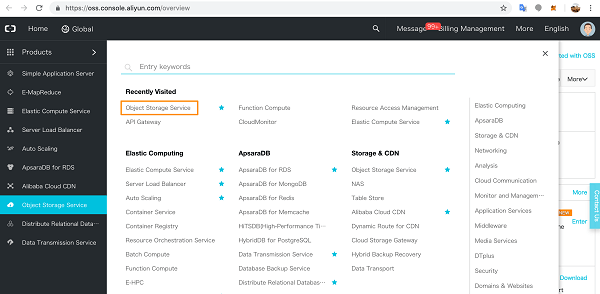
Click through to Object Storage Service on the Products page.

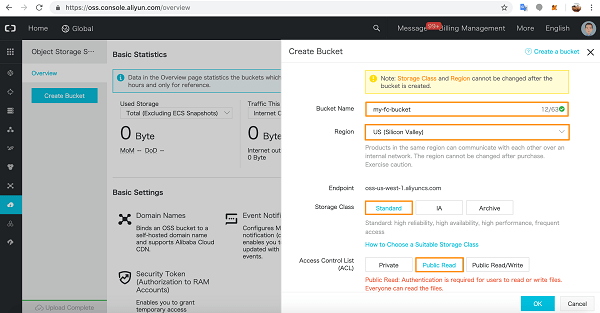
If you haven’t yet activated Object Storage Service, go ahead and activate it. In the OSS console, click Create Bucket.

Choose a name for the OSS Bucket and pick the region – you cannot change the region later. Select the Storage Class – you also cannot change this later.
We have selected Public Read for the Access Control List.
When you’re ready, click OK.

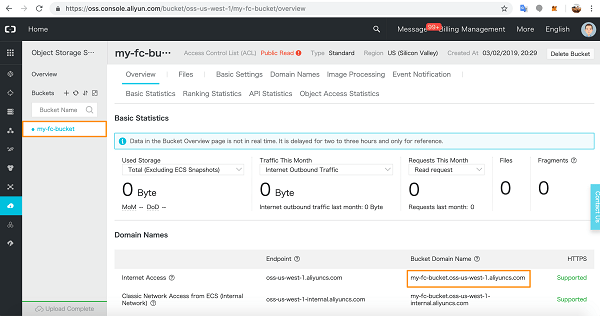
You will see the Overview page for your bucket. Make a note of the public Internet URL.

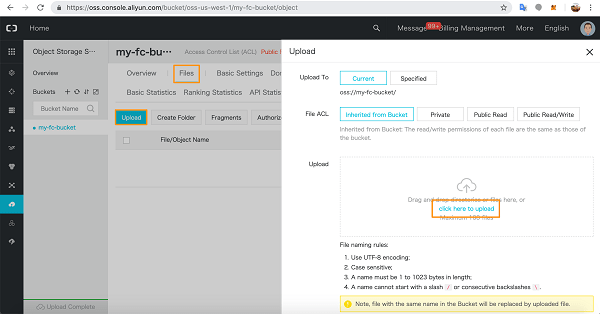
In the Files tab, upload your static web files.

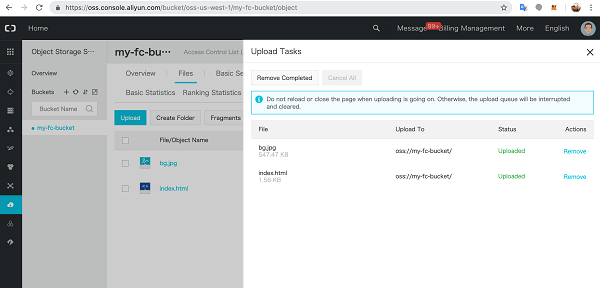
I uploaded a simple index.html homepage and a background picture.
<script type="text/javascript">
const functionURL = '<<Function URL>>';
const doHome = new XMLHttpRequest();
doHome.open('GET', functionURL, true);
doHome.onload = function () {
document.getElementById('home_message').innerHTML = doHome.responseText;
};
doHome.send();
</script>

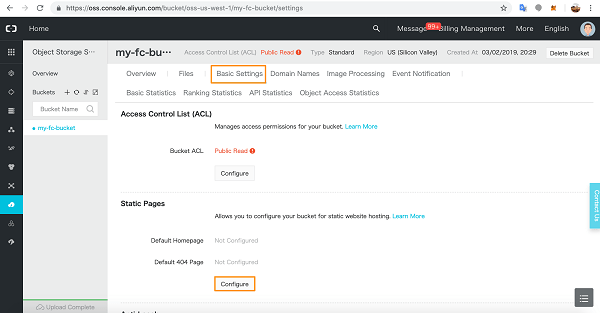
In Basic Settings, click Configure to configure your Static Pages.

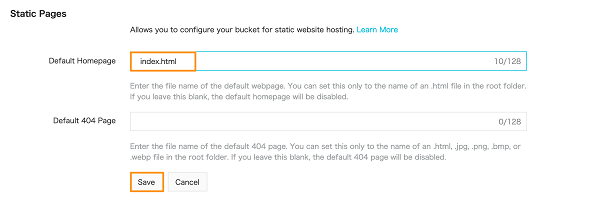
Add the homepage details and click Save.

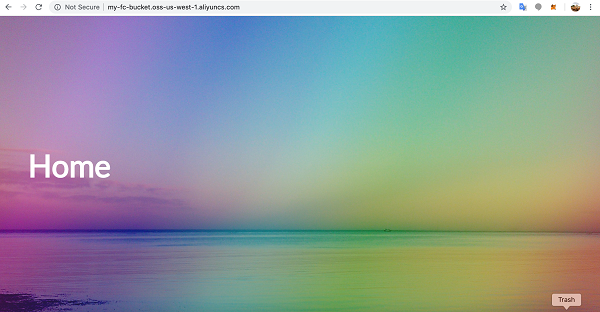
Now go to a new browser window and access the OSS URL you saved earlier.

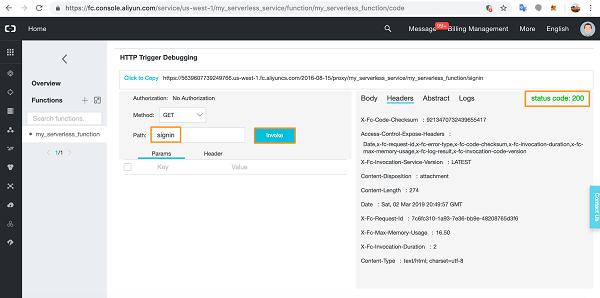
Back in the Function Compute console, you can now test the flask-app paths directly from the code.
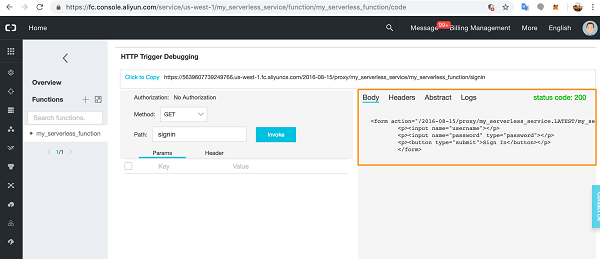
We already tested index.html with no Path variable. Next, we test the app route signin with GET and check the Headers and status code.

The signin page code is working correctly. You can also check the Body to make sure the correct HTML will render on the page. Notice that because I entered the path variable, signin is appended to the URL.
Of course, any errors you encounter will show up in the Logs section for easy debugging.

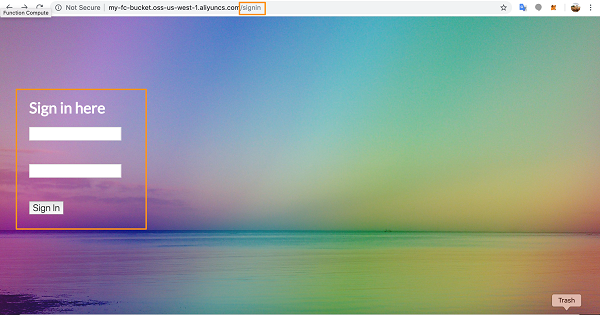
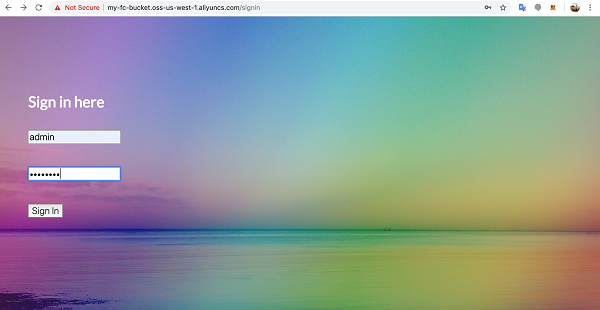
Now, let’s test this page on the Internet.

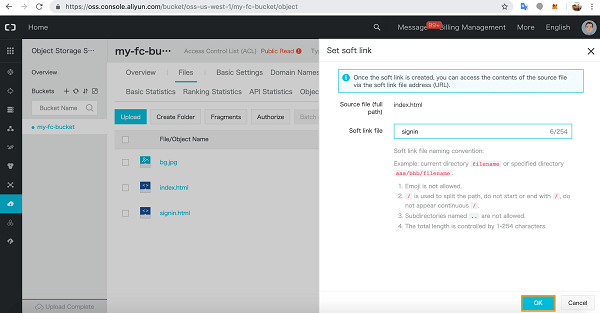
If you get an error here, implement a soft link for the page in OSS. Go to the OSS bucket and click More dropdown for the HTML file in question and choose Set soft link.
Give the link a name and click OK.

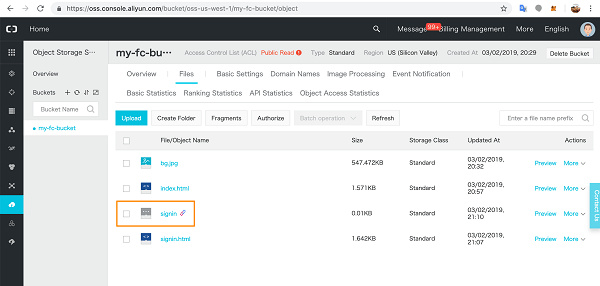
A link file will appear in the list of static files and you will now be able to access the page online with the relevant soft link and it will render as above.

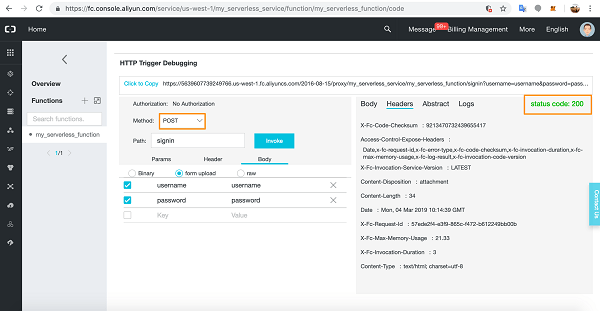
Back in Function Compute, we can test the POST method in the console with the correct username and password details in the same way.
Add the POST variables to the form upload section in the Body tab.

Now you can test this function online.

Cheers
Osama
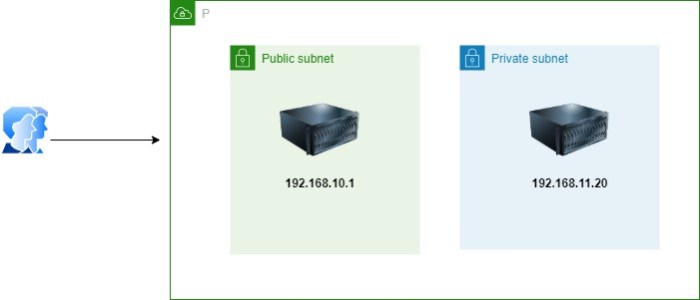
If you ever worked with cloud and configured different subnet, there will be public and private subnet, both having a different number of servers, for the public or even private have you also wonder how to access the environment without associate the VM to Public IP, in this post I will show you how.
For the figure shows one of the simple example of that, In this post you will learn how to connect to an instance that is hosted in a private subnet

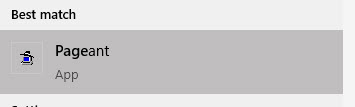
The first thing you need, install Pageant

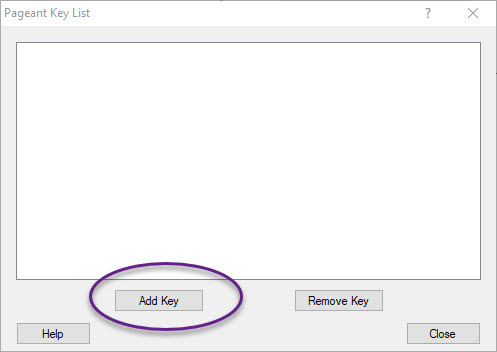
After that, open the software and add the public key to this software , enter the password

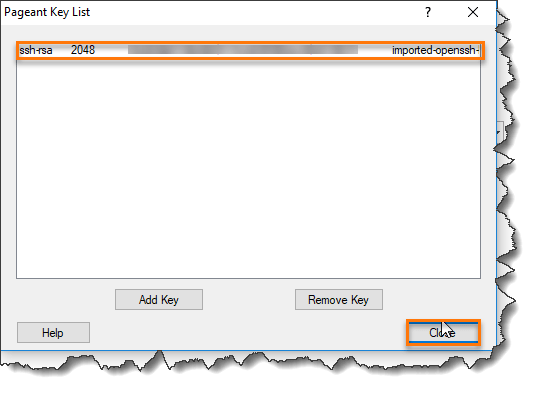
Once you add the key, it will be appear inside the program you can close it

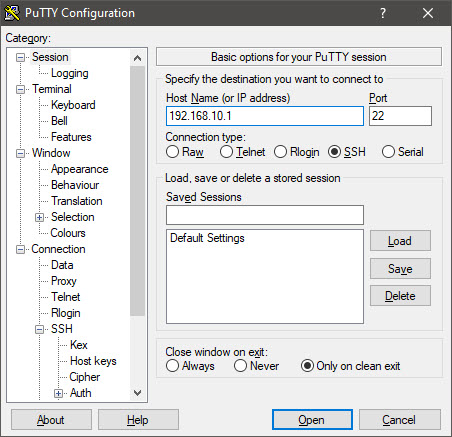
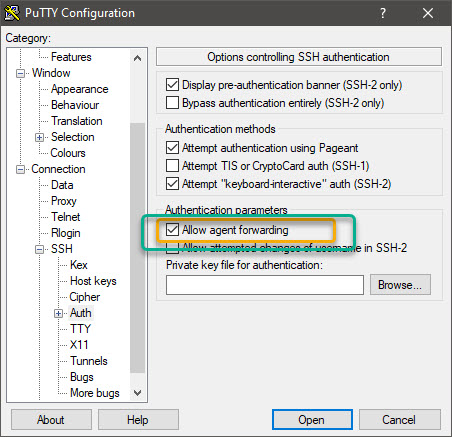
Now you can use putty and configure the software like the follwing, You are now connected to the instance in public subnet through agent forwarding.


From the public subnet you can simply SSH to to private subnet easily.
Cheers
Osama
This blog post is one of that kind that took much time and consume so much energy, to complete this post it took me around ten days to make sure that I will cover most of the available services and make it readable for people, Be sure the services can change while you are reading this post ; if you have any comments,or add something to this post, please send me an email – using contact us page or by comments below.
I am writing this post to share a different cloud providers services and the comparison between each one of them, this will show various naming services for each one of them.
Earlier we used to store our data to H.D.D or USB flash, Cloud Computing services have replaced such hard drive technology. Cloud Computing service is nothing but providing services like Storage, Databases, Servers, networking, and software through the Internet.
Cloud Computing is moving so fast, in 2020 the cloud now is more mature, going multi-cloud, and likely to become more focused on vertical and a sales ground war as the leading vendors battle for market share.
Notes :
Marketplace
| AWS | Azure | OCI | GCP | IBM Cloud | AliBaba Cloud |
|---|---|---|---|---|---|
| AWS Marketplace | Azure Marketplace | Oracle Cloud Marketplace | Google Cloud Platform (GCP) Marketplace | IBM Marketplace | Alibaba Cloud Marketplace |
AI and machine learning
| AWS | Azure | OCI | GCP | IBM Cloud | AliBaba Cloud |
|---|---|---|---|---|---|
| SageMaker | Machine Learning | OCI Machine Learning | Google Datalab Cloud AutoML (Alpha) Cloud Machine Learning Services | Machine Learning | Machine Learning Platform for AI |
| Alexa Skills Kit | Bot Framework | Oracle Digital Assistant | Google Assistant | None | None |
| Polly, Transcribe | Speech Services Bing Speech API | None | Translation API Speech API | None | None |
| Lex | Speech Services | Oracle Chatbots | Cloud Text-to-Speech DialogFlow Enterprise Edition (Beta) Natural Language API | Watson Assistant | Intelligent Service Robot |
| Rekognition | Cognitive Services | None | Cloud Video Intelligence Vision API | Visual Recognition | Image Search |
| Skills Kit | Virtual Assistant | None | None | None | None |
| Amazon Comprehend | Language Understanding (LUIS) | None | Cloud Text-to-Speech DialogFlow Enterprise Edition (Beta) Natural Language API | Visual Recognition | Image Search |
Big data and analytics
Data orchestration / ETL
Analytics and visualization
| AWS | Azure | OCI | GCP | IBM Cloud | AliBab Cloud |
| Kinesis Analytics | Stream Analytics Data Lake Analytics Data Lake Store | Event Hub (Apache Kafka as a Service) | Cloud Dataflow | Streaming Analytics | None |
| QuickSight | Power BI | Data Visualization Business Intelligence | Google Data Studio | Watson studio | Data IDE |
| CloudSearch | Cognitive Search | None | None | None | None |
| Athena | Data Lake Analytics | None | BigQuery | SQL Query | E-MapReduce Service |
Compute
| AWS | Azure | OCI | GCP | IBM Cloud | AliBaba Cloud |
| Elastic Compute Cloud (EC2) Instances | Virtual Machines | Compute | Compute Engine | Classic Virtual Server | Alibaba ECS |
| Batch | Batch | None | Preemptible VMs | IBM Cloud Functions | Batch Compute |
| Auto Scaling | Virtual Machine Scale Sets | Auto Scaling | Auto Scaler | Auto Scaling | Auto Scaling |
| VMware Cloud on AWS | VMware by CloudSimple | None | None | None | None |
| Parallel Cluster | CycleCloud | Cluster Networking | slurm gcp | None | None |
| Amazon EC2 – I3.metal | None | Compute – Bare Metal | None | None | None |
| Amazon EC2 – P2, P3, G3 instances | Azure N-Series | Oracle Cloud Infrastructure Compute – GPU | Google GPU | None | None |
Containers and container orchestrators
Serverless
| AWS | Azure | OCI | GCP | IBM Cloud | Alibaba Cloud |
| Lambda | Functions | Oracle Functions | Google Cloud Functions | IBM Cloud Functions | Function Compute |
Database
DevOps and application monitoring
| AWS | Azure | OCI | GCP | IBM Cloud | Alibaba Cloud |
| CloudWatch, X-Ray AWS Cloud9 AWS Code Star AWS CodeBuild CodeDeploy CodeCommit CodePipeline | Monitor Azure Boards Azure Pipelines Azure Repos Azure Test Plans Azure Artifacts DevOps | Developer Cloud Service | Cloud Source Repositories Cloud Build | Continuous Delivery DevOps Insights Globalization Pipeline | None |
| Developer Tools | Developer Tools | Developer Cloud Service | Cloud Source Repositories Cloud Build | Continuous Delivery DevOps Insights Globalization Pipeline | None |
| Command Line Interface | CLI PowerShell | OCI CLI | Cloud Shell Cloud Console | None | Alibaba Cloud CLI |
| OpsWorks (Chef-based) | Automation | Oracle Orchestration Cloud Service | None | None | Resource Orchestration Service |
| CloudFormation | Resource Manager VM extensions Azure Automation Azure Building Blocks | Stack Manager | Cloud Resource Manager Cloud Deployment Manager | Schematics | Resource Orchestration Service |
Internet of things (IoT)
| AWS | Azure | OCI | GCP | IBM Cloud | Alibaba Cloud |
| IoT | IoT Hub | Internet of Things Cloud Service | Cloud IoT Core (Beta) Google Cloud IoT | Internet of Things Platform | IoT Platform |
| Greengrass | IoT Edge Azure IoT SDK | None | None | None | None |
| Kinesis Firehose, Kinesis Streams | Event Hubs Azure Stream Analytics | Event Hub (Apache Kafka as a Service) | Cloud Dataflow | Streaming Analytics | None |
| IoT Things Graph | Digital Twins | None | None | Digital Transcoding | ApsaraVideo Live |
| AWS IoT Button | Azure Sphere | None | None | None | None |
Management
| AWS | Azure | OCI | GCP | IBM Cloud | Alibaba Cloud |
| Trusted Advisor | Advisor | None | Google Cloud Platform Security | None | None |
| Usage and Billing Report | Billing API | Oracle Management Console | Billing API | None | Alibaba Cloud CLI |
| Management Console | Portal | Console | Portal/Console | Console | Console |
| Application Discovery Service | Migrate Azure Active Directory | None | None | None | None |
| EC2 Systems Manager | Monitor | Oracle Management Cloud | None | None | None |
| Personal Health Dashboard | Resource Health Azure Monitor | Oracle Management Cloud | None | None | Cloud monitoring, Notification and Alerts |
| CloudTrail | Monitor | Application Performance Monitoring | Google StackDriver Monitoring Logging Error Reporting Trace Debugger | Application Performance Monitoring | CloudMonitor |
| Cost Explorer | Cost Management | Oracle Management Cloud | None | None | None |
| CloudWatch | Application Insights | Application Performance Monitoring | Google StackDriver Monitoring Logging Error Reporting Trace Debugger | IBM Cloud Log Analysis with LogDNA | CloudMonitor |
Messaging and eventing
| AWS | Azure | OCI | GCP | IBM Cloud | Alibaba Cloud |
| Simple Queue Service (SQS) Amazon MQ | Queue Storage Service Bus Service Bus topics Service Bus relay | Integration Messaging | Cloud Pub/Sub | Event Steams | Message Queue |
| Simple Notification Service | Event Grid Azure Notification Services | Messaging | Firebase Cloud Messaging | Push Notifications | Short Message Service (SMS) |
| Amazon SES | Marketplace – Email | Oracle Cloud Infrastructure Email Delivery | Partners | Sendgrid | Direct Mail |
Mobile services
| AWS | Azure | OCI | GCP | IBM Cloud | Alibaba Cloud |
| Mobile Hub | App Center Xamarin Apps | Mobile & Chatbots | Cloud Mobile App | Mobile Foundation | None |
| Mobile SDK | App Center Azure Mobile SDK,Offline/Sync Azure DevTest Labs (Back End) Hockey App | Mobile Cloud Service | Cloud Tools for Android Studio | None | |
| Amazon Pinpoint | Azure Mobile Engagement | None | None | Mobile Foundation | None |
| Cognito | App Center | Mobile Cloud Service | Cloud Tools for Android Studio | App ID | None |
| Mobile Analytics | Hockey App | Mobile Cloud Service | Firebase Analytics | Mobile Foundation | None |
Networking
| Area | AWS | Azure | OCI | GCP | IBM Cloud | Alibaba cloud |
| Cloud virtual networking | Virtual Private Cloud (VPC) | Virtual Network | Oracle Virtual Cloud Network | Virtual Private Cloud | IBM Cloud VPC on Classic | Virtual Private Cloud |
| Cross-premises connectivity | Amazon VPN | VPN Gateway | VPN Connect | Cloud VPN | Classic IPSEC-VPN | VPN Gateway |
| DNS Managment | Route 53 | DNS | Oracle DNS | Cloud DNS | Internet Services | Alibaba Cloud DNS |
| Global Traffic Managment | Amazon Route 53 Traffic Flow | Azure Traffic Manager | OCI Traffic Management | None | Internet Services | None |
| Dedicated network | Direct Connect | ExpressRoute | Fast Connect | Cloud InterConnect | Direct Link | Express Connect |
| Load balancing | Elastic Load Balancing | Load Balancer | Oracle Load Balancer | Cloud Load Balancing | IBM Cloud Load Balancing | Server Load Balancer |
Security, identity, and access
| AWS | Azure | OCI | GCP | IBM Cloud | Alibaba Cloud |
| Identity and Access Management (IAM) | Azure Active Directory Role Based Access Control | Identity | Cloud IAM | Identity & Access Management | Resource Access Management |
| Organizations | Subscription Management + RBAC Policy Management Groups | Audit | None | Resource Group | None |
| Multi-Factor Authentication | Multi-Factor Authentication | Multi-factor authentication | Multi-factor authentication | Multi-factor authentication | Multi-factor authentication |
| Directory Service | Azure Active Directory Domain Services | None | None | None | None |
| Cognito | Azure Active Directory B2C | Mobile Cloud Service | Firebase Authentication | App ID | None |
Encryption
| AWS | Azure | OCI | GCP | IBM cloud | Alibaba Cloud |
| Server-side encryption with Amazon S3 Key Management Service | Azure Storage Service Encryption | None | none | None | None |
| Key Management Service (KMS), CloudHSM | Key Vault | Key Management | Cloud Key Management Service | Key Protect | Key Management Service |
Firewall
| AWS | Azure | OCI | GCP | IBM Cloud | Alibaba Cloud |
| Web Application Firewall | Web Application Firewall Firewall | Web Application Firewall | None | Internet Services | Web Application Firewall |
Security
| AWS | Azure | OCI | GCP | IBM Cloud | Alibaba Cloud |
| Inspector | Security Center | Configuration and Compliance Service | None | Infrastructure Vulnerability Scan | None |
| Certificate Manager | App Service Certificates available on the Portal | None | Cloud Key Management Service | Key Protect | Key Management Service |
| GuardDuty | Advanced Threat Protection | None | None | None | None |
| Artifact | Service Trust Portal | Compliance | Cloud Security Command Center (Alpha) | None | Alibaba Truster Center |
| Shield | DDos Protection Service | Oracle Cloud Infrastructure DDoS Protection | Cloud Armor (Beta) | Internet Services | DDOS Pro and Basic |
Storage
Bulk data transfer
Web applications
Miscellaneous
| Area | AWS | Azure | OCI | GCP | IBM Cloud | Alibaba Cloud |
| Backend process logic | Step Functions | Logic Apps | Functions | App Engine | IBM Cloud Functions | None |
| Enterprise application services | WorkMail, WorkDocs | Office 365 | None | G Suite | None | None |
| Gaming | GameLift, GameSparks | PlayFab | None | None | None | None |
| Media transcoding | Elastic Transcoder | Media Services | None | None | Digital Transcoding | ApsaraVideo Live |
| Workflow | Simple Workflow Service (SWF) | Logic Apps | Data Integrator | Cloud DataPrep (Private Beta) Cloud Composer (Beta) | DataStage Watson Knowledge Catalog | DataWorks Data Integration |
| Hybrid | Outposts | Stack | Cloud At Customer | Anthos | None | None |
| Media | Elemental MediaConvert | Media Services | None | None | Digital Transcoding | ApsaraVideo Live |
| Region | Availability Zone (AZ) | Availability Zone (AZ) | Availability Domain (AD) | Zones | availability zones | Zones |
Disaster Recovery Services
| AWS | Azure | OCI | GCP | IBM Cloud | Alibaba Cloud |
| AWS Disaster Recovery | Azure Site Recovery | Oracle Database Backup DR Site | None | None | Alibaba Disaster Recovery Hybrid Backup Recovery |
Enjoy
Cheers
Osama
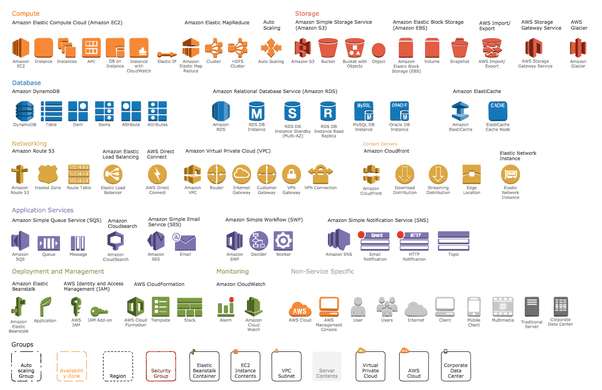
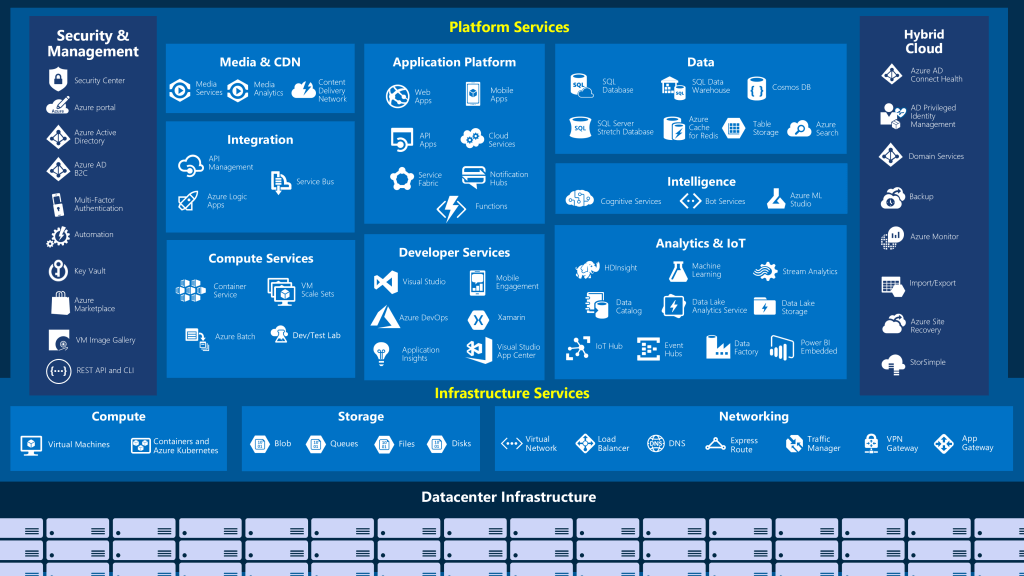
Just quick post to show and share what services for each cloud provider, be notice that the services can be change while we are talking now, and this is not a complete list of services but it’s only shows the basic one.
OCI Services

Amazon AWS

Microsoft Azure

Cheers
Osama
In gernal,
A load balancer distributes traffic evenly among each system in a pool. A load balancer can help you achieve both high availability and resiliency.
Say you start by adding additional VMs, each configured identically, to each tier. The idea is to have additional systems ready, in case one goes down, or is serving too many users at the same time.
Azure Load Balancer is a load balancer service that Microsoft provides that helps take care of the maintenance for you. Load Balancer supports inbound and outbound scenarios, provides low latency and high throughput, and scales up to millions of flows for all Transmission Control Protocol (TCP) and User Datagram Protocol (UDP) applications. You can use Load Balancer with incoming internet traffic, internal traffic across Azure services, port forwarding for specific traffic, or outbound connectivity for VMs in your virtual network.
When you manually configure typical load balancer software on a virtual machine, there’s a downside: you now have an additional system that you need to maintain. If your load balancer goes down or needs routine maintenance, you’re back to your original problem.
If all your traffic is HTTP, a potentially better option is to use Azure Application Gateway. Application Gateway is a load balancer designed for web applications. It uses Azure Load Balancer at the transport level (TCP) and applies sophisticated URL-based routing rules to support several advanced scenarios.
Benefits
What is a Content Delivery Network (CDN)?
A content delivery network (CDN) is a distributed network of servers that can efficiently deliver web content to users. It is a way to get content to users in their local region to minimize latency. CDN can be hosted in Azure or any other location. You can cache content at strategically placed physical nodes across the world and provide better performance to end users. Typical usage scenarios include web applications containing multimedia content, a product launch event in a particular region, or any event where you expect a high-bandwidth requirement in a region.
DNS
DNS, or Domain Name System, is a way to map user-friendly names to their IP addresses. You can think of DNS as the phonebook of the internet.
How can you make your site, which is located in the United States, load faster for users located in Europe or Asia?
network latency in azure
Latency refers to the time it takes for data to travel over the network. Latency is typically measured in milliseconds.
Compare latency to bandwidth. Bandwidth refers to the amount of data that can fit on the connection. Latency refers to the time it takes for that data to reach its destination.
One way to reduce latency is to provide exact copies of your service in more than one region, or Use Traffic Manager to route users to the closest endpoint, One answer is Azure Traffic Manager. Traffic Manager uses the DNS server that’s closest to the user to direct user traffic to a globally distributed endpoint, Traffic Manager doesn’t see the traffic that’s passed between the client and server. Rather, it directs the client web browser to a preferred endpoint. Traffic Manager can route traffic in a few different ways, such as to the endpoint with the lowest latency.
Cheers
Osama