Recursive Calls In Oracle

you will find Recursive Call in AWR at most , and you have to understand what we mean in this , why we use it , Simple way to discuss this . its below .

WHAT ARE RECURSIVE CALLS?

In Oracle, a recursive call is a call, for example, that must be completed before the user’s SQL can be completed.

Say you wanted to order a pizza for delivery. You make one call, place your order, and wait for your pizza.

You do NOT call the kitchen staff directly and tell them how to make your pizza , call the cashier to give him your credit card number, call the delivery man and tell him to pick up your pizza and bring it to your house.

Nope, you make one call, not three. The person you place your order with makes those “recursive” calls to the kitchen and delivery staff to make sure your order is complete.

The kitchen staff may make additional “recursive” calls (“Where are the mushrooms?”) as may the delivery man (“Where is that street located?”).

You don’t care about these details, you just want your pizza.

WHAT KINDS OF RECURSIVE CALLS DOES ORACLE MAKE?

As you can tell from our pizza example, Oracle will make a recursive call whenever it has to.

Some examples of when it “has to” include:

you want to insert data into a DMT, but all extents are full and news ones need to be allocated to hold your data

you’re doing something on a table that causes a trigger to fire (e.g. – don’t allow inserts if it’s Saturday)

performing DDL

data dictionary cache needs info about objects during parsing .

you have PL/SQL units that include SQL statements (like a stored procedure that inserts into a table, or a function that selects from a table)

TUNING RECURSIVE CALLS???

I hope you can see from this brief discussion that the concept of tuning recursive calls is not as easy as configuring the Recursive Program Interface (RPI).

Tuning depends on several factors, the two biggest being what are you trying to do and what version are you on?

Sometimes recursive calls indicate a problem, sometimes they don’t. Can you see why?

I hear and am asked about the notion that recursive calls should always be less than “real” calls. I ask “Why?”

If I have a db app that only accesses the db via stored procedures and each of my procedures issues an average of 10 DML statements within it, then why would a 10/1 ratio be bad?

But that’s not to say that analysing recursive calls is not an important tuning step. You need to know what your database is doing and why. Recursive calls could be a hidden problem.

Thank you
osama mustafa
ORA-00604: error occurred at recursive SQL level 1

Example :

SQL> alter user u1 identified by u1
2 / 
alter user u1 identified by u1
*
ERROR at line 1:
ORA-00604: error occurred at recursive SQL level 1
ORA-06502: PL/SQL: numeric or value error: character string buffer too small
ORA-06512: at line 6
 

Solution :

SQL> alter system set "_system_trig_enabled"=FALSE;
 
System altered.
 
 
Enjoy 
 
Osama Mustafa  

Oracle Secuirty Tips / SQLNET.ORA Part 2

Hi All ,

I post before about sqlnet.ora with parameter called invited_list , Exclude_list , assume  that i want to prevent sysdba to access database without password Simple Way .

SQLNET.AUTHENTICATION_SERVICES=NONE 


Setting “SQLNET.AUTHENTICATION_SERVICES” parameter to “NONE” in sqlnet.ora file will make it not possible to connect to the database without a password as sysdba. (sqlplus / as sysdba)

This parameter may also have the values : NTS for Windows NT native authentication, ALL for all authentication methods.

Authentication Methods Available with Oracle Advanced Security:

  • kerberos5 for Kerberos authentication
  • cybersafe for Cybersafe authentication
  • radius for RADIUS authentication
  • dcegssapi for DCE GSSAPI authentication

If authentication has been installed, it is recommended that this parameter be set to either none or to one of the authentication methods.

Enjoy

Thank you
Osama Mustafa

Script to Restart the OEM Agent When It Has Failed

Gaurav Batta has published this nice script to restart the OEM agent when it has failed:

$ cat agent_check.sh
#!/usr/bin/ksh
#
agent_status=`ps -ef|awk ‘{print $8}’|grep agent10g/bin/emagent`

if [[ -z $agent_status ]]
then
$AGENT_HOME/bin/emctl start agent
echo Agent started on server `hostname` at `date`
else
echo Agent is running fine on server `hostname` at `date`
fi

It is running every 30min.
crontab –l

00,30 * * * * /home/oemagent/agent_check.sh >> /home/oemagent/agent_status.log


Enjoy 


Thank you
Osama Mustafa

Tracking Alert Log file by x$dbgalertext

First i would thank CKPT for this amazing article that post in his blog .

Instead of reviewing whole alert log file for any Particular information, We can search using that key word from X$DBGALERTEXT Table.

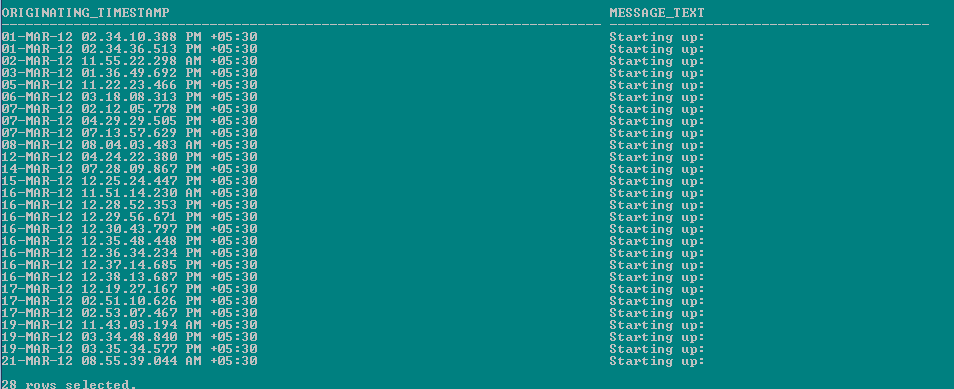
Grep The word “Starting Up” of Alert log file from Instance.


col ORIGINATING_TIMESTAMP for a40
col MESSAGE_TEXT for a80
set linesize 500
SELECT
originating_timestamp,
message_text
FROM
sys.x$dbgalertext
WHERE
message_text LIKE '%Starting up%';

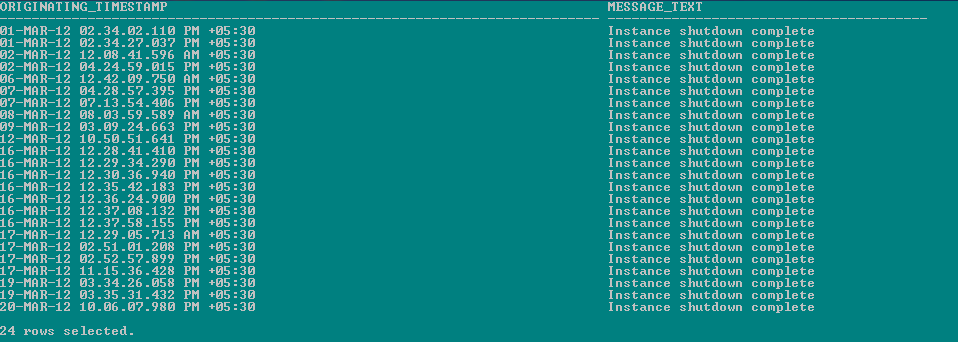
Grep The word “Instance shutdown complete” of Alert log file from Instance.

SELECT
originating_timestamp,
message_text
FROM
sys.x$dbgalertext
WHERE
message_text LIKE '%Instance shutdown complete%';

again thank you CKPT for this article since its useful for all DBA’s , you can check CKPT Blog From the above link

Thank you
Osama mustafa
 

WFMLRSVCApp.ear not found

I installed Oracle 11g and the installation didn’t find WFMLRSVCApp.ear file. I extracted two files (win64_11gR2_database_1of2.zip and win64_11gR2_database_2of2.zip) in two different folder disk1 and disk2. 

I solved the file not found issue by coping all the folders under disk2databasestageComponents to disk1databasestageComponents.

After restarting the installation it went like a charm and without any issues.

Or Maybe the error will be appear like this :

The same : ou should extract each of them and place win32_11gR2_database_2of2 content into win32_11gR2_database_1of2 folder before running installer.

Enjoy
 

Thank You 
Osama Mustafa

Flash_Recovery_Area

Mointer Space in Flash_recovery_are

1- sqlplus / as sysdba
2- Run the Below Query 

SELECT 
NAME,
TO_CHAR(SPACE_LIMIT, '999,999,999,999') AS SPACE_LIMIT,
TO_CHAR(SPACE_LIMIT - SPACE_USED + SPACE_RECLAIMABLE, '999,999,999,999')
AS SPACE_AVAILABLE,
ROUND((SPACE_USED - SPACE_RECLAIMABLE)/SPACE_LIMIT * 100, 1)
AS PERCENT_FULL
FROM V$RECOVERY_FILE_DEST;

 There’s many scripts you can use to monitor FRA Or Arvhive I will post Few Of them :

Select file_type, percent_space_used from v$flash_recovery_area_usage;
SELECT NAME,
TO_CHAR(SPACE_LIMIT, '999,999,999,999') AS SPACE_LIMIT,
TO_CHAR(SPACE_LIMIT - SPACE_USED + SPACE_RECLAIMABLE, '999,999,999,999') AS SPACE_AVAILABLE,
ROUND((SPACE_USED - SPACE_RECLAIMABLE)/SPACE_LIMIT * 100, 1) AS PERCENT_FULL
FROM V$RECOVERY_FILE_DEST;


 Query the V$RECOVERY_FILE_DEST view to find out the current location, disk quota, space in use, space reclaimable by deleting files, and total number of files in the Flash Recovery Area. For example :

SQL> SELECT * FROM V$RECOVERY_FILE_DEST;

NAME                        SPACE_LIMIT SPACE_USED SPACE_RECLAIMABLE NUMBER_OF_FILES
----------- ---------- ----------------- ---------------
D:\Oracle\flash_recovery_area 838860800  292490752                 0              44

Query the V$FLASH_RECOVERY_AREA_USAGE view to find out the percentage of the total disk quota used by different types of files. Also, you can determine how much space for each type of file can be reclaimed by deleting files that are obsolete, redundant, or already backed up to tape. For example :

SELECT * FROM   V$FLASH_RECOVERY_AREA_USAGE;

FILE_TYPE    PERCENT_SPACE_USED PERCENT_SPACE_RECLAIMABLE NUMBER_OF_FILES
------------ ------------------ ------------------------- ---------------
CONTROLFILE                   0                         0               0
ONLINELOG                     2                         0              22
ARCHIVELOG                 4.05                      2.01              31
BACKUPPIECE                3.94                      3.86               8
IMAGECOPY                 15.64                     10.43              66
FLASHBACKLOG                .08                         0               1
 

You Can check 
Flash Recovery area – Space management Warning & Alerts [ID 305812.1]

 thank you
Osama Mustafa

Oracle General Ledge/Posting Single Ledger program takes too long

After suffering about 6 hours of tuning EBS R12 on Customer Side , Since Posting not not working , but status on Concurrent Is Running and hang in some where .

Cause

This is Bug 9707317.

Posting Performance issue caused by Rule Hint being hard coded in the glsasi.lpc file.

The program uses the “/*+ rule */” hint, but it should be using “/*+ CHOOSE */” or none, which is shown in the tkprof’d trace file explain plan.

Also the wrong index is being used, it is using GL_ACCOUNT_HIERARCHIES_01 when it should be using the GL.GL_ACCOUNT_HIERARCHIES_U2 index.

Solution

To implement the solution, please execute the following steps:

1. Download and review the readme and pre-requisites for the relevant patch.

For 12.0.x patch 9707317:R12.GL.A
For 12.1.x patch 9707317:R12.GL.B

Note: If a password is required to download the patch, please open a service request to get the proper password.

2. Ensure that you have taken a backup of your system before applying the recommended patch.

3. Apply the patch in a test environment.

4. Confirm the following file versions:

For 12.0 Patch 9707317:R12.GL.A

src/post glpmai.opc 120.21.12000000.2
src/summary glsasi.lpc 120.3.12000000.2

For 12.1 Patch 9707317:R12.GL.B

src/post glpmai.opc 120.24.12010000.1
src/summary glsasi.lpc 120.3.12010000.1
You can use the commands like the following:
strings -a $XX_TOP/filename |grep ‘$Header’

5. Retest the issue.

6. Migrate the solution as appropriate to other environments.

Enjoy

thank you
Osama mustafa

Unable to login to Database Because Archivelog

Regarding to heavy duty On Database , Database start Generates Archive log with time size for flash recovery become full , so what i have to do :

first you will not be able login for database or rman

Solution :

Step1 :

-Go to archivelog detestation and delete archivelog (old first) , if you have space on your server you can move them from direcotry to another .

-Flash Recovery On ASM , Follow the below steps

export ORACLE_SID=+ASM1
asmcmd 

now you are inside ASM head to Archivelog destation and delete archive log manually (old first )

 Step 2 :

Now you will be able to login to rman :

Run
{

ALLOCATE CHANNEL c1 DEVICE TYPE DISK FORMAT '/u01/'; 
backup archivelog all delete input ;
release c1 ; } 

 Now you clean Archivelog .

THis solution for Both Cluster and Single Node Database

Enjoy

Thank you
Osama mustafa