WorkFlowCA: NullError : Could not Connect to the Remote Server

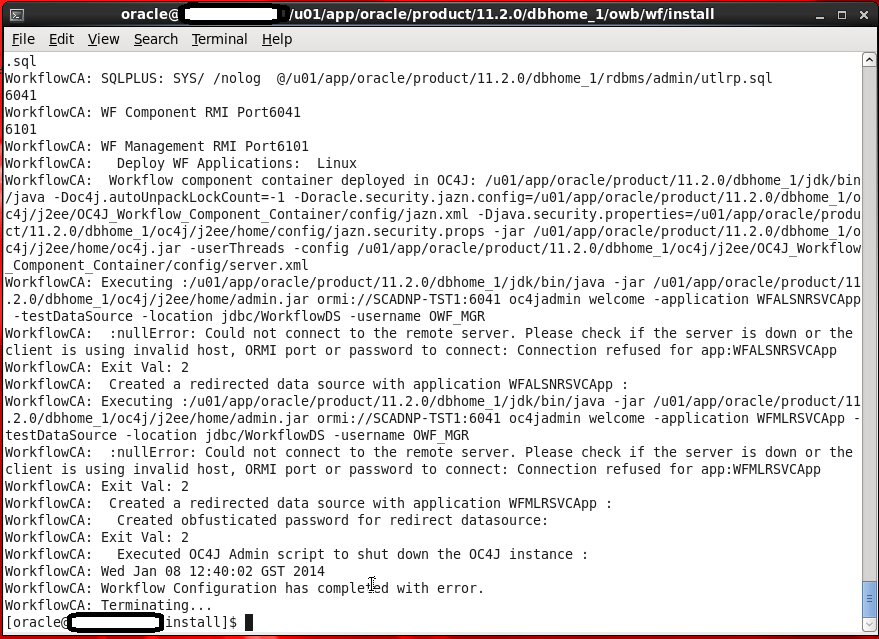
This Error Appear When Trying to Run Oracle Ware-House Builder On Linux , in this tools you are connecting to Database to Setup some configuration for Workflow in DWH, Every Thing Run Successfully Till i received the error in the picture :

WorkFlowCA: NullError : Could not Connect to the Remote Server

You Can ignore this error simply , I didn’t configure Oracle Enterprise manager in my database , which is the reason for this Error.if you want create enterprise manager and re run the tool again.

Thank you
Osama Mustafa 

Oracle Linux 6.5 released

Oracle Announced the release of Oracle Linux 6.5, The Latest Version Of Oracle Linux, It’s only Other Operating System Because this version Contain Some New Features :

  • Unbreakable Enterprise Kernel Release 3
  • Support DTrace.
  • Delivering Better Performance, scalability   and reliability For Companies.
  • New File System : btrfs enable administrators to implement an efficient incremental backup mechanism using file system snapshots.
And More Features.
You Can download Oracle Linux 6.5 Here
It will be Available soon On Oracle Software Delivery Here

ODI-1545: Missing odi supervisor credentials in credential store map

This Error appear because missing SuperVisor User Credentials, and you need to create it using wls.sh command, And Since we are working On Oracle_ODI So you have to use WLST.sh from there.

cd /u01/app/fmw/Oracle_ODI1/common/bin
./wlst.sh

and do the below

Jython scans all the jar files it can find at first startup. Depending on the system, this process may take a few minutes to complete, and WLST may not return a prompt right away.

Welcome to WebLogic Server Administration Scripting Shell

Type help() for help on available commands

wls:/offline> connect (‘weblogic’,’welcome1′,’t3://localhost:7001′)

 Connecting to t3://10.40.74.210:7001 with userid weblogic …
Successfully connected to Admin Server ‘AdminServer’ that belongs to domain ‘IDDomains’.

Warning: An insecure protocol was used to connect to the
server. To ensure on-the-wire security, the SSL port or
Admin port should be used instead.

wls:/IDDomains/serverConfig> createCred(map=”oracle.odi.credmap”, key=”SUPERVISOR”, user=”SUPERVISOR”, password=”sysadmin1″, desc=”Key for Supervisor”)
Location changed to domainRuntime tree. This is a read-only tree with DomainMBean as the root.
For more help, use help(domainRuntime)

wls:/IDDomains/serverConfig> createCred(map=”oracle.odi.credmap”, key=”odi11g”, user=”weblogic”, password=”welcome1″, desc=”WLS SUPERVISOR Credential”)

wls:/IDDomains/serverConfig> disconnect()
Disconnected from weblogic server: AdminServer
wls:/offline>
wls:/offline>
wls:/offline>
wls:/offline> exit()

The Red Line for to define 3 command you will use.

Some Link :
1- How To Configure The ODI JavaEE Agent and ODI Console On WebLogic Server (Doc ID 1300550.1)
2- Working with ODI Here

Thank you
Osama Mustafa
API5036: Client version 11.2.0.3.0 is not compatible with repository version 11.2.0.4.0

To Solve this error Follow the below Steps :

  • Edit /owb/bin/admin/Preference.properties
  • And set the following parameter :-
    • OverrideRepositoryVersionCheck=true
    • OverrideRuntimeVersionCheck=true
Thank you
Osama Mustafa

Create Group using Em12c

Sometimes you need to create Certain group for Enterprise manager to make monitor more easy , sepcially if you have lot of agent and components such as database , Host , application server … so if you want to manage them individually it will consume time and seems to be impossible.

Enterprise manager provide you with Group Features to combine components, and there’s two type :

  • Target at the same type 
  • Target contain different components such as database, Application server , Host.

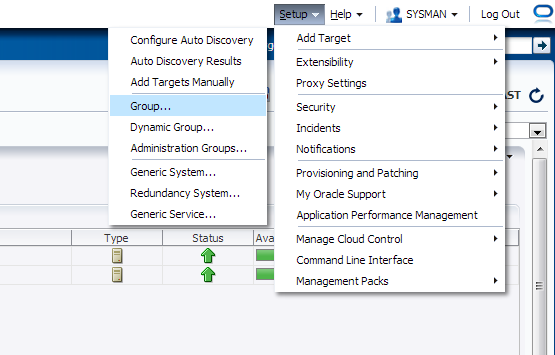
Check the below screenshot :

From Setup –> Add Target –> Group

you have five tab each one of them contain different parameters, Choose the right option that works with your Work:

After Choose the name for the group you need to add Agents, from search button new popup screen will be open choose which agent type you want.

Another example on Chart tab :

After Create Group :

For More information about Enterprise Manager 12c Group Read Oracle Documentation Here
Thank you 
Osama mustafa

unpack.sh Error -name=Value

The pack command creates a template archive (.jar) file that contains a snapshot of either an entire domain or a subset of a domain. You can use a template that contains a subset of a domain to create a Managed Server domain directory hierarchy on a remote machine.

The unpack command Creates a full domain or a subset of a domain used for a Managed Server domain directory on a remote machine. You may use unpack only with a template compatible with your current installation. The template can be any of the following:

  •  A domain template provided by BEA and packaged with your current installation
  •  A domain template created using the Domain Template Builder or WLST Offline
  •  A domain template created using the pack command
  •  A Managed Server template created using the pack command. A Managed Server template, by default, contains only the files necessary for creating a Managed Server domain directory.
You Can Check Oracle Documentation here for more information about the above commands.
When Trying to use unpack command with the below command:

./unpack.sh -domain=/u01/app/oracle/domains/IDMDomains -template=/u01/shared/IDMdomains.jar

The below error appear :

ERROR !!! ./unpack.sh -name=Value Missing

The Solution is simple :

-template attribute should come first. 

./unpack.sh  -template=/u01/shared/IDMdomains.jar -domain=/u01/app/oracle/domains/IDMDomains

Thank you
Osama Mustafa

Start Managed Server Failed With "Access not allowed for subject: principals=[]"

When Trying to Start Managed Server From Admin Console it’s Failed with

weblogic.management.NoAccessRuntimeException: Access not allowed for subject: principals=[], on ResourceType: Application Action: write, Target: Deployed”

After Check Everything and Configuration i found the following :

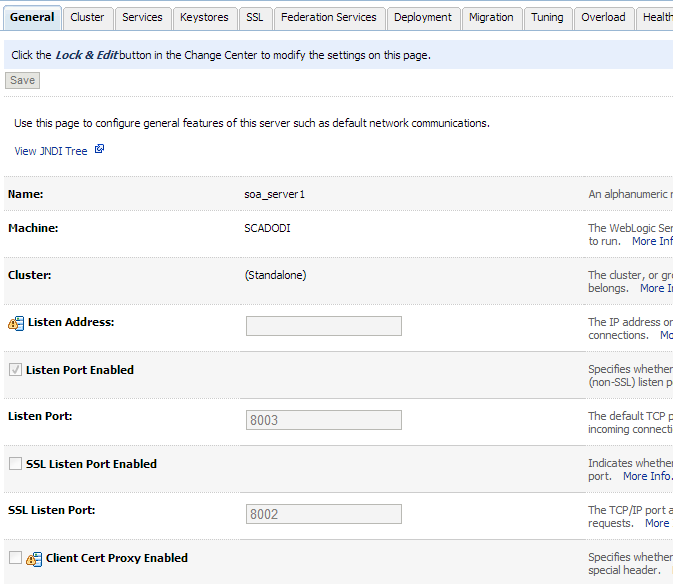
  • My Admin Server Already have More than one managed Server : SOA, ODI , BAM.
  • SOA and ODI Using the Same Port which is 8001 Which caused Conflict.

I Changed SOA Port to Work On 8003 From Admin Server Console. Like the Below

Are we in the Cloud

What is The Cloud Computing ? Are We in the Cloud ? Where Can I Find it ? Simple Question but It’s has been asked a lot.

Simply Cloud Computing Storing and accessing Data and programs Using Over Internet instead of Local Computer.

I Found the Below Chart on the internet and it’s The Best Describe for the cloud “Source Cloud For Dummies” :

Cloud is the next Stage for everything, Because it can be defined as set of hardware,Platforms , Databases, Networking it will safe lot of money for the companies.

Check the below video :

You need to know some  Definition you will heard when we are talking about Cloud:
Xaas is Term said for number of things “X as a Services” / ” Anything as a Services”

The Most Common Examples on the above :

  • DBaas : Database as a Service.
  • Paas : Platform as a Service.
  • SaaS : Software as a Service/Storage as a Service.
  • IaaS : Infrastructure as a Service.
  • Caas : Communication as Service.
  • Naas : Network as Service.
It’s New Future.
Thank you 
Osama mustafa