Oracle Java SE Critical Patch Released

“The June 2013 Oracle Java SE Critical Patch Update was released on June 18, 2013. Oracle strongly recommends applying the patches as soon as possible.

The Critical Patch Update Advisory is the starting point for relevant information. It includes the list of products affected, a summary of the security vulnerabilities, and a pointer to obtain the latest releases and patches.”

June 2013 Oracle Java SE Critical Patch Update: Here

The next four scheduled dates for Oracle Java SE Critical Patch Updates are:
16 April 2013
18 June 2013
15 October 2013
14 January 2014

Thank you
Osama mustafa

Example on how to add Virtual Host On em12c

Active/Passive Clusterware , how to use it with em12c ? How to monitor OS and Database ? As One Single host Agent will deploy on Both Hosts without Any problem but in this case you will only Deal with one Host as Single not as Clusterware.

i will provide example how to add active/passive Clusterware to em12c :
First Agent should be deploy for single Host not acitve/passive clusterware, after do that Run the below command from Single Host 
 
emctl deploy agent -o -n “Service_name” -A  
The Below Commands should be run from new agent Location 
emctl secure agent
emctl start agent
emctl config agent addinternaltargets
**I prefer to set Service_name —> OracleAgent12cShared.
** Re run the above command on the passive Node after Failover shared storage on it.
Thank you 
Osama Mustafa
Some notes you maybe need for Em12c

I would like to share some MOS  Notes that could be useful please note that You can share yours in comments

EM12c R2: How to Upgrade to EM 12c R2 – Two System Method [ID 1363162.1]
EM12c: How to install JVM Diagnostics (JVMD) in Cloud Control [ID 1493862.1]
EM12c: How To Upgrade Plugin On 12.1 Management Agent [ID 1490762.1]
How to Install 12c Agent on Virtual Host [ID 1469995.1]

EM12c Upgrade : Agents Are Not Listed in the Upgrade Console With Error Inventory Data Is Missing From the Repository [ID 1489109.1]

EM 12c : How to Discover All Targets On a Single Host After Agent Installation ? [ID 1386817.1]
EM 12c : Understanding Promote Target Functionality [ID 1386161.1]

EM12c How to Perform Automatic Host Discovery Using IP Scan Method ? [ID 1386811.1]
EM12c Agent status Fails With “Peer Not Authenticated” Error. [ID 1510706.1]

EM12C: Agent Installation Failed With Error: “OMS_HOST and EM_UPLOAD_PORT is not active” [ID 1371873.1]

How To Upgrade Java Diagnostics In Enterprise Manager 12c With the Latest Patches [ID 1534023.1]
EM12c Cloud Control: Required Patches for Discovery and Monitoring of Coherence Targets [ID 1526316.1]

EM12c : Patch Conflict While Applying Patch 14040891 [ID 1479092.1]
Unable To Add host targets with EM12c – Valid Host Name check fails [ID 1433843.1]
Release Schedule of Current Enterprise Manager Releases and Patch Sets (10g, 11g, 12c) [ID 793512.1]
EM 12c: How to Deploy a Plug-In from Enterprise Manager Cloud Control 12.1.0.1 [ID 1364030.1]

Thank you
Osama Mustafa
Increase /tmp Using Zfs Solaris 11

zfs create -V 1gb rpool/newtmp
swap -a /dev/zvol/dsk/rpool/newtmp

 Old Size :

swap                   159M   212K       159M     1%    /tmp
rpool/export            78G    32K        67G     1%    /export
rpool/export/home       78G    32K        67G     1%    /export/home
rpool/export/home/omnix
                        78G   790K        67G     1%    /export/home/omnix
oracle                 118G   1.1M        11G     1%    /oracle
rpool                   78G    39K        67G     1%    /rpool
oracle/u01             118G    93G        25G    79%    /u01
/oracle                 11G   1.1M        11G     1%    /home/oracle

New Size :

root@HMMDB:/# zfs create -V 1gb rpool/extraswap
root@HMMDB:/# zfs list
NAME                      USED  AVAIL  REFER  MOUNTPOINT
oracle                    107G  10.6G  1.11M  /oracle
oracle/u01               92.6G  25.0G  92.6G  /u01
rpool                    12.6G  65.6G    39K  /rpool
rpool/ROOT               5.39G  65.6G    31K  legacy
rpool/ROOT/solaris       5.39G  65.6G  5.03G  /
rpool/ROOT/solaris/var    316M  65.6G   312M  /var
rpool/dump               1.03G  65.7G  1.00G  –
rpool/export              854K  65.6G    32K  /export
rpool/export/home         822K  65.6G    32K  /export/home
rpool/export/home/omnix   790K  65.6G   790K  /export/home/omnix
rpool/extraswap          1.03G  66.7G    16K  –
rpool/swap               5.16G  65.8G  5.00G  –

root@HMMDB:/# swap -a /dev/zvol/dsk/rpool/extraswap

Now Check New Size for /tmp

swap                   1.2G   212K       1.2G     1%    /tmp
rpool/export            78G    32K        66G     1%    /export
rpool/export/home       78G    32K        66G     1%    /export/hom

Thank you
Osama Mustafa
Flashback version query/Operation Column is Unknown

SQL > SELECT START_SCN,OPERATION,LOGON_USER,XID FROM  FLASHBACK_TRANSACTION_QUERY WHERE TABLE_NAME=’TEST’;

The Output will be like this :

XID              TABLE_OWNER TABLE_NAME OPERATION           LOGON_USER UNDO_SQL
—————- ———– ———- ——————————– ———-              —————
0600090064030000              TX         UNKNOWN                          TEST
0600090064030000              TX         UNKNOWN                          TEST

To avoid Unknown Status enable  supplemental logging by

SQL> ALTER DATABASE ADD SUPPLEMENTAL LOG DATA ;

Database altered.

Thank you
Osama mustafa

Configure Email Notification and Incidents Rule

Before I talked about how to Install and Add Target in Enterprise Manager 12c today i will talk how to enable Email notification and Incidents Rule Step By Step and as usual you can download the article as PDF file :

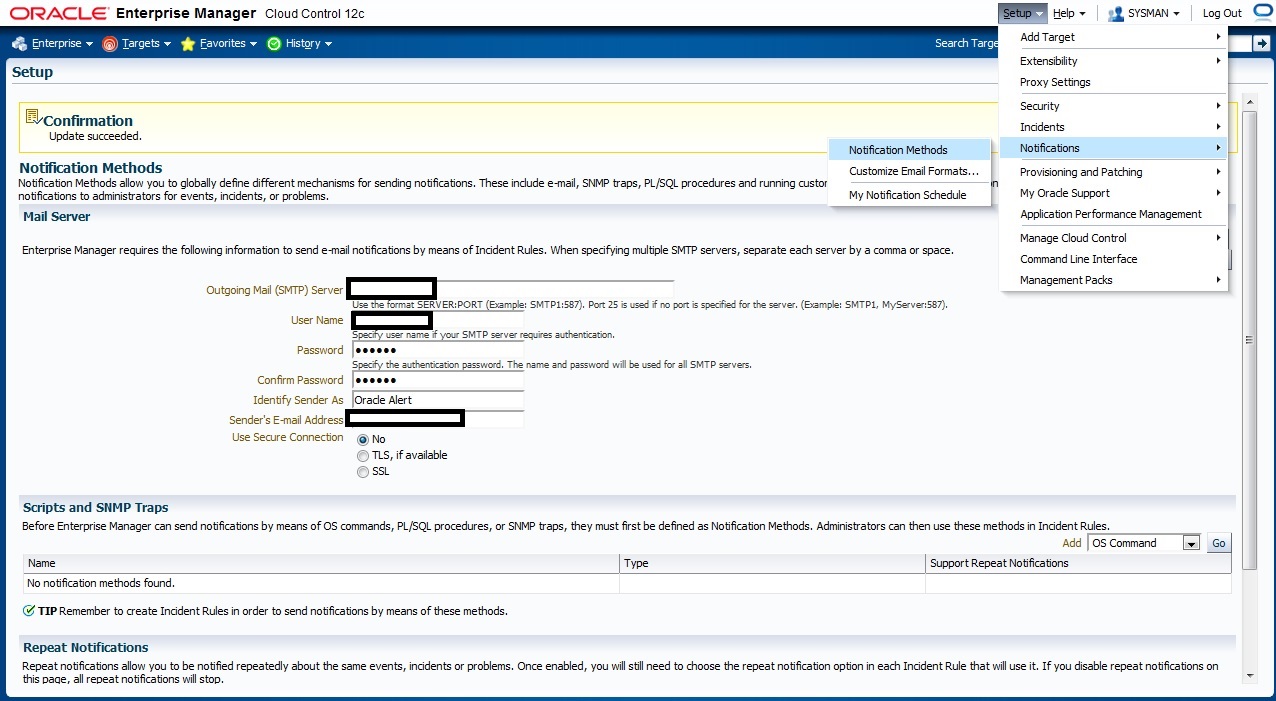
Check the below picture the fill with Correct Parameter to enable email notification First

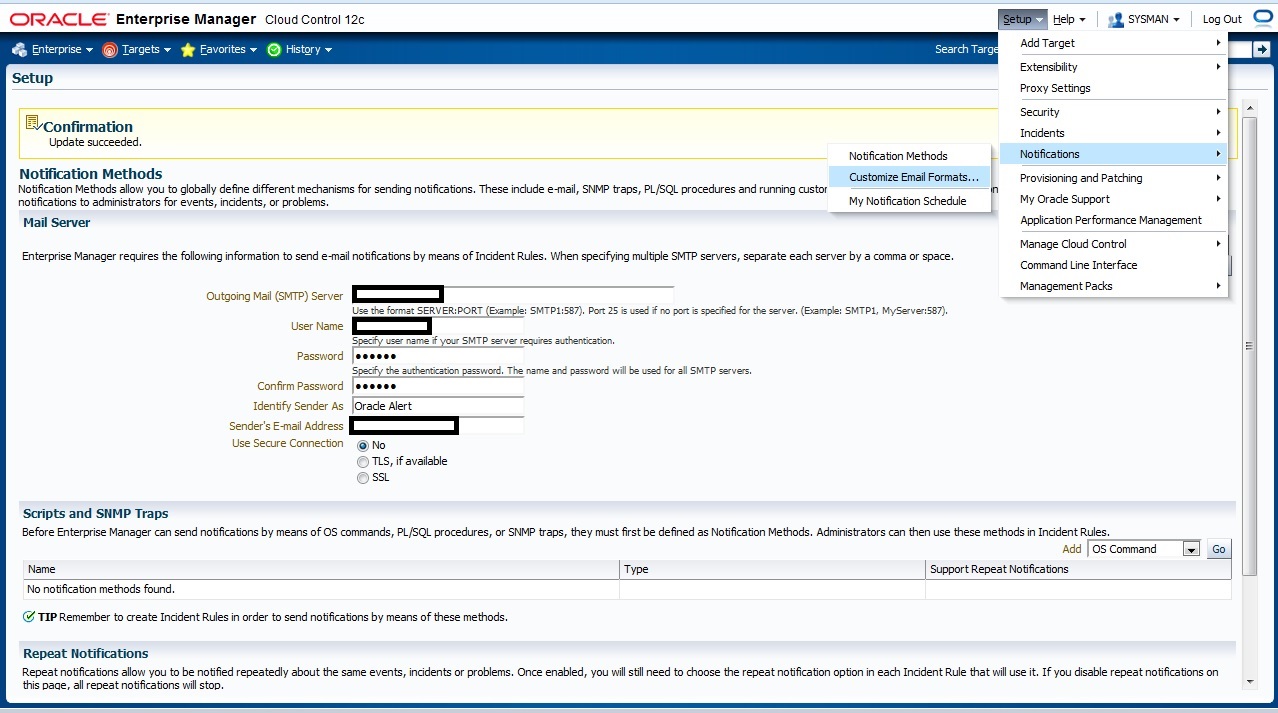
If you need to customize your Email format that will be deliver to you go to the below section in em12c :

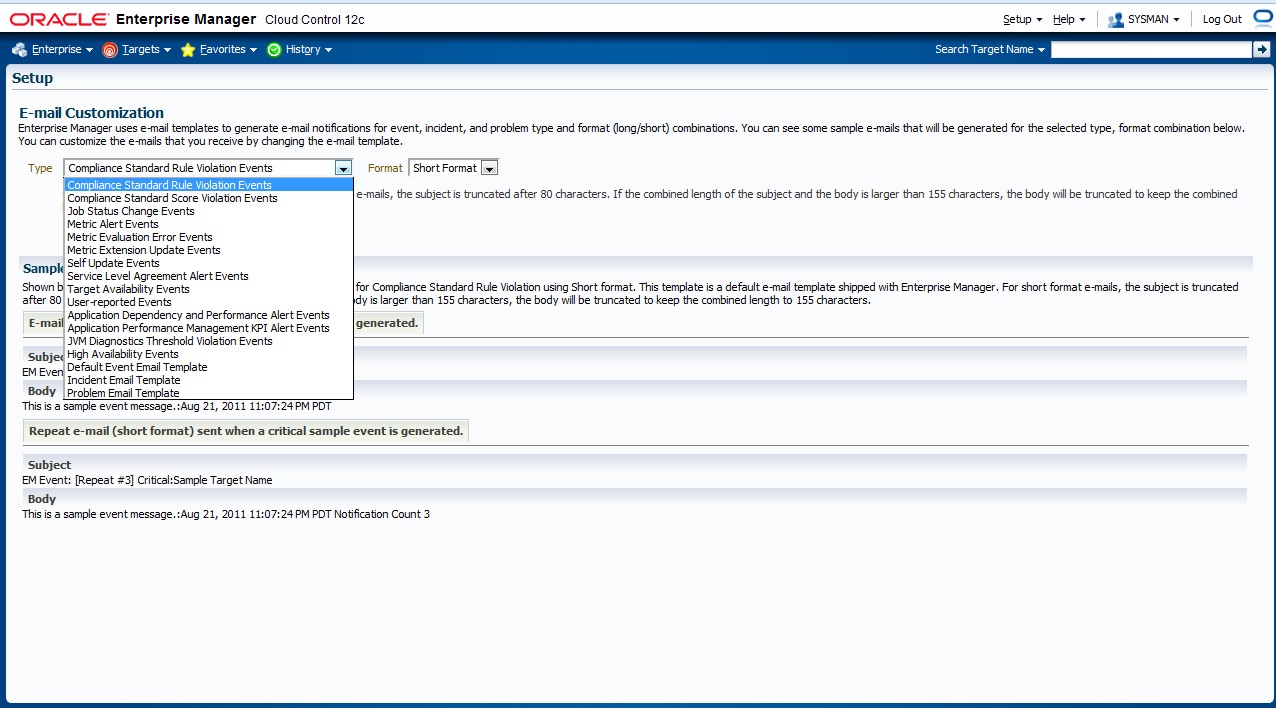
The Below Page will appear to you choose which Type you want to customize

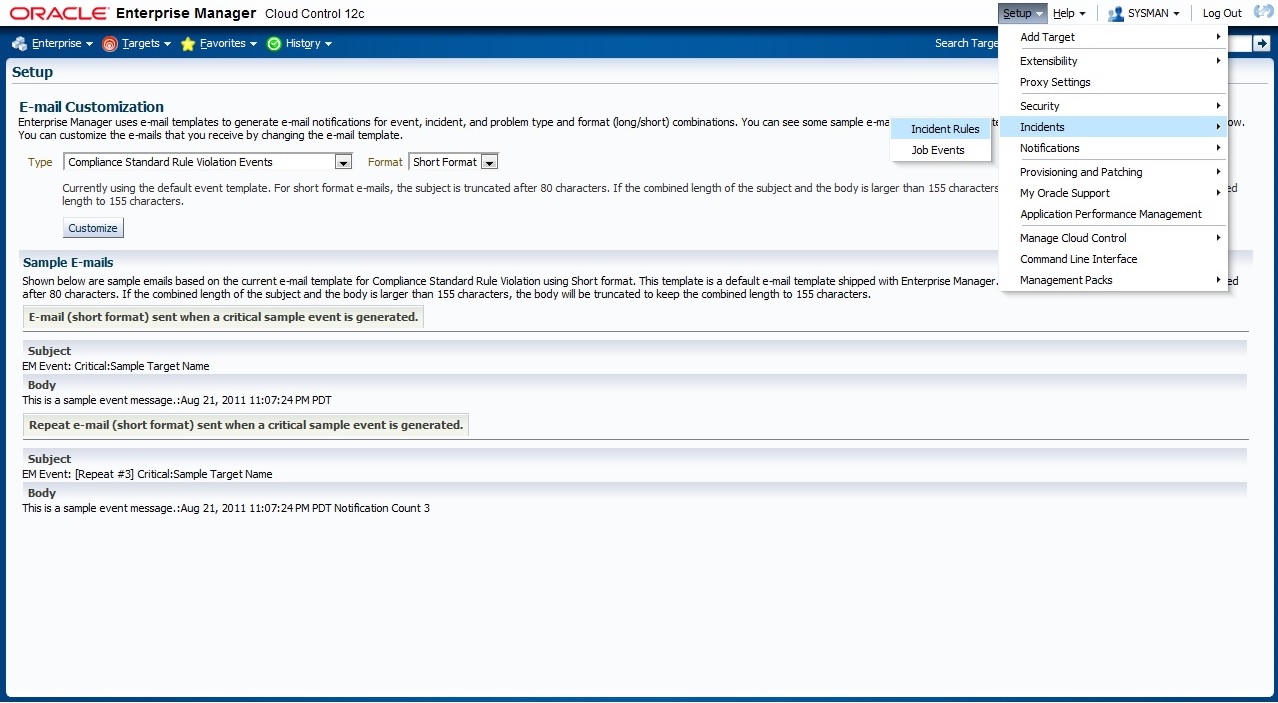
now Let’s work On Incident Rules, From Setup –> Incidents –> Incident Rules

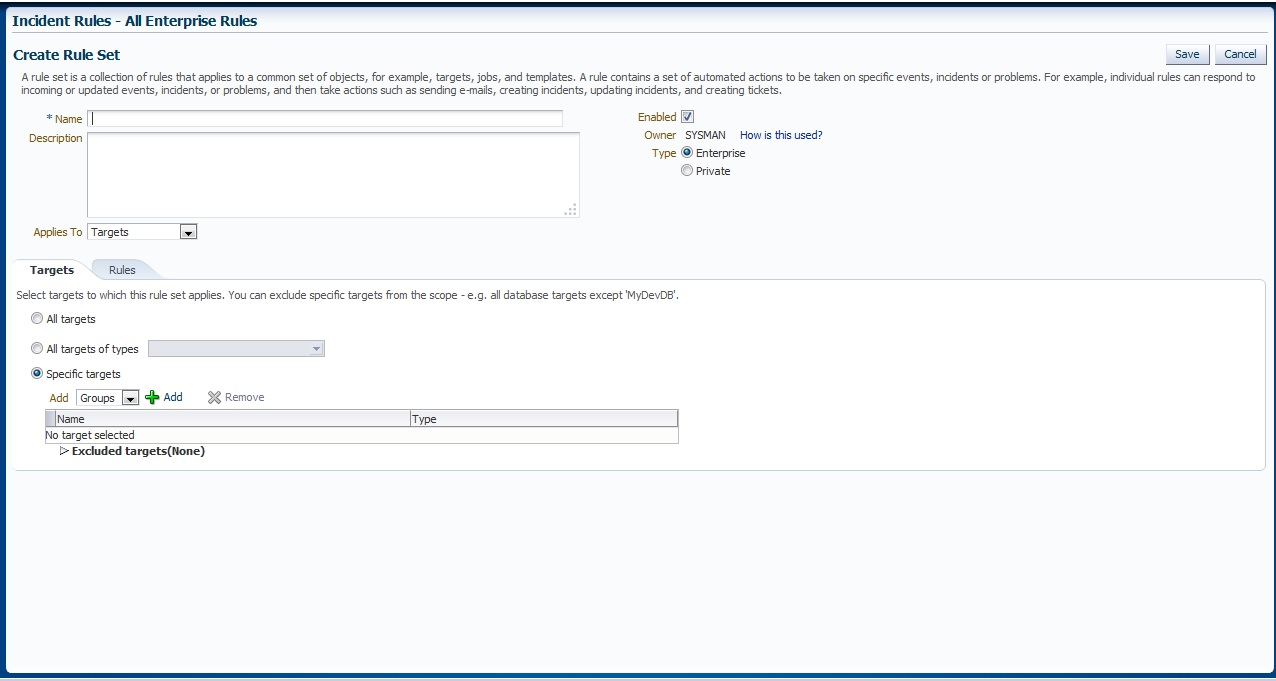
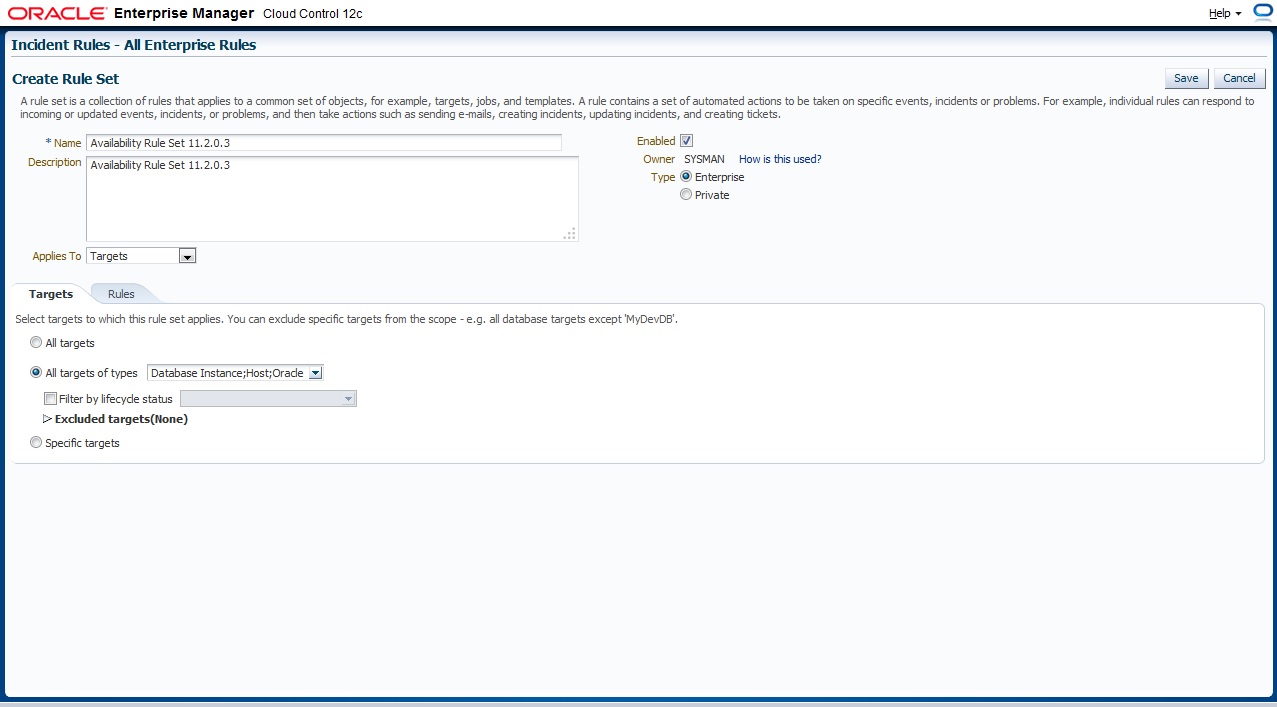
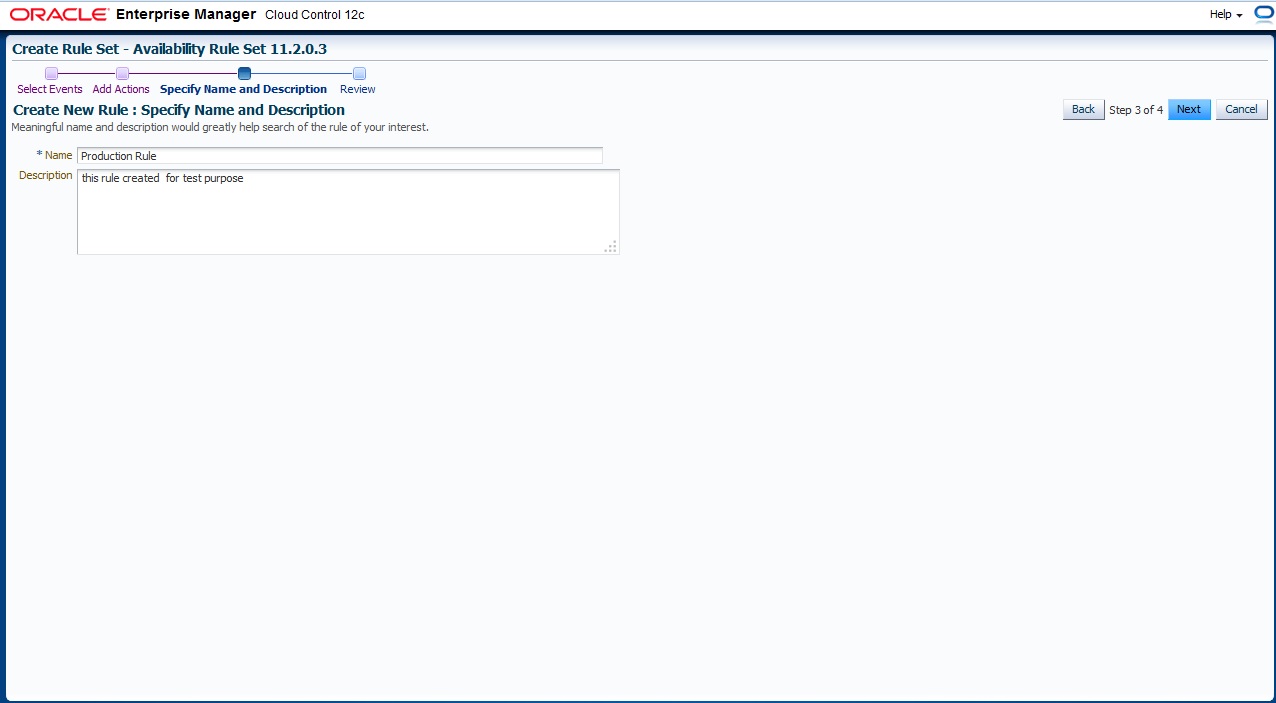
New Page will appear With Some Content All you have to do is Press “Create Rule Set” and below page will appear, Choose the name for Rule Set, which target this Rule set will be applied

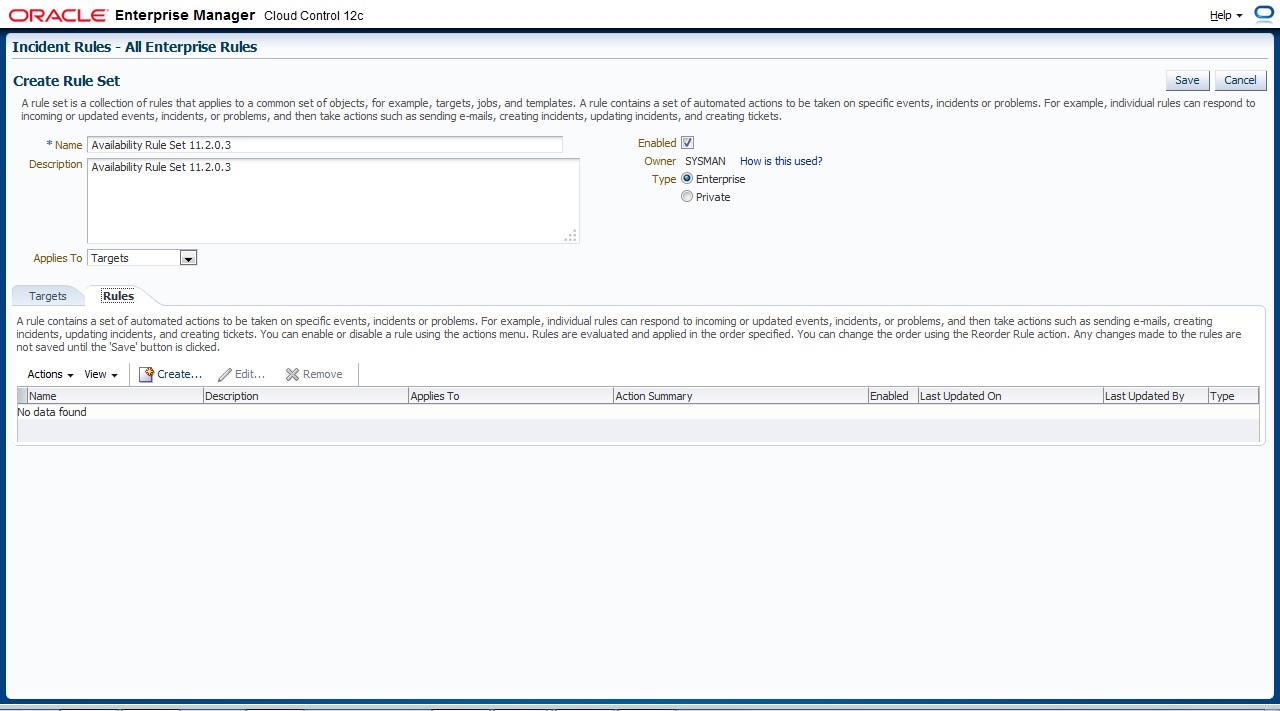
On Second Tab ” Rule” Press Create to add new One

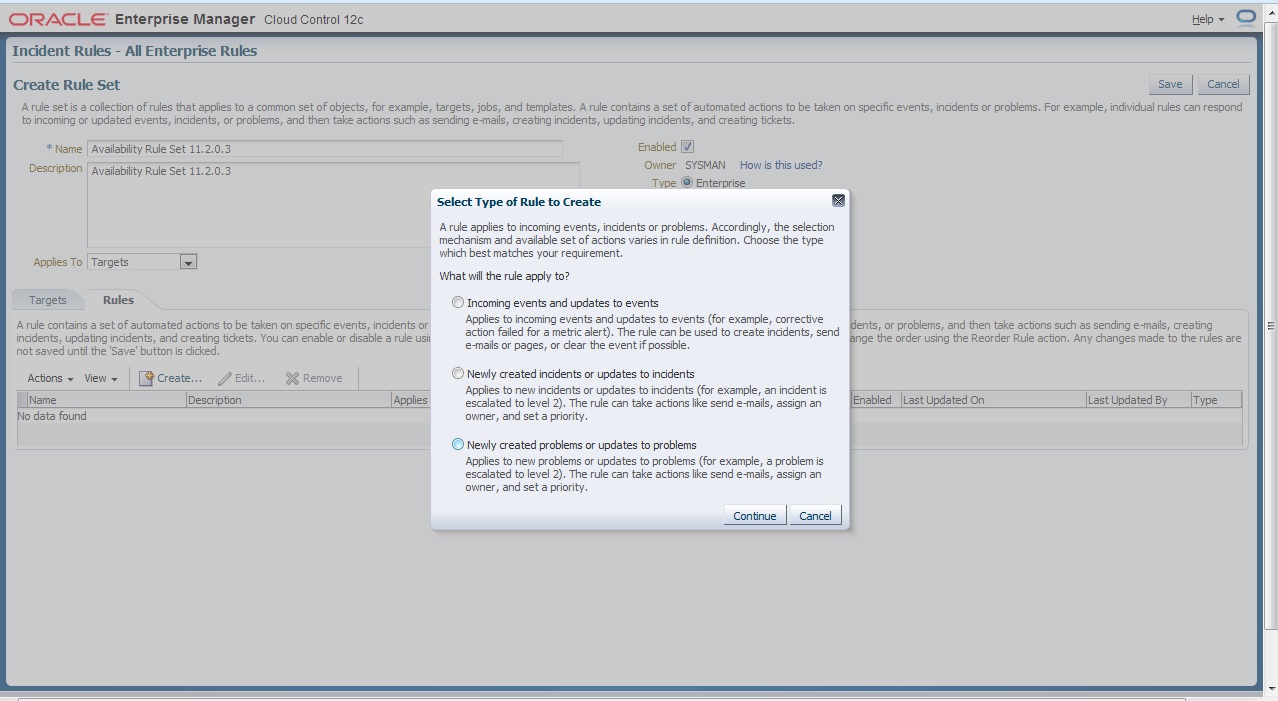
There’s Description for each Type I will choose the first one

After That follow the instruction to create your own Rule Set ,
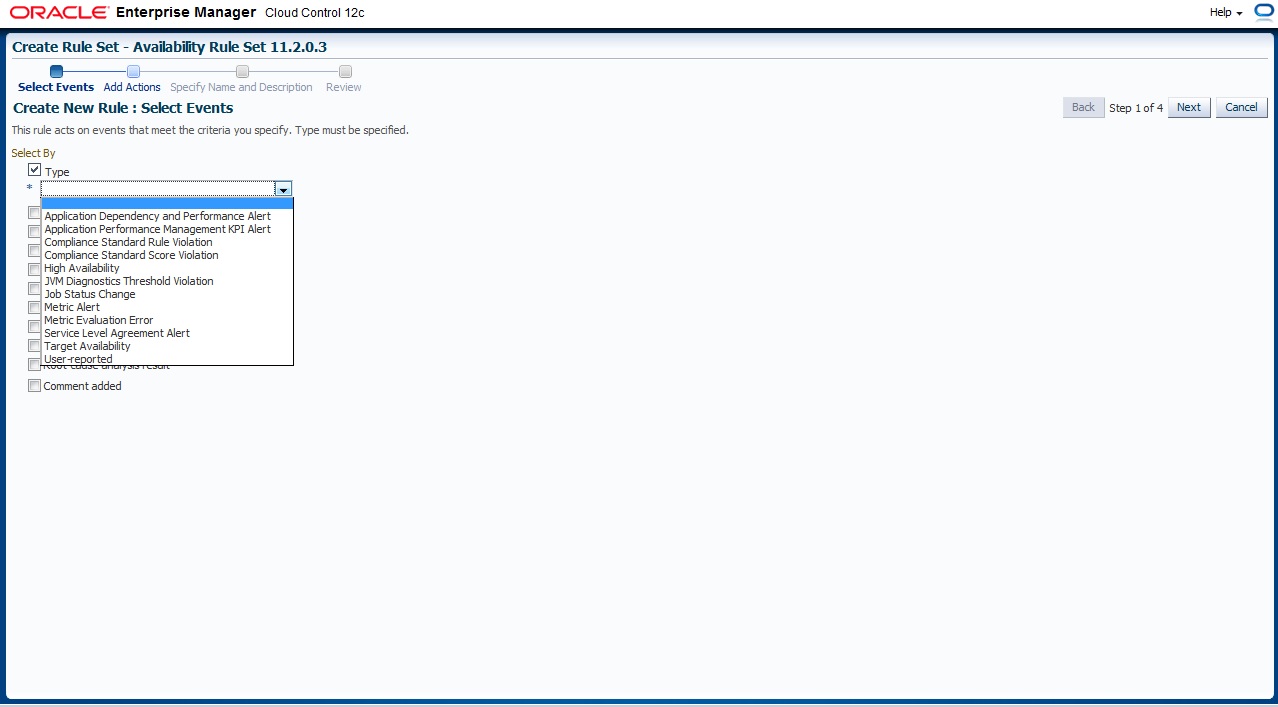
First you need to choose which type of event

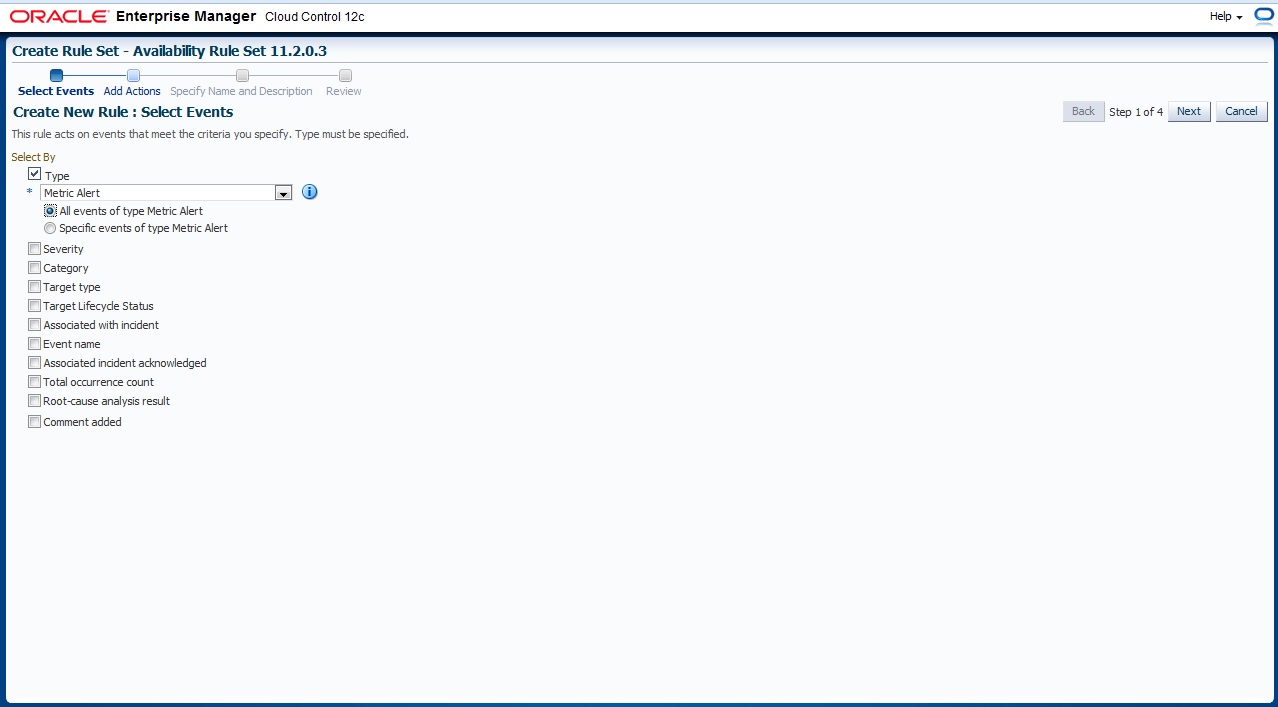
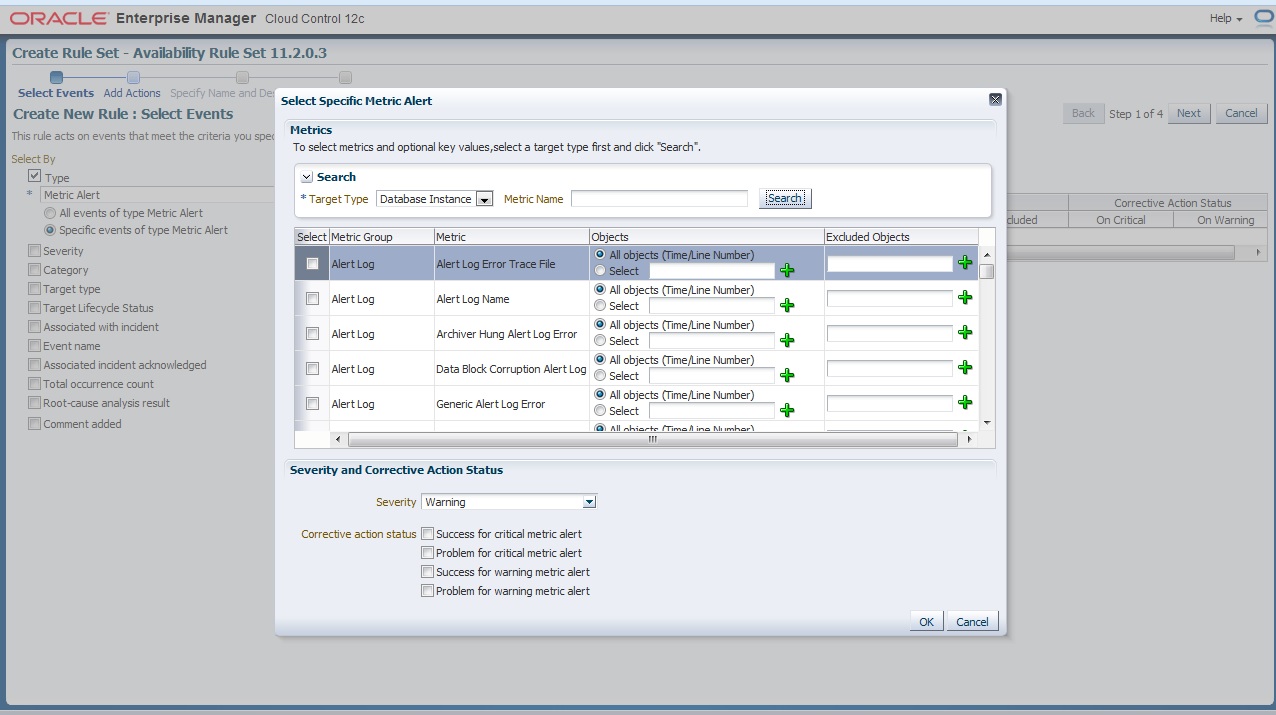
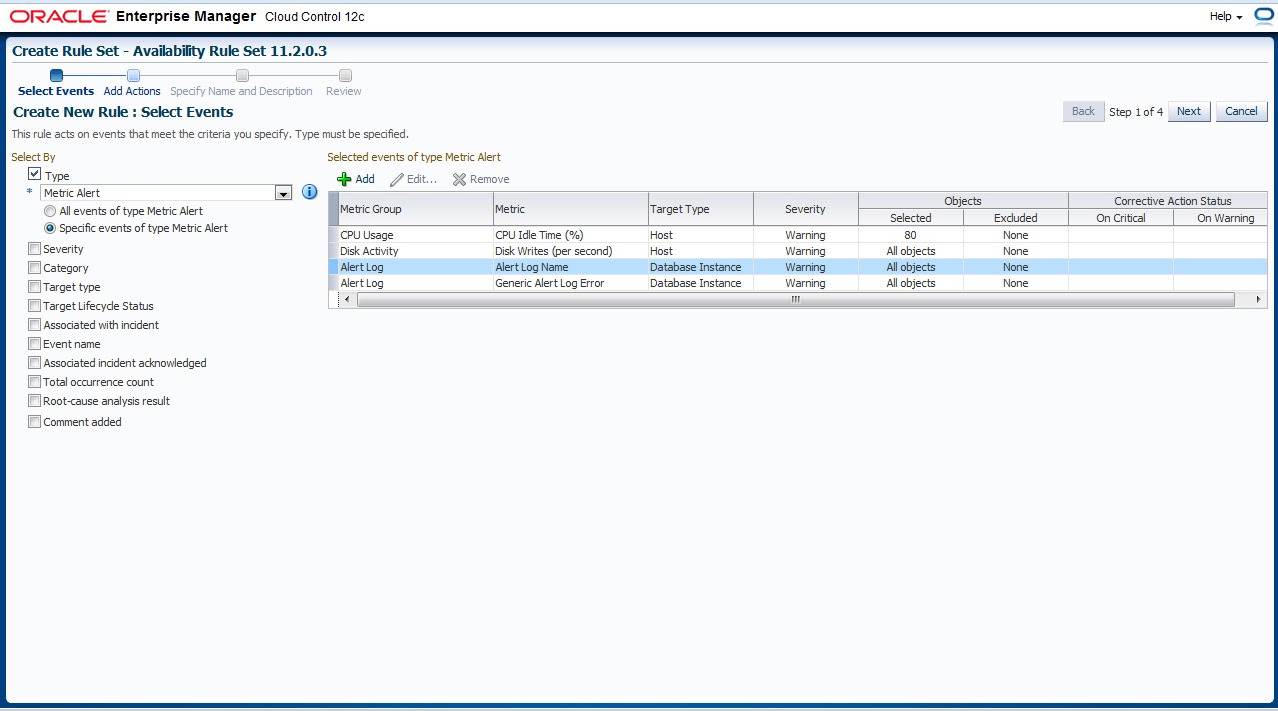
As you see there’s two option below Drop box if you need to create events for all target option one your choice otherwise choose #2  and which one you want to enable 


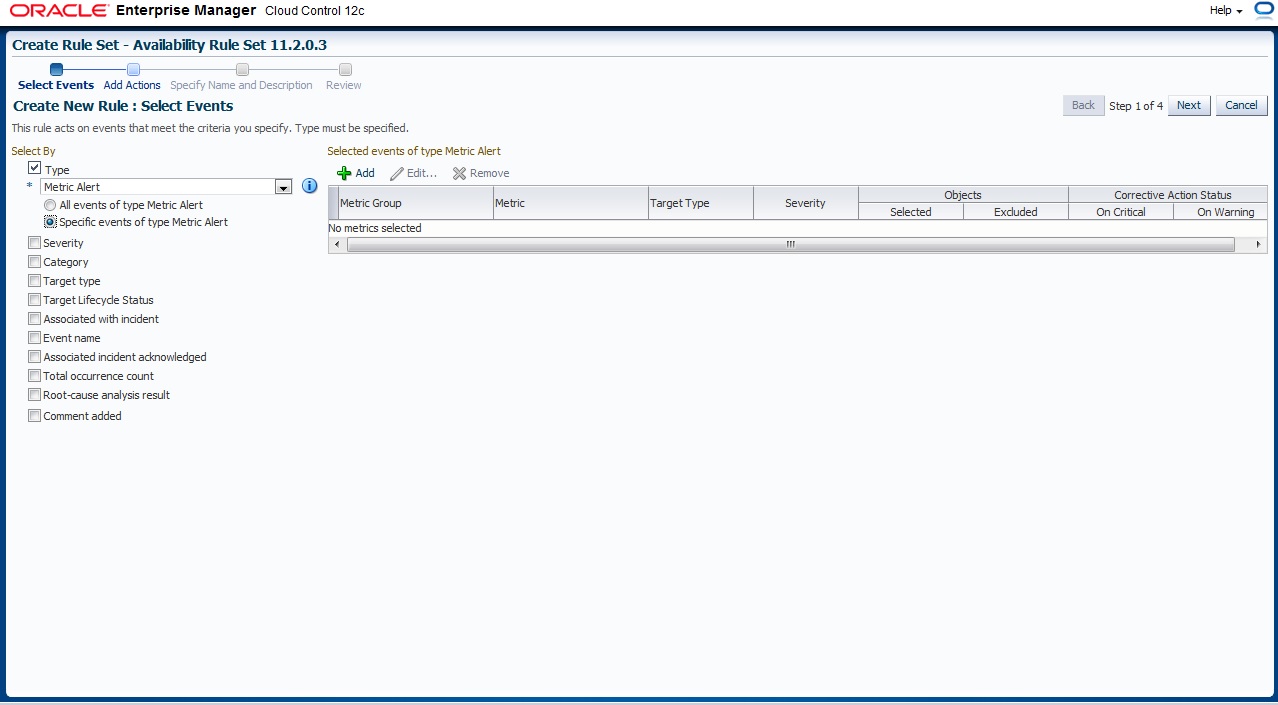
The below Picture describe what happened if you choose Option #2 

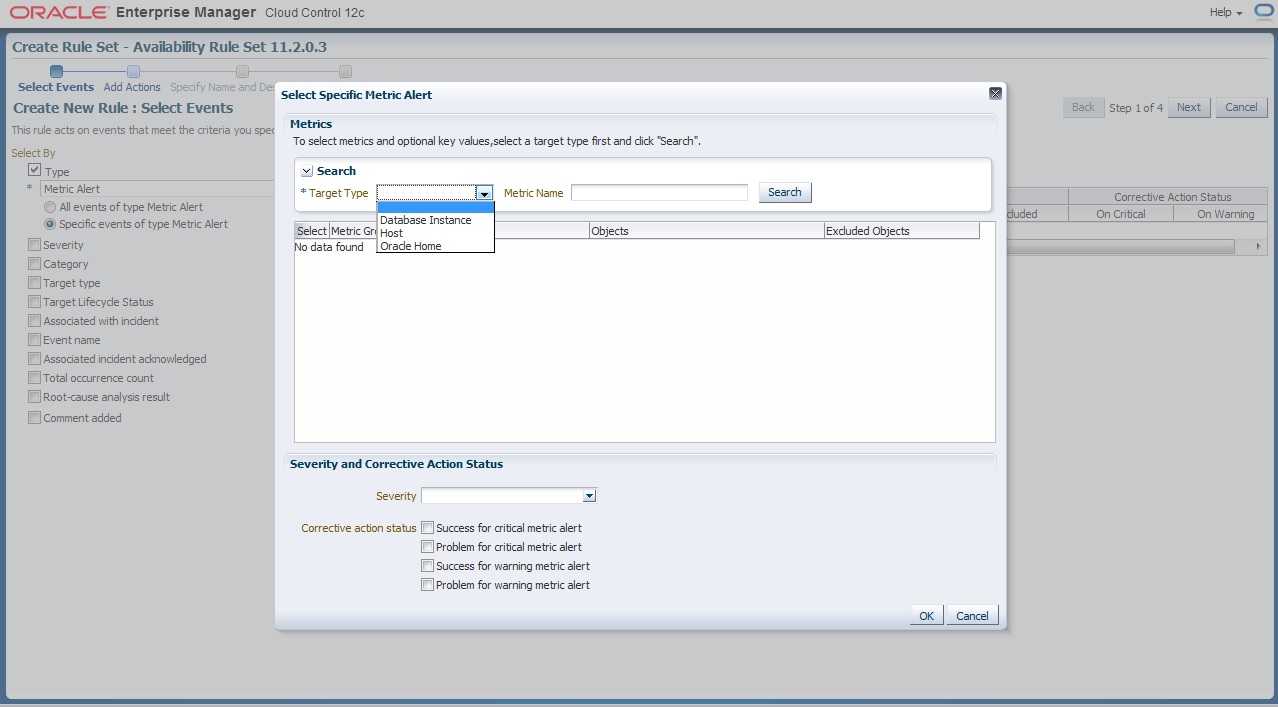
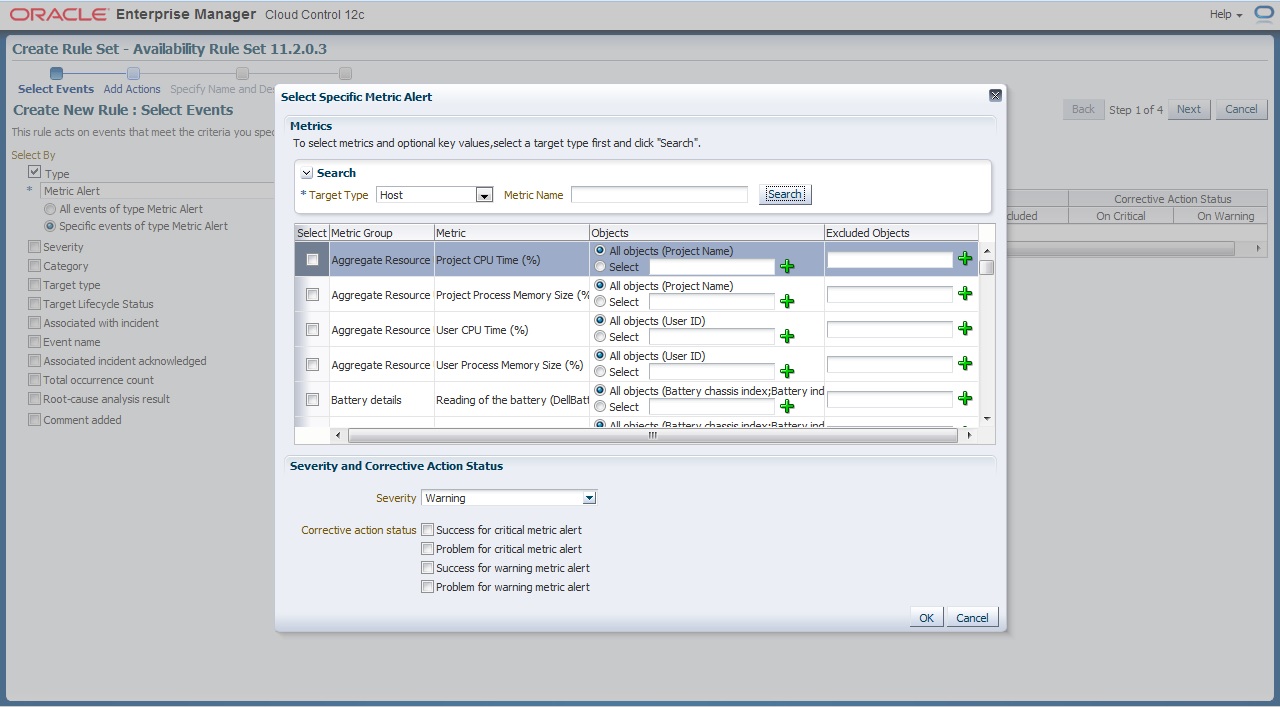
 Now what we choose before will appear to us here now you want to enable metrics for Which Target
and i provide some example for predefined metrics group

 The Overall will be look like this

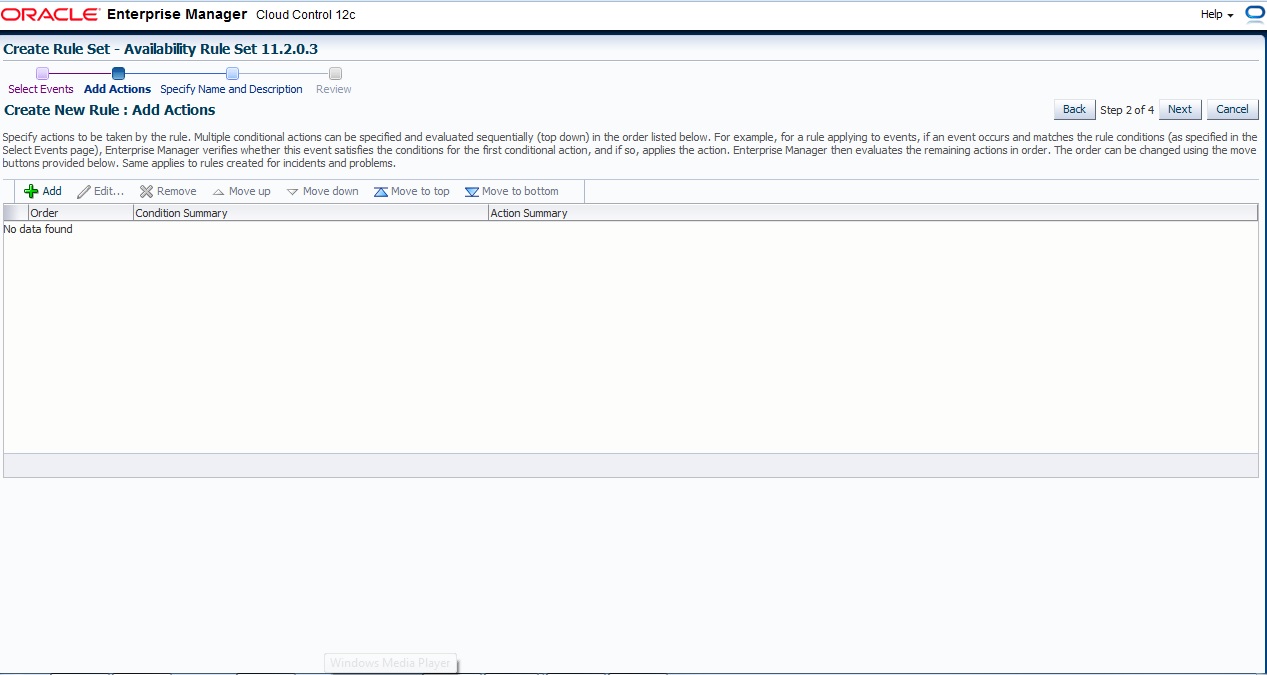
 Next , and Add Action page press add like usual

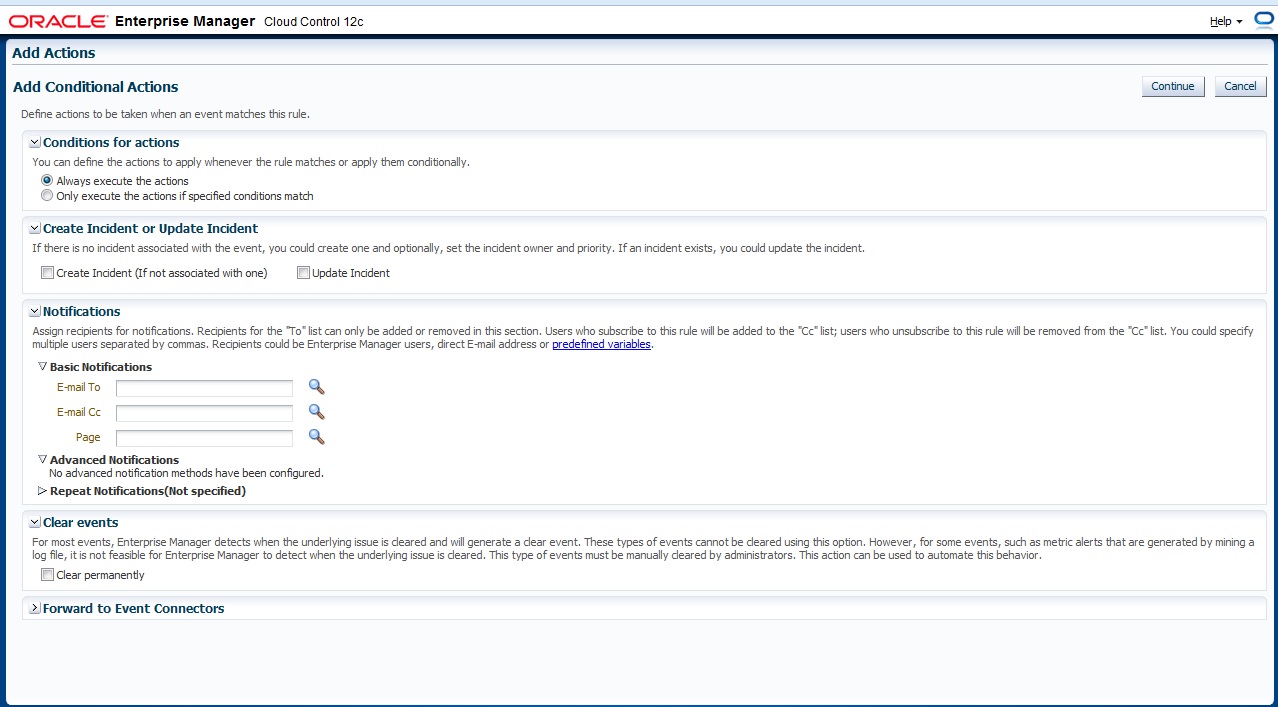
Define Which action will taken if event match

 Finally Name For Rule Set

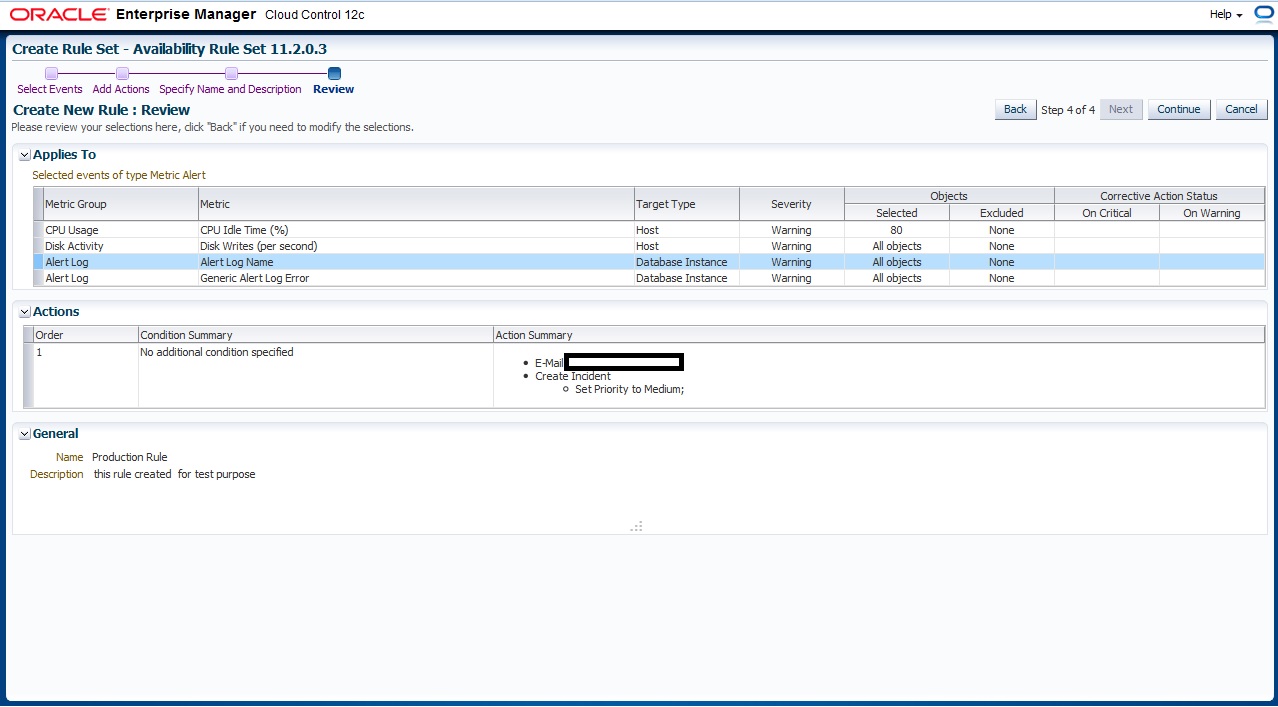
 Review Page

you can download this article from here

Thank you
Osama Mustafa
Add Target Manually / Enterprise Manager 12c

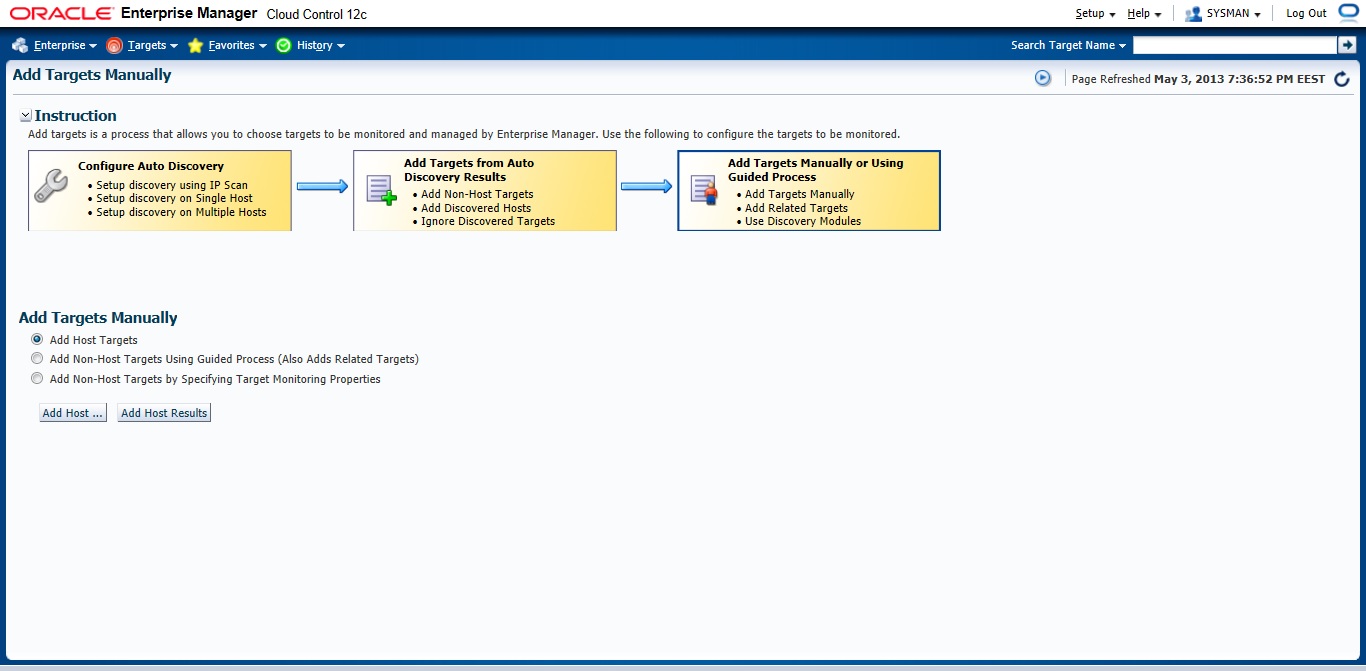
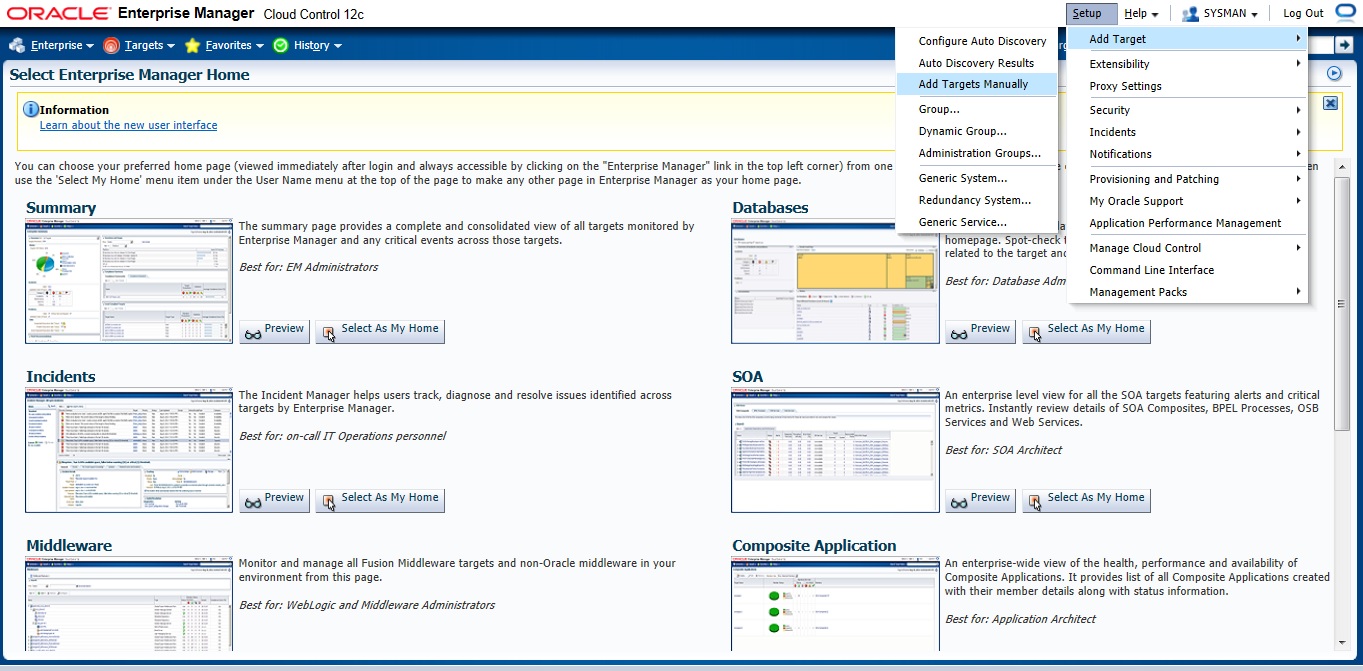
previously I mentioned how to deploy agent in enterprise manager using Auto Discovery, But today I will Post about the second way which called “Add target Manually” all you have to do is follow the screen shot and the instruction :

Setup –> Add target –> Add Target manually

Choose the first Option

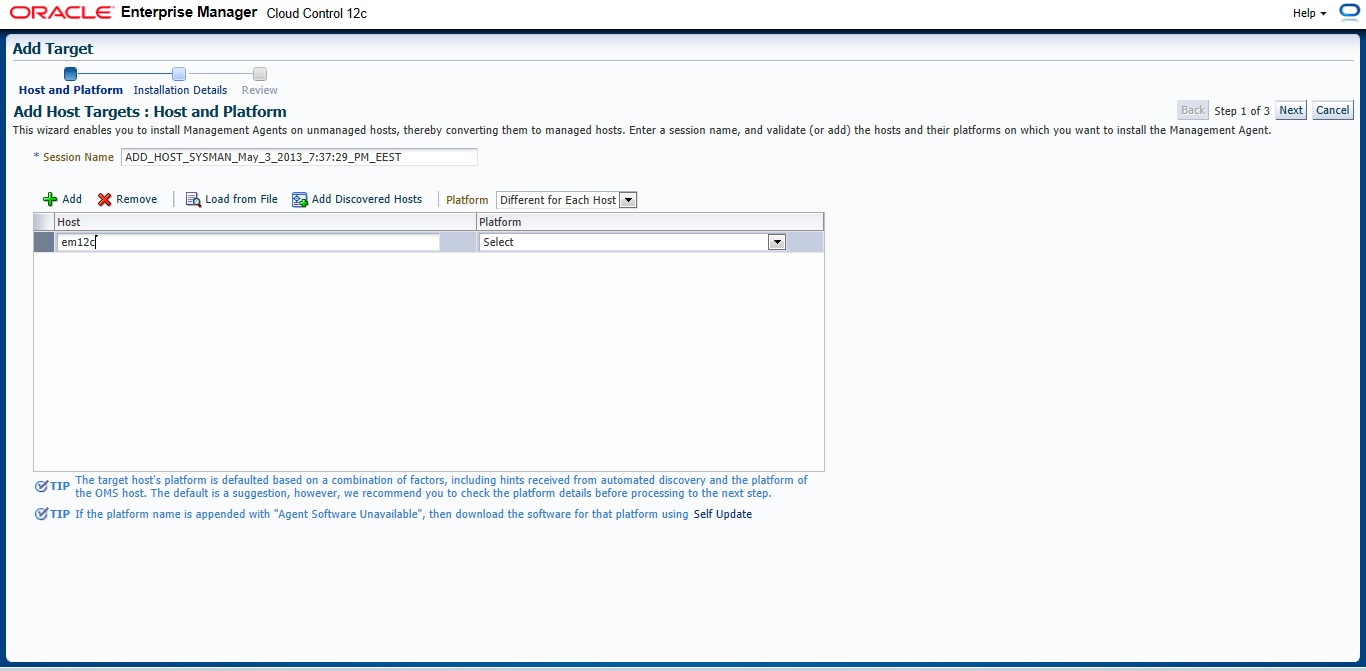
 New Page will appear — > Press add and Type Hostname for the server and which Operating system installed it on it.

Insert your Agent Path ( where you want to install agent ) and username

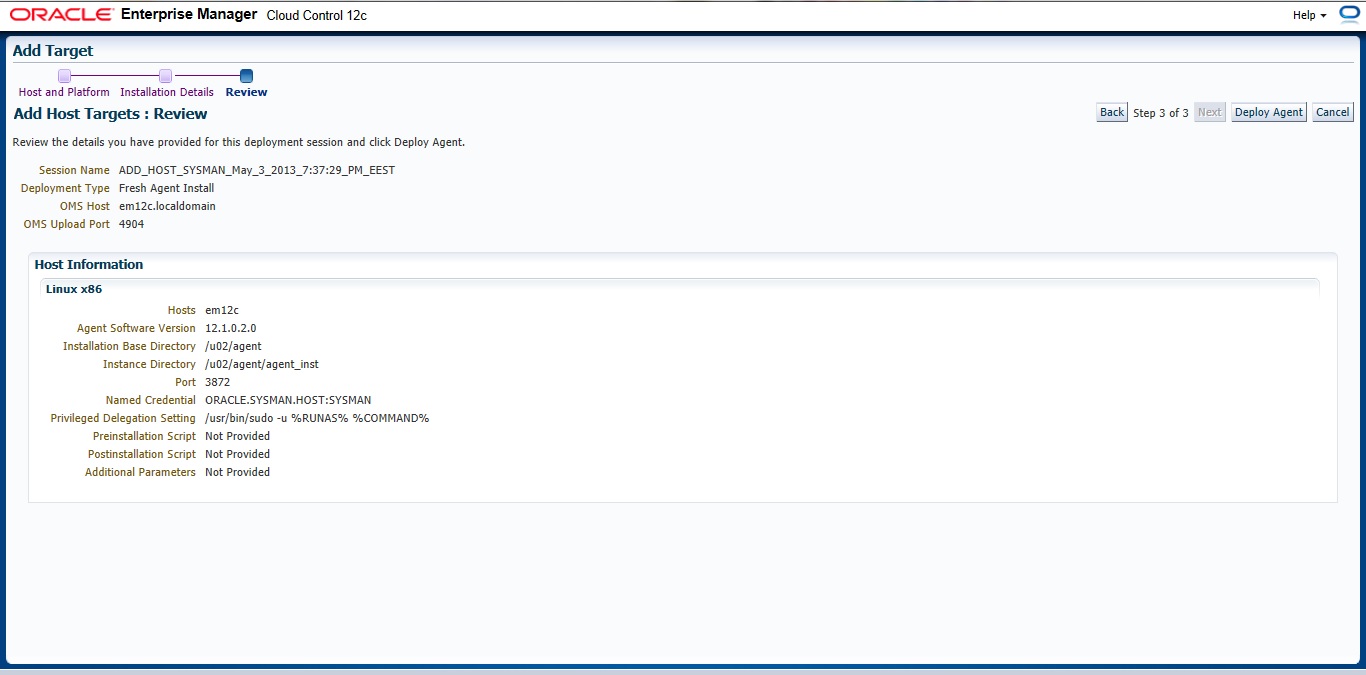
Review and then Deploy Agent

You can download this article here

Thank you
Osama Mustafa
Start/Stop Oracle Enterprise Manager 12c

To Start enterprise manager 12c you need to follow the below steps :

export ORACLE_HOME=/u01/app/oracle/product/11.2.0/dbhome_1
export OMS_HOME=/u03/app/oracle/Middleware/om12c/oms/
export AGENT_HOME=/u03/app/oracle/Middleware/agent12c/agent_inst/

  • ensure database and listener is running
  • Run the below command from $OMS_HOME

emctl start oms

  • Run the below command from $AGENT_HOME

emctl start agent 

to Stop all the services you need to do the below :

 export ORACLE_HOME=/u01/app/oracle/product/11.2.0/dbhome_1
export OMS_HOME=/u03/app/oracle/Middleware/om12c/oms/
export AGENT_HOME=/u03/app/oracle/Middleware/agent12c/agent_inst/

  • Run the below command from $OMS_HOME

emctl stop oms -all

  • Run the below command from $AGENT_HOME

emctl stop agent 

  • Now you can shutdown database and listener.

Thank you
Osama mustafa


SQL92_SECURITY Parameter

SQL> show parameter sql92_

NAME                                 TYPE        VALUE
———————————— ———– ——————————
sql92_security                       boolean     FALSE

SQL92_Security seems it’s parameter related to Security But what is it ? what is the benefits of using this parameter ?

I will describe this example since it will be understandable 🙂

SQL> create user test1 identified by test1 ;

User created.

SQL> grant create session , Create table to test1 ;

Grant succeeded.

SQL>
SQL>
SQL> create user test2 identified by test2 ;

User created.

 SQL> create user test3 identified by test3 ;

User created.

SQL> grant create session to test3 ;

Grant succeeded.

SQL> conn test1/test1 ;
Connected.
SQL> create table new ( id number(20)) ;

Table created.

SQL> BEGIN
    FOR v_LoopCounter IN 1..50 LOOP
    INSERT INTO new (id)
    VALUES (v_LoopCounter);
     END LOOP;
         END;
   / 

PL/SQL procedure successfully completed.

SQL> conn test1/test1 ;
Connected.
SQL>
SQL>
SQL>
SQL> grant update on test1.new to test2 ;

Grant succeeded.

SQL> grant update on test1.new to test3;

Grant succeeded.

SQL> grant select on test1.new to test3;

 SQL> conn test2/test2 ;
Connected.
SQL> update test1.new set id=1 where id=10 ;

1 row updated.

SQL> conn test3/test3 ;
Connected.
SQL> update test1.new set id=10 where id=1 ;

2 rows updated.

Now let’s set SQL92_Security to TRUE and Restart Database and re fire the same query by each user.


Conn test2/test2

SQL>update test1.new set id=1 where id=10 ;

ERROR at line 1:
ORA-01031: insufficient privileges

SQL> conn test3/test3;
Connected.
SQL> update test1.new set id=10 where id=1 ;

2 rows updated.

What Happening Here , Each of users have Privileges on test1.new but why after set SQL92_Security to true test2 not working ?

Simply  SQL92_SECURITY need Update/delete and Select Privileges for the same user if you grant the user one of these privileges then it will be useless.

Amazing 🙂

Thank you
Osama Mustafa
Short Look for Oracle Privileges

Oracle Database Contain two type of privileges one called System and other called Objects each one grant it to use as they need, But interesting entity called Public. it’s more Role than users , and every user created in database assign to Public by default unfortunately nothing can be done to change that. so we can say it’s seems like User Group, so if you grant anything of privileges to public this means that everyone of users database will have this privilege ( System or Object ) So you need to becareful of you doing while dealing with public.

Public is everyone access to database .PUBLIC is an entity that can be granted any privilege and assigned any role. All database users automatically inherit all the rights assigned to PUBLIC. It’s a simple concept designed for convenience. Granting permissions to PUBLIC is easy to do, and often the easiest way to get a system working, however, the security implications of using the PUBLIC group to assign permissions are significant.PUBLIC should be treated with care and used sparinglyPUBLIC should be treated with care and used sparingly.

Before go deeply with this subject we need to understand Role and Privileges in oracle database,as you all know Oracle Privileges control the rights to see, you could Modify, create or alter database depend on privileged you have,as i mention earlier two Privileges in database exists System and Object.

System privileges are not related to any specific object or schema. Object privileges are just the opposite, those that are directly related to a specific object or schema.check the examples below

System Privilege
Object Privilege
GRANT ANY PRIVILEGE
GRANT
ALTER ANY ROLE
ALTER
ALTER DATABASE
SELECT

to check system privileges in database you need to check the following DBA_ DICTIONARY :

SQL> desc dba_sys_privs;
 Name                                      Null?    Type
 —————————————– ——– —————————-
 GRANTEE                                   NOT NULL VARCHAR2(30)
 PRIVILEGE                                 NOT NULL VARCHAR2(40)
 ADMIN_OPTION                                            VARCHAR2(3)

Sample data From table :

GRANTEE                        PRIVILEGE                                ADM
—————————— —————————————- —
SYS                            CREATE OPERATOR                                 NO
SYS                            EXECUTE ANY OPERATOR                     NO
SYS                            CREATE DIMENSION                                NO
SYS                            ADMINISTER RESOURCE MANAGER     NO

Another example i want to check scott and his system privileges :

SQL> select * from dba_sys_privs where GRANTEE = ‘SCOTT’;
GRANTEE                        PRIVILEGE                                ADM
—————————— —————————————- —
SCOTT                          UNLIMITED TABLESPACE                     NO

Now Let’s Talk About Object Privileges :

SQL> desc dba_tab_privs;
 Name                                      Null?    Type
 —————————————– ——– —————————-
 GRANTEE                                   NOT NULL  VARCHAR2(30)
 OWNER                                     NOT NULL  VARCHAR2(30)
 TABLE_NAME                          NOT NULL  VARCHAR2(30)
 GRANTOR                                 NOT NULL VARCHAR2(30)
 PRIVILEGE                                 NOT NULL VARCHAR2(40)
 GRANTABLE                                                  VARCHAR2(3)
 HIERARCHY                                                   VARCHAR2(3)

more complex huh ? Read Oracle Documentation Here

SQL> select OWNER, TABLE_NAME, PRIVILEGE, GRANTABLE from dba_tab_privs where GRANTEE = ‘SCOTT’;
no rows selected.

What about Roles ? as you we knows Oracle Comes with Pre defined such as DBA, Resource , and connect also you can create your own Role which is Set of privileges to manage Users Privileges.
 user can be a member of more then one role, and roles can even be members of other roles.
Users in company leaves their jobs , Travel or even don’t need privileges in futures Create Oracle Role will make all this Manage is easy since . Privileges are then granted only to the roles, never to a specific user,if the privileges ever change, they are changed on the role and automatically take effect for all users with the role.and you check

SQL> desc dba_roles ;
 Name                                      Null?    Type
 —————————————– ——– —————————-
 ROLE                                      NOT NULL         VARCHAR2(30)
 PASSWORD_REQUIRED                                  VARCHAR2(8)

For information about this table you can Read Oracle documentation here.

SQL> desc dba_role_privs
 Name                                      Null?    Type
 —————————————– ——– —————————-
 GRANTEE                                                   VARCHAR2(30)
 GRANTED_ROLE                  NOT NULL VARCHAR2(30)
 ADMIN_OPTION                                       VARCHAR2(3)
 DEFAULT_ROLE                                       VARCHAR2(3)

The above table checks the privileges granted to Role, you can refer to Oracle Documentation here
check the below query to determine Which User Have DBA Role :

SQL> select GRANTEE, ADMIN_OPTION, DEFAULT_ROLE from dba_role_privs where
GRANTED_ROLE = ‘DBA’;  2
GRANTEE                        ADM DEF
—————————— — —
SYS                                  YES YES
SYSMAN                         NO  YES
SYSTEM                         YES YES

As conclusion Public can be Granted any of Roles or users,While it is easy and fully supported to grant roles to PUBLIC i don’t recommended to do that  give one case why to do that ?
Check the user who has Public  :

SQL> select * from dba_role_privs where GRANTEE = ‘PUBLIC’;
no rows selected

And this exactly what we want not Public roles to any users.
Thank you 
Osama Mustafa