This Article Describe Step by Step How to install Oracle Service Bus On Linux 6.4/64 Bit
You can Download the Document Here.
Thank you
Osama Mustafa
For the people who think differently Welcome aboard
You can Download the Document Here.
Thank you
Osama Mustafa
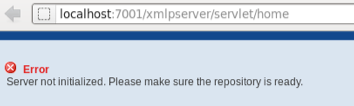
This error Related to OBIEE, if you received this error Then Simple
cd $OFM_WM/admin/obiee/bin
check that opmnctl is worked using
./opmnctl status
./opmnctl startall
Thank You
Osama Mustafa
Absolutely Not When you install Weblogic any Version Oracle Provide you with Command Line Utility to administrate weblogic, what you can do it using Console can be done with this tool.
change to weblogic-directory/common/bin
./wlst.sh
Now follow the below Steps to change port :
wls:/offline> readDomain (‘/u01/app/fmw/domains/IDDomains’)
wls:/offline/IDDomains> cd (‘Server’)
wls:/offline/IDDomains/Server> ls ()
Choose your Server Here
wls:/offline/IDDomains/Server> cd (‘AdminServer’)
wls:/offline/IDDomains/Server/AdminServer> ls ()
Search for Old Port ListenPort
wls:/offline/IDDomains/Server/AdminServer> set (‘ListenPort’,New Port)
wls:/offline/IDDomains/Server/AdminServer> updateDomain ()
wls:/offline/IDDomains/Server/AdminServer> exit ()
Done you can now Test your new port
http://Server-ip:/console
Thank you
Osama Mustafa
NAME TYPE VALUE
———————————— ———– ——-
archive_lag_target integer 0
db_flashback_retention_target integer 1440
fast_start_io_target integer 0
fast_start_mttr_target integer 0
memory_max_target big integer 26048M
memory_target big integer 0
parallel_servers_target integer 2048
pga_aggregate_target big integer 6502M
sga_target big integer 19520M
SQL> ALTER SYSTEM SET MEMORY_MAX_TARGET = 16384M scope=spfile ;
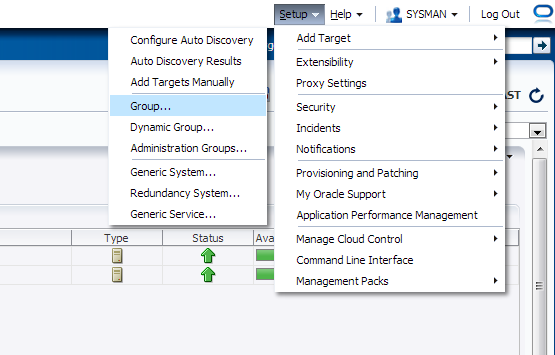
Enterprise manager provide you with Group Features to combine components, and there’s two type :
Check the below screenshot :
From Setup –> Add Target –> Group


The unpack command Creates a full domain or a subset of a domain used for a Managed Server domain directory on a remote machine. You may use unpack only with a template compatible with your current installation. The template can be any of the following:
./unpack.sh -domain=/u01/app/oracle/domains/IDMDomains -template=/u01/shared/IDMdomains.jar
ERROR !!! ./unpack.sh -name=Value Missing
The Solution is simple :
-template attribute should come first.
./unpack.sh -template=/u01/shared/IDMdomains.jar -domain=/u01/app/oracle/domains/IDMDomains
Thank you
Osama Mustafa
After Install Weblogic and BI On Windows, And Create Admin Server as Services BI_server unable to start, Node manager Created Service Created Without Any Error.
Cause & Solution :
After Investigation I found Class Path is too Long So what i did like the following, Edit installSVC.cmd To set Classpath to be Short
you will find the below line in the InstallSvc.cmd all you have to do is change it to be like Line in Red Color :
@echo off
echo %CLASSPATH% > %USERDOMAIN_HOME%\cp.properties
if “%ADMIN_URL%” == “” goto runAdmin
@echo on
set CMDLINE=”%JAVA_VM% %MEM_ARGS% %JAVA_OPTIONS%
-classpath @%USERDOMAIN_HOME%\cp.properties
-Dweblogic.Name=%SERVER_NAME% -Dweblogic.management.username=%WLS_USER%
-Dweblogic.management.server=\”%ADMIN_URL%\”
-Dweblogic.ProductionModeEnabled=%PRODUCTION_MODE%
-Djava.security.policy=\”%WL_HOME%\server\lib\weblogic.policy\” weblogic.Server”
goto finish
Thank you
Osama Mustafa
mount -F nfs IP:/export/home/oracle/test /export/home/oracle/test
Output :
nfs mount: mount: /export/home/oracle/test : Device busy
Check why it’s Busy using :
fuser -u /export/home/oracle/test
/export/home/oracle/test : 1432c(oracle)
Kill the process :
kill – 9 1432
Thank you
Osama mustafa
[oracle@test12c Desktop]$ ps -ef | grep pmon
oracle 3230 1 0 04:04 ? 00:00:09 ora_pmon_db12c
oracle 12112 1 0 08:20 ? 00:00:07 ora_pmon_NonCDB
oracle 29621 3203 0 18:47 pts/1 00:00:00 grep pmon
[oracle@test12c Desktop]$ export ORACLE_SID=NonCDB
SQL> select instance_name from v$instance ;
INSTANCE_NAME
—————-
NonCDB
SQL> shutdown immediate ;
Database closed.
Database dismounted.
ORACLE instance shut down.
SQL> startup mount exclusive
ORACLE instance started.
Total System Global Area 939495424 bytes
Fixed Size 2295080 bytes
Variable Size 348130008 bytes
Database Buffers 583008256 bytes
Redo Buffers 6062080 bytes
Database mounted.
SQL> alter database open read only;
Database altered.
SQL> exec dbms_pdb.describe(pdb_descr_file=>’/u01/noncdb.xml’);
PL/SQL procedure successfully completed.
SQL> shutdown immediate ;
Database closed.
Database dismounted.
ORACLE instance shut down.
I already working on the same host so no need to copy datafiles,if you are not working on same host copy datafiles to same location.
Let’s Work On Container Database .
after copy datafiles to folder, On Os Level , Create directory to use file_name_convert.
[oracle@test12c oradata]$ mkdir newnoncdb
[oracle@test12c newnoncdb]$ pwd
/u01/app/oracle/oradata/newnoncdb
[oracle@test12c Desktop]$ export ORACLE_SID=db12c
[oracle@test12c Desktop]$ sqlplus / as sysdba
SQL> create pluggable database non_cdb as clone
2 using ‘/u01/noncdb.xml’
3 file_name_convert=(‘/u01/app/oracle/oradata/NonCDB’,’/u01/app/oracle/oradata/newnoncdb’) copy;
Pluggable database created.
Where
SQL> alter pluggable database non_cdb open ;
Pluggable database altered.
SQL> alter pluggable database non_cdb close ;
Pluggable database altered.
SQL> alter pluggable database non_cdb open ;
Pluggable database altered.
NAME OPEN_MODE
—————————— ———-
PDB$SEED READ ONLY
NEWDB_PLUG MOUNTED
NEW_PLUG_COPY MOUNTED
NEW_PLUG_MOVE MOUNTED
NON_CDB READ WRITE
SQL> alter session set container=Non_cdb;
Session altered.
[oracle@test12c newnoncdb2]$ sqlplus sys/sys@test12c:1521/Non_cdb as sysdba ;
SQL> @$ORACLE_HOME/rdbms/admin/noncdb_to_pdb.sql
 Technology Geek