Install EMCLI For EM12C

The Enterprise Manager Command Line Interface (EM CLI) enables users to access Enterprise Manager functionality through a command-line interface or scripts. It is accessible through classic programming language constructs, enabling tasks to be created and run either from the command-line or programatically. EM CLI enables you to access Enterprise Manager Cloud Control functionality from text-based consoles (shells and command-line windows) for a variety of operating systems.

For Overview and concept about it Read Oracle Documentation Here

The Setup to enable emcli so simple and already provided with Enterprise manager 12c,

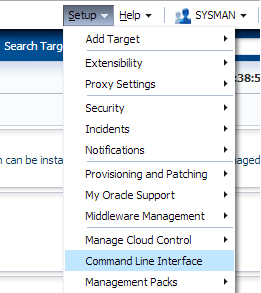
From Setup –> Command Line Interface.

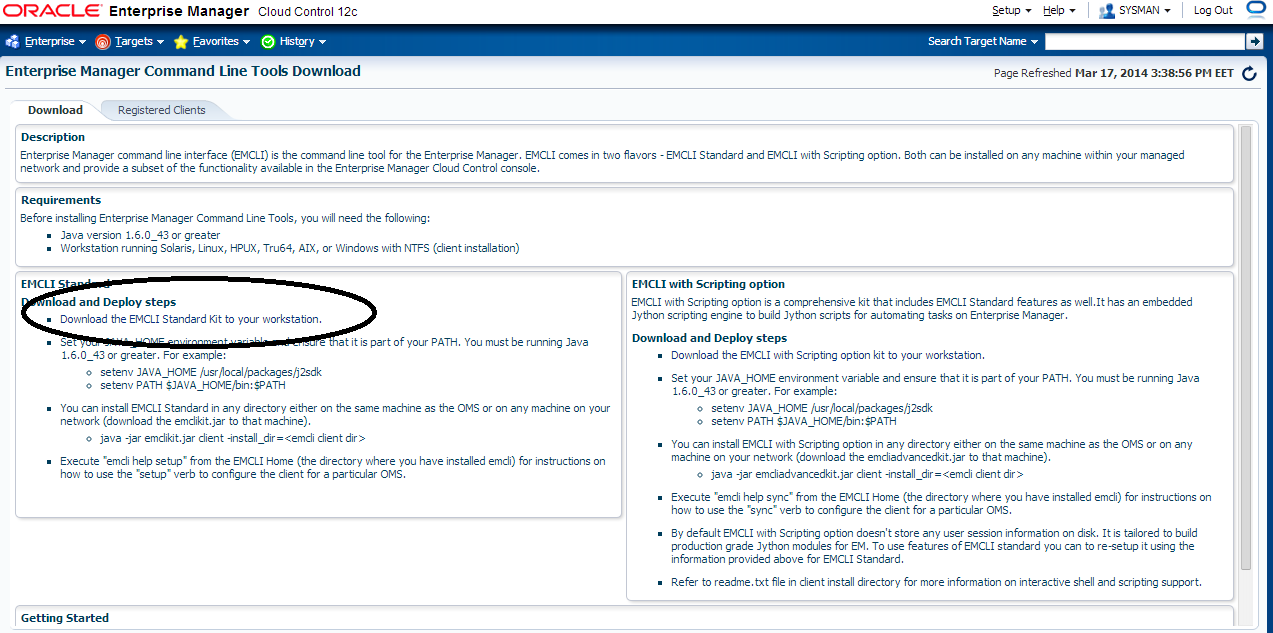
After Access Command Line Interface you should be able to install emcli kit by press the below :

Jar File will be installed,Upload it to the server.

Create New Folder On the Server Using :

mkdir /u01/emcli 

Set The Variable:-

export JAVA_HOME=/u01/app/fmw/jdk
export PATH=$JAVA_HOME/bin:$PATH 

Run the Below Command

java -jar emcliadvancedkit.jar client -install_dir=/u01/emcli 

cd /u01/emcli  

emcli setup -url=https://EM12c:7802/em -username=sysman -trustall -autologin

Thank you
Osama Mustafa

HTTP3094: 1 listen sockets could not be created / Oracle IPlant

When Trying to Startup iplant Instance the below error Appearing every-time :

TEST siebel: :/Siebel/iPlanet/webserver7/https-Osama_TST/bin\>./startserv
Oracle iPlanet Web Server 7.0.15 B04/19/2012 21:52
info: CORE5076: Using [Java HotSpot(TM) 64-Bit Server VM, Version 1.6.0_24] from [Sun Microsystems Inc.]
startup failure: could not bind to port 8080 (Address already in use)
failure: HTTP3127: http-listener-1: http://TEST:8080: Error creating socket (Address already in use)
failure: HTTP3094: 1 listen sockets could not be created
failure: server initialization failed

From the above error you notice that Port 8080 is already in use.

The Solution :

ps -ef |grep webservd

and Use Kill -9

Try Again Now

Thank you
Osama Mustafa

Change SQL Developer Java Home

If you want to change the Java Home for SQL Developer , You Have to Locate product.conf and set JAVAHOME to the new one.

On Linux :

Usually it’s Located in /home/oracle

cd ./sqldeveloper/4.0.0/
Edit Product.conf
and Search For setJavaHome to new One

 On Windows : 

It’s Depend on user :

C:\Users\Osama\AppData\Roaming\sqldeveloper\4.0.0
and edit the same file.

Thank you
Osama Mustafa

WorkFlowCA: NullError : Could not Connect to the Remote Server

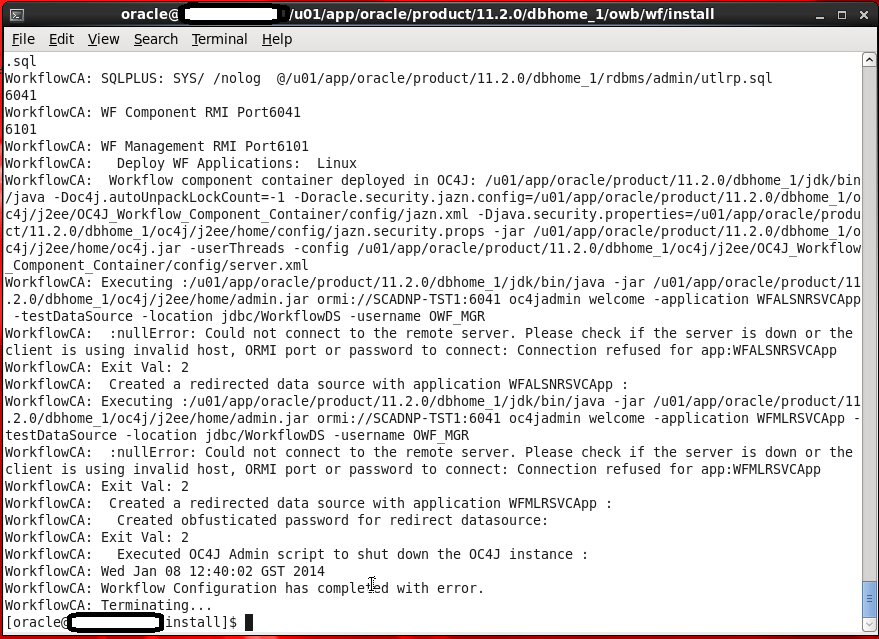
This Error Appear When Trying to Run Oracle Ware-House Builder On Linux , in this tools you are connecting to Database to Setup some configuration for Workflow in DWH, Every Thing Run Successfully Till i received the error in the picture :

WorkFlowCA: NullError : Could not Connect to the Remote Server

You Can ignore this error simply , I didn’t configure Oracle Enterprise manager in my database , which is the reason for this Error.if you want create enterprise manager and re run the tool again.

Thank you
Osama Mustafa 

API5036: Client version 11.2.0.3.0 is not compatible with repository version 11.2.0.4.0

To Solve this error Follow the below Steps :

  • Edit /owb/bin/admin/Preference.properties
  • And set the following parameter :-
    • OverrideRepositoryVersionCheck=true
    • OverrideRuntimeVersionCheck=true
Thank you
Osama Mustafa

Create Group using Em12c

Sometimes you need to create Certain group for Enterprise manager to make monitor more easy , sepcially if you have lot of agent and components such as database , Host , application server … so if you want to manage them individually it will consume time and seems to be impossible.

Enterprise manager provide you with Group Features to combine components, and there’s two type :

  • Target at the same type 
  • Target contain different components such as database, Application server , Host.

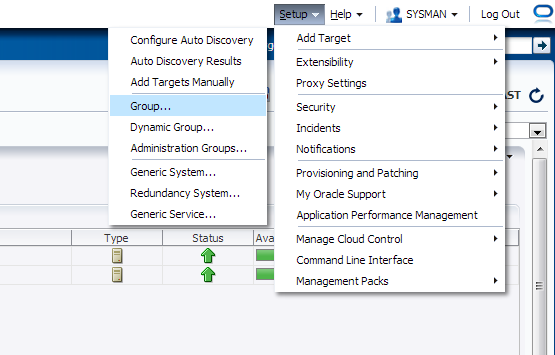
Check the below screenshot :

From Setup –> Add Target –> Group

you have five tab each one of them contain different parameters, Choose the right option that works with your Work:

After Choose the name for the group you need to add Agents, from search button new popup screen will be open choose which agent type you want.

Another example on Chart tab :

After Create Group :

For More information about Enterprise Manager 12c Group Read Oracle Documentation Here
Thank you 
Osama mustafa

SIEBEL odbcsql Unable to Connect

Logging into “SBA_81_DSN” as “SADMIN” …
ODBC error 81 in SQLConnect:
523 72
(native error 0).
Unable to login using specified ODBC parameters.

The above error appear when you are trying to run the below command:

odbcsql /s SIEBEL8_DSN /u sadmin /p sadmin

Solutions :

Make sure the you set TNS_ADMIN in .profile or .bash_profile , TNS_ADMIN Should be Directed to Client32 bit , Copy tnsnames.ora from Database home to Client32

it will be like the following :

export TNS_ADMIN=/u01/app/oracle/instanctclient32/

Thank you
Osama mustafa

Segmentation Fault(coredump) when Trying to Start Siebel Server

Today i was working with SIEBEL On Solaris , And as usually it was working without any issue , after modified images on SIEBEL as Oracle Support Document

Images Files on Screen Tabs Required for High Interactivity Clients in Innovation Pack 2012 (Doc ID 1511448.1).

But when i tried to start SIEBEL Server the below errors appear :

/u01/app/siebel/8.2.2.0/ses/siebsrvr/bin/start_server: line 212: 6488: Memory fault(coredump) 

it’s confusing because SIEBEL was working without any problem, After tried more than one solution i would like to share the below Solution ( at least it’s works for me)

cd $SIEBEL_ROOT/sys

you will find File called osdf_ENTERPRISE_NAME

This file Will be Read by SIEBEL when you trying to start_server and if doesn’t exists it will recreate it again.

 Delete this file and try to start Siebel Server Again using

start_server ALL

Thank you
Osama Mustafa 

Oracle Enterprise Manager unable to Start

When I checked the log Located $ORACLE_HOME/SID_HOSTNAME/sysman/log

I found the below errors :

app.ContextInitializer contextInitialized.420 – Integration Class not found

and

ERROR main: nmectla_agentctl: Error connecting to

First you need to make sure that the link in emd.properties and ports and configured right and hostname is correct, restrat dbconsole if this not works then check the below

On Host :

oracle@TEST:/u01/app/$ echo $TZ
localtime

oracle@TEST:/u01/app/$ export TZ=Etc/GMT+2

emctl config agent updateTZ

emctl resetTZ agent 

Restart Dbconsole

Emctl start dbconsole 

 Thank you
Osama mustafa

Enable Debug Mode Oracle Enterprise Manager

you need to change directory to below :

/u01/app/oracle/product/11.2.0/dbhome_1/sysman/config

under this directory you will work on

  • emd.properties
  • emagentlogging.properties
Backup two files. using cp command.
Open 

  • emagentlogging.properties
File :

change 

log4j.rootCategory=WARN, emagentlogAppender, emagenttrcAppender
TO 
log4j.rootCategory=DEBUG, emagentlogAppender, emagenttrcAppender
  • emd.properties
Change 
EMAGENT_PERL_TRACE_LEVEL=WARN
TO 
EMAGENT_PERL_TRACE_LEVEL=DEBUG
Restart dbconsole
Thank you 
Osama mustafa