RAC Attack Survey

Count Down is already started, Less than 10 days to Oracle Open World 2013, Sessions, Groups and Discussions/Panel , but this year will be different, as we all know Oracle Database 12c has been released in July some of us got some time to test and work on it. Database and advance Features such as Real Application Cluster (RAC).

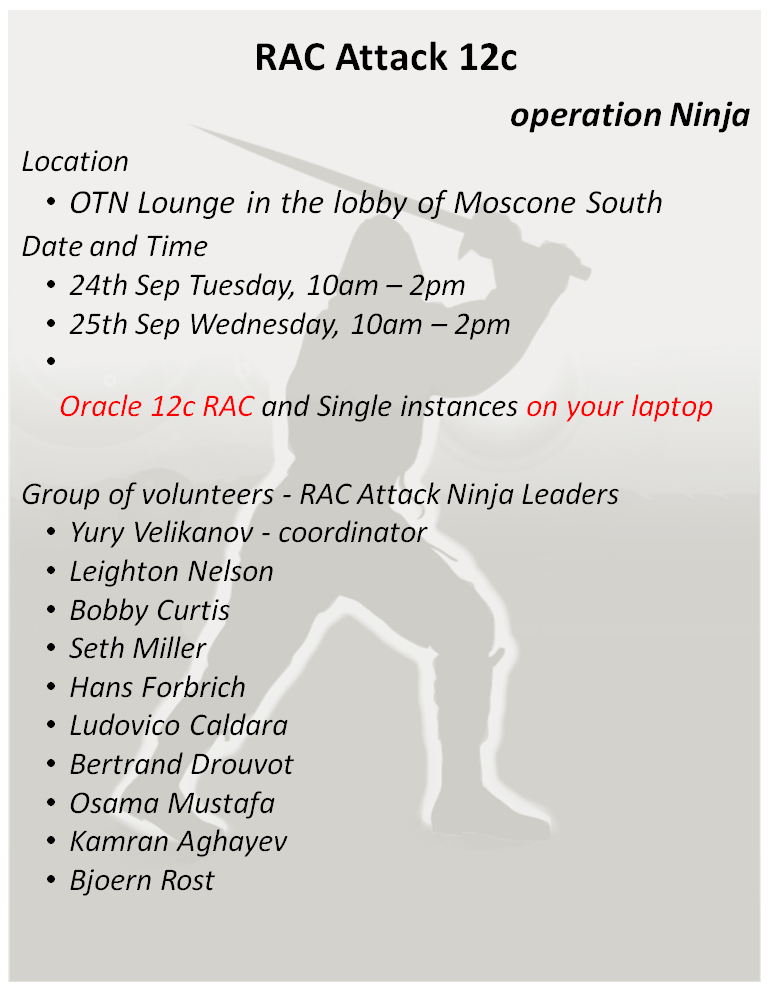
Don’t Worry you didn’t mess you chance yet. This Year specifically in Oracle Open World 2013 You will have chance to test Oracle Real Application Cluster on your Own Laptop, Created by yourself, and it will not take that much time, learn the steps and have chance to be DBA.

RACATTACK events Created by Volunteers

you can know more about this event here, Join us and Learn Something New and Meet the Oracle Guru, it will be nice to see everybody there.
Complete this Survey Please Here
Thank you 
Osama Mustafa

Step by Step Configure SSO Using Oracle Fusion Middle-ware

I would like to share this document , which is describe step by step dealing with :

  • WebLogic
  • Oracle Internet Directory
  • Oracle Content Server
  • Oracle Access manager 
Every thing mentioned with Installation &  Configuration Steps.
I tried To make it simple as i can, Included with Screen Shots ,Step By Step how to install The above Oracle Products and how to configure them to prepare your application for Single-Sing-On 
Please if you would like to share this document ask me before.

You can View and Download the Document from Here
Thank you 
Osama mustafa

Segmentation Fault(coredump) when Trying to Start Siebel Server

Today i was working with SIEBEL On Solaris , And as usually it was working without any issue , after modified images on SIEBEL as Oracle Support Document

Images Files on Screen Tabs Required for High Interactivity Clients in Innovation Pack 2012 (Doc ID 1511448.1).

But when i tried to start SIEBEL Server the below errors appear :

/u01/app/siebel/8.2.2.0/ses/siebsrvr/bin/start_server: line 212: 6488: Memory fault(coredump) 

it’s confusing because SIEBEL was working without any problem, After tried more than one solution i would like to share the below Solution ( at least it’s works for me)

cd $SIEBEL_ROOT/sys

you will find File called osdf_ENTERPRISE_NAME

This file Will be Read by SIEBEL when you trying to start_server and if doesn’t exists it will recreate it again.

 Delete this file and try to start Siebel Server Again using

start_server ALL

Thank you
Osama Mustafa 

Officaly DBvisit Partner

After Testing DbVisit Product and Post about it Here, I Didn’t Stop There Because This Product Gives lot of Benefits and Easy To Manage.  You Don’t Need to Become DBA to manage it.

The Most Important Thing in Any Products as i see Support Part Because Any Software in this World will Generate New errors you don’t know anything about it. DbVisit Provide you with Support Team Response on you As Soon As Possible with Answers.

DbVisit Solutions Is not expensive if you want to compare with Other Software Proof on this my friend Steve Karam Write Blog here talking About License Here With Examples on Prices.

Finally I am Proud to be DbVisit Gold Partner In Jordan And Covering Middle East Region.

Thank you
Osama Mustafa

Clone Pluggable Database

If you want to Clone One Of Pluggable database , How can you do that :

SQL> select name from v$pdbs ;

NAME
——————————
PDB$SEED
TEST_1
TEST_2

Let’s Clone Test_1 , Create folder on os level to move test_1 data. 

[oracle@test12c u01]$ mkdir clone
[oracle@test12c u01]$ cd clone/
[oracle@test12c clone]$ pwd
/u01/clone

Open Test_1 Read Only : 

SQL> alter pluggable database test_1 close immediate;Pluggable database altered.

SQL> alter pluggable database test_1 open read only ;Pluggable database altered.

Set this parameter to our created directory above : 

SQL> show parameter db_create_file_dest ;

NAME     TYPE VALUE
———————————— ———–
db_create_file_dest     string

SQL> alter system set db_create_file_dest=’/u01/clone’;             System altered.

SQL> show parameter db_create_file_dest ;

NAME     TYPE VALUE
———————————— ———–
db_create_file_dest     string /u01/clone

SQL> create pluggable database clone from test_1 ;Pluggable database created.

SQL> alter pluggable database clone open ;Pluggable database altered.

Test Clone Pluggable database 

[oracle@test12c ~]$ sqlplus sys/sys@test12c:1521/clone as sysdba

SQL*Plus: Release 12.1.0.1.0 Production on Sat Jul 13 20:20:24 2013
Copyright (c) 1982, 2013, Oracle.  All rights reserved.

Connected to:
Oracle Database 12c Enterprise Edition Release 12.1.0.1.0 – 64bit Production
With the Partitioning, OLAP, Advanced Analytics, Real Application Testing
and Unified Auditing options

SQL> show con_name ;CON_NAME
——————————
CLONE

SQL> select name from v$pdbs ;

NAME
——————————
PDB$SEED
TEST_1
TEST_2
CLONE

You can drop Clone Database using the below command

SQL > Alter Pluggable database Clone Including Datafiles ;

Thank you 
Osama mustafa

Point-In-Time Recovery for a Pluggable Database

Check Pluggable database that you have :

SQL> select name from v$pdbs ;

NAME
——————————
PDB$SEED
TEST_1
TEST_2
TEST_3

Shutdown database , to configure database archivelog

SQL> shutdown immediate ;

Database closed.
Database dismounted.
ORACLE instance shut down.
SQL> startup mount ;

 ORACLE instance started.

Total System Global Area 1252663296 bytes
Fixed Size    2287864 bytes
Variable Size  838862600 bytes
Database Buffers  402653184 bytes
Redo Buffers    8859648 bytes
Database mounted.

SQL> alter database archivelog ;

Database altered.

SQL> alter database open 

Database altered.

SQL> alter pluggable database all open; 

Pluggable database altered.

SQL> alter system set db_recovery_file_dest_size = 2G scope=both; 

System altered.

SQL> alter pluggable database all open; 

Pluggable database altered.

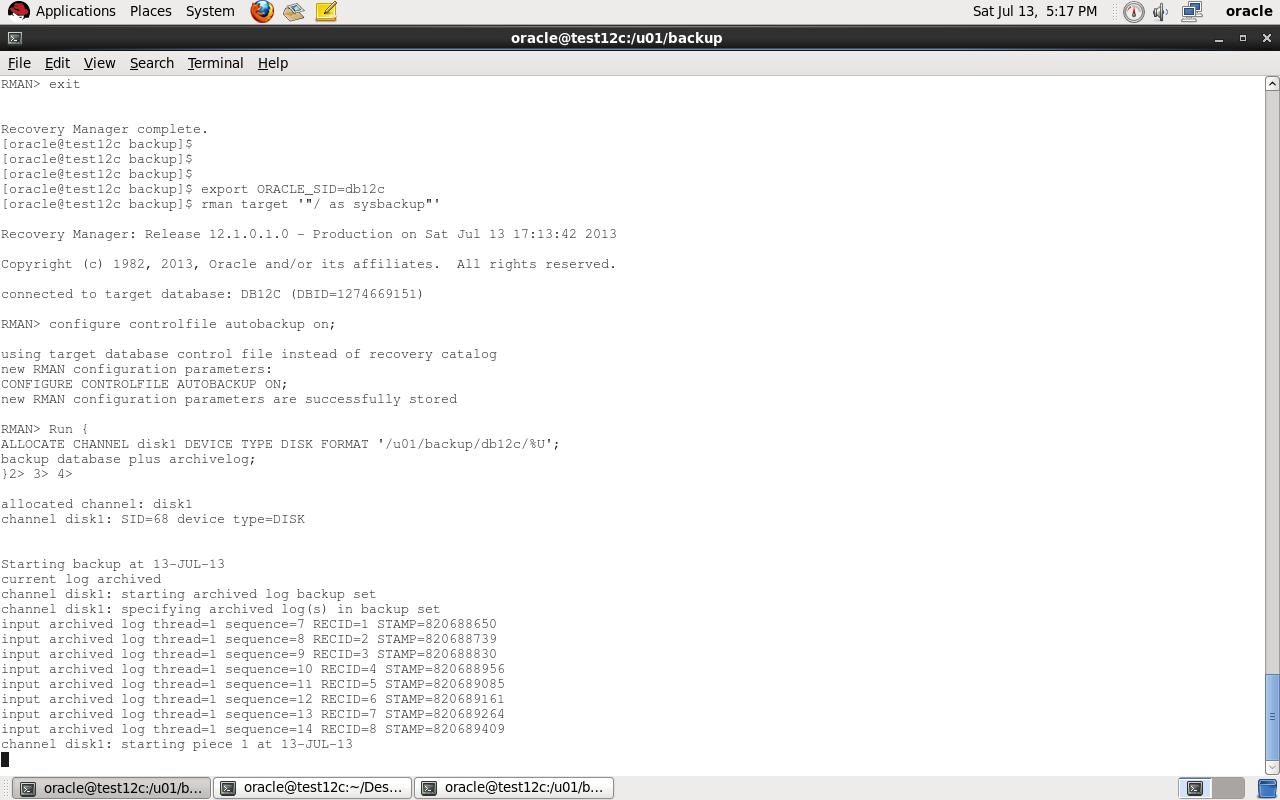
Export ORACLE_SID for container database and enter rman to backup  like below

[oracle@test12c backup]$ export ORACLE_SID=db12c
[oracle@test12c backup]$ rman target ‘”/ as sysbackup”‘

Recovery Manager: Release 12.1.0.1.0 – Production on Sat Jul 13 17:13:42 2013
Copyright (c) 1982, 2013, Oracle and/or its affiliates.  All rights reserved.
connected to target database: DB12C (DBID=1274669151)

Auto Backup controlfile :

RMAN> configure controlfile autobackup on;

using target database control file instead of recovery catalog
new RMAN configuration parameters:
CONFIGURE CONTROLFILE AUTOBACKUP ON;
new RMAN configuration parameters are successfully stored

Backup Script that we need :

Run {
ALLOCATE CHANNEL disk1 DEVICE TYPE DISK FORMAT ‘/u01/backup/db12c/%U’;
backup database plus archivelog;
}

 Where 
Format ‘/u01..’:  Location for backup

now move to our pluggable database

SQL>alter session set container=test_1 ;

SQL>create tablespace test_1  datafile ‘/u01/app/oracle/oradata/db12c/test_1/test_1.dbf’ size 10m;

SQL>create user test identified by test temporary tablespace temp default tablespace test_1;

SQL>grant create session, create table, unlimited tablespace to test ;

SQL>create table data (id varchar2(100)) tablespace test_1;

Enter Data using The Below code in above table :

begin
 for i in 1.. 10000 loop
    insert into data values (‘osama’);
 end loop;
 commit;
end;

After you insert data close pluggable database to start restore.

alter pluggable database test_1 CLOSE ;

Restore script :

run {
set until SCN = 1832026 ;
restore pluggable database test_1;
recover pluggable database Test_1 auxiliary destination=’/u01/backup/db12c’;
alter pluggable database TEST_1 open resetlogs;
}

Note :  To get SCN for database before insert use the query below :

SQL > select timestamp_to_scn(sysdate) from v$database;

After Restore :

sqlplus sys/sys@test12c:1521/test_1 ;
SQL> select count(*) from data ;
select count(*) from data
                     *
ERROR at line 1:
ORA-00942: table or view does not exist

Thank you
Osama Mustafa